y China Gadgets Reviews: zidoo
Showing posts with label zidoo. Show all posts

May 7, 2017

Zidoo is Leading Products Support 4K UHD Blu-ray Players


Zidoo released new information recently; users just need to install an APK on the machine. All of the products will perfectly supported 4K UHD Blu-ray play, which is the first time in the TV box industry to achieve the accomplishment. If you have device of x8\x9s\x10, you can download an APK through the published address, first time of using 4K UHD film "The Smurfs 2"

Download zidoo_videoplay_1.1.40112.apk (28MB) from here, here or here

Note: Please make sure you have firmware 1.4.4 from here, not available to other version lower than 1.4.4. You'll have to restart the device after install is completed.

HDR is a new standard for Ultra HD TVs that brings image quality closer to the natural world. With HDR, TV comes to life with richer colors, more details, and brighter objects. HDMI installed in X10 can guarantee the HDR picture transmission properly.

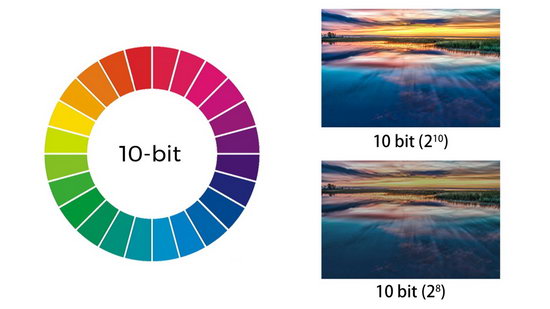
Thank for the 10-bit color and BT.2020 New Technology. This is considered deep color and instead of offering 256 RGB (Red, Green, BLUE) values, it offers 1024 of them. This amounts to a total of 1.06 billion colors instead of the 16 million offered by older 8-bit color TVs. Thus, the gradations between shades and different tone in onscreen content present a far greater degree of realism to the viewer. Outstanding Movie Poster, detailed video and document information & Breathtaking Play Time, first 4K UHD BD playing system based on Android.

Enjoy 4K UHD
In addition, Zidoo X10 also optimized quality of the image, and this means a lot to users who pursuit of high quality image. Advanced anti-aliasing algorithm, sharpening the edge of the picture. Digital noise reduction filter, clear picture quality in the night. sRGB automatic adjustment,the color of picture is more suitable for viewing. The optimization technique of light-dark density; enhance the contrast; enhance a sense of space. Decode 10-bit output; more natural color transition. Color balance management engine; highly reduction to true color. High speed frame by frame optimization; keep more complete details. Nonlinear dynamic filtering brightness. The stable output frame rate; support 23.976 fps modes.


Don’t miss any of our future video tutorials, follow us on Youtube. Like us on Facebook. Add us in your circles on Google+. Watch our photo albums on Flickr. Subscribe now to our newsletter.

Nov 2, 2015

Real life 300 Mbps in download! Zidoo X6 Pro TV Box - First impressions, Tests & Quick Review


As I told you in this article, Geekbuying Online Store send me a few days ago a new Rockchip RK3368 octa core Android TV Box: Zidoo X6 Pro TV Box model. Here you'll find a photo gallery and a video with the unboxing of this nice device.

The TV box has a silver plastic exterior case, it is compact and very well organized, with and all the connectors located in the left & rear sides, and the power button on the top. In the front side it has only the IR receiver & a beutiful power LED.


You can now buy Zidoo X6 Pro Android TV Box from www.geekbuying.com for only $89.99 with free shipping if you’ll use this coupon code: DVEIFSYZ.  (regular price:   $109.99) 

Next, watch the first impressions and the experience on Android Lollipop 5.1.1 stock firmware.
Firmware tested: stock Android Lollipop 5.1.1
Kernel version: 3.10.0
Build number: rk3368_box-userdebug 5.1.1 LMY48G eng.xiaoweihua.20151021.151614 test-keys

The box came with v.1.0.15 firmware older version but now it has v.1.0.19 firmware. You can download this latest stock firmware version from here and flash firmware according to this video tutorial.
Root: Firmware is rooted, with Super SU application preinstalled.

Full photo album here


The firmware is just great, best in its class till now, with powerful customizations made in house by Zidoo. There are a lot of preinstalled applications, including Play Store and Google applications (gapps) and very useful Zidoo ones: Shortcut Key, Zidoo RC, Explorer, Music, Clear Manager, Easy Cast & Update. This firmware version has root acces, with SuperSU application pre-installed.

In Antutu Video Tester 3.0 Zidoo X6 Pro TV Box scores 531 points, a good score in this test ranking. It played smoothly almost all video file types; this firmware version fully supports 23 video & audio format files, it partially supports 3 video & audio format files and doesn't manage to play 4 files. In Antutu Benchmark 5.7.1 the device achieves also an amazing score, about 35.000 points.


As you can see, Zidoo X6 Pro is a very good and powerful multimedia player giving you the power to transform your living room into a real 4k Home Theater. 

Internet speed tested on both WiFi & Ethernet gets amazing values too. For 2.4 Ghz WiFi connection, the download speed was 35 Mbps and the upload speed is 52 Mbps. For 5 Ghz WiFi connection, the download speed was 121 Mbps and the upload speed is 71 Mbps. Wired, on Gigabit Ethernet connection, the download speed was incredibly 296 Mbps and the upload speed is 93 Mbps. The router used in this test is Xiaomi Mi WiFi Router.


About Geekbuying GeekBuying.com was built to offer the coolest gadgets to the whole world at incredible low prices. And we have realized that online shopping has been very popular world widely but all the same story, sometimes kind of bored, lots of funs in real shopping are missing, so we’d like to add some new fun in online shopping to make the experience better. At GeekBuying, you will get fun in shopping. No matter you are a geek or not, you are sure to enjoy shopping at GeekBuying. We work passionately to exceed your expectations every time. Once You Buy, You Know.

Don’t miss any of our future video tutorials, follow us on Youtube. Like us on Facebook. Add us in your circles on Google+. Watch our photo albums on Flickr. Subscribe now to our newsletter.

Jul 30, 2015

Download Android KitKat 4.4.2 stock firmware for Zidoo X1 TV Box


Download Android KitKat 4.4.2 stock firmware for Zidoo X1 TV Box from here or here. Download previous firmware from here.


Firmware details
Archives: Zidoo X1 v1.0.16 fw
Archive size: 325 MB
Image: zidoo_x1_v1.0.16-ota-20150729.zip
Platform: Allwinner H3
Build number: dolphin_fvd_p1-eng 4.4.2 KOT49H 20150729 test-keys


Changelog 

System
1.Fixed the style of navigation bar, changed into hiding the navigation bar manually.
2.Fixed the problem of cover input box when opening the input method.
3.Fixed some apps have no navigation bar.
4.Fixed some apps can't fullscreen.
5.Fixed notification icons are far too large.
6.Added the switch of keypad tone.
7.Fixed problem that VPN can't connect.
8.Fixed some sdcard can't update fireware.

Video Player
1.Fixed the 24Hz switch default close in interal player.
2.Saved audio track setting.
3.Saved subtitle setting.
4.Repaired the problem of when there is bilingual subtitles, subtitle display in the upper left corner.
5.Added test tips when closing subtitles.
6.Set English as the default language.

File manager
1.Repaired problem that it can't cut between the recovery storage devices
2.Fixed the error problems of translation
3.Solved the click failure problem of screening bar

Setting
1.Fixed setting has Bluetooth button when plug in a USB Bluetooth dongle.

KODI
1.Fixed the debug display error with dropped frames.

UI
1.Fixed the application name as ZIUI Simple
2.Fixed the problem of Vietnamese words lost
3.Repaired the error problem of translation

ZIDOO RC
1.To connect devices automatically when entering apps
2.Repaired some insensitive bottons
3.Repaired the problem that when it's mouse code, the mouse can't move to the bottom

USB installation

1.Fixed English as the default language

Easy cast
1.Repaired the app error problem when changing the device name.


Caution: Please do not update firmware unless you know what you are doing, you really want it or it is absolutely necessary. Firmware updates may occasionally have bad results, like bricking your device, temporarily or permanently. The firmware update process is done entirely at your own risk. Before attempting to update the firmware, back up your data.


Don’t miss any of our future video tutorials, follow us on Youtube. Like us on Facebook. Add us in your circles on Google+. Watch our photo albums on Flickr. Subscribe now to our newsletter.

Apr 9, 2015

Download latest Android KitKat 4.4.2 Stock Firmware v1.0.2.9 for Zidoo X9 TV Box


Download latest Android KitKat 4.4.2 Stock Firmware v1.0.2.9 for Zidoo X9 TV Box from here or here. Download previous firmware from here.


Firmware details
Archives: Zidoo X9 v1.0.2.9 fw
Archive size: 43225 MB
Image: ota-1.0.2.9.zip
Platform: MSTAR MSO9180D1R
Build number: full_lemon-userdebug 4.4.2 KOT49H 1.0.2 test-keys


Changelog 
1. Fixed the problem that wifi can’t search the 5G signal for 36/40/44/48 channels.
2. It will not scan the Samba path when music player scans music files automatically.
3. It will not scan the Samba path when picture manager scans picture files automatically.
4. The user name and password can be record by Samba.
5. Added new function that can set new show or not show the hidden files.
6. Added new function that sorting files according to their sizes and types.
7. Added new setting whether pop-up prompts when connected to the USB.
8. Added new setting that the display mode of Samba according to its address or host name.
9. There will be no extra hints after pull out USB when unload.
10.It will not search automatically any longer next time, when user had a SMB equipment.
11.Fixed the problems that the position of scroll bar isn’t correct when refresh the list, it can paste the file without suffix,it will has an emergency stop when files are in the same name.
12.In OTA application, adding the button for entering recovery interface.
13.In OTA application, modified the cues when the OTA network had error.
14.Modified the recording interface and the writing style.
15.Modified the prompt icon when deleted recording files on the recorder interface.
16.Modified the RC interface of mobile phone.
17.Adding support for multiple applications in Vietnamese.
18.To speed up the recovery backup and recovery.
19.Added the backup of system partition in the recovery.
20.Added the saving function on the subtitles plugin setting.
21.Added the optional function between feature and tidbit on blu-ray disc.
22.Fixed the problem of proportion display on the local video.
23.Added support of  Thai coding.
24.Fixed the problem that recovery part couldn’t update on the OTA upgrade.
25.Update XBMC with 14.1 version, it can call native player to play local video directly.
26.Remove Mcast apk.


Caution: Please do not update firmware unless you know what you are doing, you really want it or it is absolutely necessary. Firmware updates may occasionally have bad results, like bricking your device, temporarily or permanently. The firmware update process is done entirely at your own risk. Before attempting to update the firmware, back up your data.


Don’t miss any of our future video tutorials, follow us on Youtube. Like us on Facebook. Add us in your circles on Google+. Watch our photo albums on Flickr. Subscribe now to our newsletter.

Mar 9, 2015

Download latest Android KitKat 4.4.2 Stock Firmware for Zidoo X9 TV Box


Download latest Android KitKat 4.4.2 Stock Firmware v1.0.2.7 Alpha for Zidoo X9 TV Box from here or here. Download previous firmware from here.


Firmware details
Archives: ZIDOO_X9_v1.0.2.7_ota fw
Archive size: 425 MB
Image: ZIDOO_X9_v1.0.2.7_ota.zip
Platform: MSTAR MSO9180D1R
Build number: full_lemon-userdebug 4.4.2 KOT49H 1.0.2 test-keys


System Update List
- Add the recovery function, press the recovery key to boot.
- If can’t find MstarUpgrade.bin in USB DISK, enter into the interface of recovery.
- Change the color of the recovery interface.
- The backup menu on the interface of recovery, only backup user data and tv data

Zidoo RC
Add the remote control of Android mobile phone, easier operation, support a variety of operation ways.
The choices of operation: button code/ handle code/ mouse code/ gestures code.
Add the management APP of cell phone.
Add the function of screenshots.

Zidoo UI

Add the icon of redraw.
Modify the problem of returning to setting interface according to the menu.
Optimize the flash move.

Video Player
Solve the problem of subtitle gibberish, adding the switch function of subtitle   encoding.
Add the codes of identification subtitles automatically.
Add the movement function on the basis of units on the location of subtitle.
There won’t be any mistake while the screen scaling and choosing the Default.


File explorer
The new UI, more intuitive experience, more easier and quicker operation ways, smoother running.
 

New functions
Add the create file/folder function.
Add the multiple choices function, operating multiple files simultaneously.
Add the function of view to switch: let list/ network work by yourself.
Add the function of page turning, for finding files faster.
Add the function of show ways while screening, change the screen way whenever you want, operating by yourself.
Add the route function, and you can operate with mouse, keeping the current location at anytime.
Add the function of file details shown, making the information (modified time/ type/size,etc.)clearer.
Add the manual search function of SAMBA and NFS.
Add the adding function for SAMBA, don’t worry to search no device.
Add the logout/ delete function for SAMBA, removing traces more convenient.
Add the pop-up function while inserting an external storage device.
Add the anonymous logon function for users.
Add pop-up function for repeat file name/out of free space,when paste file.
Speed up start-up, for entering apps faster.
Improve the main UI, for all the operation clear, no more red tapes to switch interface.
Improve the searching way of SMB, for searching more precise.
Optimize entirely the support of mouse operating, for operating more simple


Caution: Please do not update firmware unless you know what you are doing, you really want it or it is absolutely necessary. Firmware updates may occasionally have bad results, like bricking your device, temporarily or permanently. The firmware update process is done entirely at your own risk. Before attempting to update the firmware, back up your data.


Don’t miss any of our future video tutorials, follow us on Youtube. Like us on Facebook. Add us in your circles on Google+. Watch our photo albums on Flickr. Subscribe now to our newsletter.

Feb 6, 2015

Download latest Android KitKat 4.4.2 Stock Firmware for Zidoo X9 TV Box


Download latest Android KitKat 4.4.2 Stock Firmware for Zidoo X9 TV Box from here or here.


Firmware details
Archives: ZIDOO X9 v1.0.2.5 182924 20150205
Archive size: 420 MB
Image: full_lemon-ota-1.0.2.5.zip
Platform: MSTAR MSO9180D1R
Build number: full_lemon-userdebug 4.4.2 KOT49H 1.0.2 test-keys


System Update List
1. Add the function of Bluetooth connects automatically after power on.
2. Smooth the dtshdma audio of Blu-ray 3d movie
3. Smooth truehd track occasionally
4. Modify the error problem of video interface when 4K output or inserting HDMI OUT line
5. Add the flip function of Remote key

Software update list
1.The APK still shows recommended data even doesn’t get into the network.
2. Data keeps updated after the recommended data changed.
3. Add the dragging function of UI mouse
4. Optimize the font styles
5. Modify the error indicator problem when inserted USB devices.

Record screen
1. Modify display styles of setting appointment time, change into specific time
2. Optimize UI disappears automatically when deleting appointment or recorded files
3. Optimize setting the accuracy of video length

File Manager
1. Optimize SD also can display by press Up to unload
2. Add the function of circulation list
3. Add a key to flip

Music Player
1. Optimize the accuracy of translation from the “Unknown” language
Picture Manager:
1. Optimize swithcing pirtures around when view pictures from file manager
2. Optimize the clarity when flashing
3. Modify the display position of UI
4. Optimize recycling of picture memory
5. Modify the memory overflows for some larger pictures

OTA Update
1. Revise the APK
2. speeds download
3. more reasonable designature for UI
4. Support background download
5. Download from breakpoint automatically
6. Support local upgrade and background replication
7. View update blogs of 6 nearest versions

Video Player 1. Optimize the continued saved function of ISO/BDMV
2. Localmm keeps on running when the system language switchs to others,like Russian
3. Delete the repeat function of the loop mode playlist options
4. Modify track after swithing track or video fast- forward.
5. Modify the problem of forward/back, when play/pause pressing around the key.
6. Optimize the display dimension when playing 3D
7. Optimize the unfull dimension when playing 3D-2D video
8. LocalMM keeps running when switching into cycle mode
9. After selecting track, maintain the selected track when re- enter the menu
10. Modify default display when inscribed caption

Caution 
Please do not update firmware unless you know what you are doing, you really want it or it is absolutely necessary. Firmware updates may occasionally have bad results, like bricking your device, temporarily or permanently. The firmware update process is done entirely at your own risk. Before attempting to update the firmware, back up your data.


Don’t miss any of our future video tutorials, follow us on Youtube. Like us on Facebook. Add us in your circles on Google+. Watch our photo albums on Flickr. Subscribe now to our newsletter.

Twitter Delicious Facebook Digg Stumbleupon Favorites More

 
Powered by Blogger