y China Gadgets Reviews: tronfy
Showing posts with label tronfy. Show all posts

Nov 18, 2015

Video & Photo Gallery: Unboxing Qintex Q12 M-Box Fire 4K Smart TV Box with Amlogic S812 CPU


Qintex Q12 TV Box has an elegant and compact design, with a black matte plastic case exterior. On the right side it has a big & powerful external WiFi antenna. In the front  it has only the IR receiver and the power LED light indicator. On the left side it has the micro SD card reader and 2 full size USB ports. In the rear you can find the power port, Ethernet LAN RJ45 port, HDMI out, Optical audio out and AV out. The overall impression is pretty good, the device looks to be constructed with big care to details.

Qintex Q12 TV Box comes with 2GB of RAM and 8GB of internal storage. The model adopts the quad core S812 chipset from Amlogic. For connectivity the device includes wired Ethernet RJ45, 802.11 a/b/g/n Dual BandWi-Fi, Bluetooth 4.0 and Infra Red receiver on board.

You can buy Qintex Q12 4K Smart TV Box from www.qintexworld.com & alibaba.com (wholesale) or aliexpress.com (end users).


Qintex Q12 4K Smart TV Box Specifications
CPU: Amlogic S812 Quad-Core Cortex-A9R4 2.0GHz 
GPU: Mali-450MP Octa Core Maxmimum 600MHz+ (DVFS)
OS: Android KitKat 4.4.2
RAM: 2GB DDRIII

ROM: 8GB / 16GB NAND Flash
Video output: 4K 2K HDMI and 1080P 

Other: Miracast /Airplay Supported, sharing your smart phone's (Android & iOS) media file (video/photo/music) onto TV screen
KODI Pre-installed
GUI V.2 1080P UI offering you wonderful user experience

Communication
Ethernet:  10/100M LAN RJ45
WIFI: 802.11 a/b/g/n Dual Band

Bluetooth: 4.0
Sensor: IR Sensor     

Indicator: Power LED with two colors (Blue / Red)

Ports 
2 x Standard USB 2.0
1 x DC-in Jack
1 x HDMI 1.4 A Type (4K/2K)

1 x S/PDIF optical audio out port
1 x AV out
1 x RJ45 Ethernet port

1 x reset button
1 x micro SD card reader
1 x IR receiver
1 x Power LED

Package content 

- 1 x TV Box
- 1 x HDMI Cable
- 1 x IR Remote Controller

- 1 x Power Adapter
- 1 x User Manual

- 2 x battery for IR Remote

Photo gallery full album here.
About Qintex QINTEX-TECH, is a professional manufacturer of Network Player, Android Player, TV Box /Dongle, Smart Watch, Wireless Bluetooth Keyboard, Multimedia Projector (Media Player) and other digital products, which is located in Shenzhen, China, and registered with one million RMB. QINTEX-TECH, adhering to “Honest, Professional, Win-Win” business philosophy, and customer-first, quality-first, service for customers with science and technology, adhering to technology progress, continuous innovation, constant transcendence, QINTEX-TECH has become an enterprise with strong strength and scale. Your satisfaction is our pursuit! We sincerely invite the masses of enterprises, users and consumers to visit us and be free to contact us with your enquiries and interests, we will service for you wholeheartedly with best products & best service. Welcome to visit us www.qintexworld.com! Any inquiries and interests will be kindly invited and answered!


Don’t miss any of our future video tutorials, follow us on Youtube. Like us on Facebook. Add us in your circles on Google+. Watch our photo albums on Flickr. Subscribe now to our newsletter. Biggest firmware download center.

Nov 3, 2015

Download KitKat 4.4.2 111k4 firmware for Tronfy MXQ TV Box

http://chinagadgetsreviews.blogspot.ro/2014/10/photo-gallery-unboxing-tronfy-mxq-s805.html

Download KitKat 4.4.2 111k4 firmware for Tronfy MXQ TV Box from here or from here. To flash firmware on this TV Box from SD card read this article. Unboxing of Tronfy MXQTV Box here.


BTW, you can now buy Tronfy MXQ TV Box from www.tinydeal.com for only $53.53 with free shipping.    


Firmware details
Archive: TRONFY_TVB_MXQ_CARD_USB_VERSION_FULLY_LOADED_V111k4
_20150706
Archive size: 710 MB 
Image: m201-ota-20150706.zip
Model: MXQ TV Box
Platform: AMLogic S802
Build number: m201-user 4.4.2 KOT49H 20150706 test-keys


Caution: Please do not update firmware unless you know what you are doing, you really want it or it is absolutely necessary. Firmware updates may occasionally have bad results, like bricking your device, temporarily or permanently. The firmware update process is done entirely at your own risk. Before attempting to update the firmware, back up your data. 

About Tinydeal.com Tinydeal.com is a Hong Kong-based online shopping site who specialises in selling globally a wide range of inexpensive electronic goods and other related items. Some of the most popular gadgets available on Tinydeal include toys, cell phones and computer accessories, rechargeable batteries and chargers, and other novelty items. With over three thousand new products uploaded every month, Tinydeal.com is one-stop shopping site for all electronics lovers. Most importantly, while people form countries nearby China are enjoying the wide range China-made goods at relatively low price, we are dedicating ourselves to bring the same products to another side of the world at the similar price as you would paid if you were in China. Tinydeal is also a power seller on eBay for its large and varied product range, competitive product pricing, as well as its draw-card feature of free air mail shipping on all orders.
 

Don’t miss any of our future video tutorials, follow us on Youtube. Like us on Facebook. Add us in your circles on Google+. Watch our photo albums on Flickr. Subscribe now to our newsletter.

Download KitKat 4.4.2 116k4 firmware for Tronfy MXIII TV Box


Download KitKat 4.4.2 116k4 firmware for Tronfy MXIII TV Box from here or from here. Download previous 113k4 firmware from here. To flash firmware on this TV Box from PC card read this article.

BTW, you can now buy Tronfy MXIII TV Box from www.tinydeal.com for only $72.63 with free shipping.    


Firmware details
Archive: TRONFY_TVB_MX3_2G_Card_USB_VERSION_FULLY_LOADED_116k4
_20150612
Archive size: 784 MB 
Image: TRONFY_TVB_MX3-1G_Card_USB_VERSION_FULLY_LOADED_116k4_
20150612.img
Model: MXIII / MX3 TV Box
Platform: AMLogic S802


Caution: Please do not update firmware unless you know what you are doing, you really want it or it is absolutely necessary. Firmware updates may occasionally have bad results, like bricking your device, temporarily or permanently. The firmware update process is done entirely at your own risk. Before attempting to update the firmware, back up your data. 

 
About Tinydeal.com Tinydeal.com is a Hong Kong-based online shopping site who specialises in selling globally a wide range of inexpensive electronic goods and other related items. Some of the most popular gadgets available on Tinydeal include toys, cell phones and computer accessories, rechargeable batteries and chargers, and other novelty items. With over three thousand new products uploaded every month, Tinydeal.com is one-stop shopping site for all electronics lovers. Most importantly, while people form countries nearby China are enjoying the wide range China-made goods at relatively low price, we are dedicating ourselves to bring the same products to another side of the world at the similar price as you would paid if you were in China. Tinydeal is also a power seller on eBay for its large and varied product range, competitive product pricing, as well as its draw-card feature of free air mail shipping on all orders.
 

Don’t miss any of our future video tutorials, follow us on Youtube. Like us on Facebook. Add us in your circles on Google+. Watch our photo albums on Flickr. Subscribe now to our newsletter.

Oct 26, 2015

Video: How to easily update firmware on Zidoo X6 Pro RK3368 octa core Lollipop TV Box


The Zidoo X6 Pro is Zidoo’s latest Android TV box powered by the Rockchip RK3368 processor. It also features 2GB of RAM, 16 GB of onboard storage, dual band WiFi and gigabit Ethernet. The Zidoo X6’s ports are located on the left and rear of the unit. On the side we’ve got 2 USB 2.0 ports and a micro SD card slot. The rear features a DC In port, composite video, gigabit Ethernet, HDMI out and optical audio out. Here you have the unboxing of this amazing device.

You can now buy Zidoo X6 Pro Android TV Box from www.geekbuying.com for only $89.99 with free shipping if you'll use this coupon code: DVEIFSYZ (regular price:   $109.99)

Tutorial on how to do Local update
First, you need to download the latest firmware from here and copy the firmware
ZIDOO_X6_Pro_v1.0.19_ota.zip of local OTA upgrade on the U disk; then connect it to your BOX, findout the APK you want to upgrade from desktop: Settings>>About>>Update. You will find the following upgrade interface.


You can findout your U disk through selecting the Local update, and findout the ZIP of OTA upgrade of you selected. After finishing the copy, you will allow to Update through the lower right corner.

Sure, you can also upgrade through online if there is the latest version onine.

When a new version pushed, system will pop up a dialog of upgrade when online, after the boot into the system about 30s, and show it on your screen; at this moment, you just need to press OK, it will automatically enter the interface of download the Update and download the zip of upgrade. Finishing downloading, it will start automatically updating when you select Update again(It also needs to keep turn on, and it will enter the system automatically after finishing upgrading.)

Please note again: DO NOT turn off your power during the process of upgrade, or you have to recover by flashing.

No go to Settings>>About>>Update>>OnlineUpdate. Congratulatons! It shows the latest version. The box came with v.1.0.15 firmware version and now it has v.1.0.19 firmware.

That’s all. You might have a try.


About Geekbuying GeekBuying.com was built to offer the coolest gadgets to the whole world at incredible low prices. And we have realized that online shopping has been very popular world widely but all the same story, sometimes kind of bored, lots of funs in real shopping are missing, so we'd like to add some new fun in online shopping to make the experience better. At GeekBuying, you will get fun in shopping. No matter you are a geek or not, you are sure to enjoy shopping at GeekBuying. We work passionately to exceed your expectations every time. Once You Buy, You Know.


Don’t miss any of our future video tutorials, follow us on Youtube. Like us on Facebook. Add us in your circles on Google+. Watch our photo albums on Flickr. Subscribe now to our newsletter.

Oct 24, 2015

Video & Photo Gallery: Unboxing Zidoo X6 Pro RK3368 octa core Lollipop TV Box


The Zidoo X6 Pro is Zidoo’s latest Android TV box powered by the Rockchip RK3368 processor. It also features 2GB of RAM, 16 GB of onboard storage, dual band WiFi and gigabit Ethernet. The Zidoo X6’s ports are located on the left and rear of the unit. On the side we’ve got 2 USB 2.0 ports and a micro SD card slot. The rear features a DC In port, composite video, gigabit Ethernet, HDMI out and optical audio out.

You can now buy Zidoo X6 Pro Android TV Box from www.geekbuying.com for only $89.99 with free shipping if you'll use this coupon code: DVEIFSYZ (regular price:   $109.99)

Zidoo X6 Pro Technical Specifications
Operating System: Android 5.1
Chipset: Rockchip RK3368
CPU: Octacore Cortex A53 processor @ 1.5 GHz
GPU:  PowerVR G6110
Memory: 2GB DDR3
Internal Storage: 16GB eMMC + Micro SD card slot
Connectivity: Gigabit Ethernet
1000M/LAN, Dual Band 802.11 b/g/n/ac Wi-Fi  (AP6335), Bluetooth 4.0
Audio/Video Output: HDMI 2.0, SP-DIF, Composite AV
Interfaces: 2 x USB 2.0
Power Supply: DC 5V/2A
Other: IR Sensor


Button & Ports 
2 x Standard USB 2.0
1 x DC-in Jack
1 x HDMI 2.0 A Type (4K/2K 60FPS)

1 x S/PDIF optical audio out port
1 x composite CVBS
1 x RJ45 Gigabit Ethernet port

1 x reset button
1 x micro SD card reader
1 x IR receiver
1 x Power LED

Package content 

1 x TV box
1 x IR remote control
1 x HDMI cable
1 x Power adapter
1 x User manual
1x Warranty Card 
1x Quality Control Card
 
Photo gallery full album here.


About Geekbuying GeekBuying.com was built to offer the coolest gadgets to the whole world at incredible low prices. And we have realized that online shopping has been very popular world widely but all the same story, sometimes kind of bored, lots of funs in real shopping are missing, so we'd like to add some new fun in online shopping to make the experience better. At GeekBuying, you will get fun in shopping. No matter you are a geek or not, you are sure to enjoy shopping at GeekBuying. We work passionately to exceed your expectations every time. Once You Buy, You Know.


Don’t miss any of our future video tutorials, follow us on Youtube. Like us on Facebook. Add us in your circles on Google+. Watch our photo albums on Flickr. Subscribe now to our newsletter.

Oct 20, 2015

Video & Photo Gallery: Unboxing Tronfy X6 TV Box with Lollipop 5.1 & RK3368 octa core CPU


Tronfy X6 TV Box has an elegant and compact design, with a black matte plastic exterior. It has a nice power button on top and all the connectors are located in the rear & left side, including the WiFi external antenna. In the front  it has only the IR receiver and the power LED light indicator. The overall impression is pretty good, the device looks to be constructed with big care to details.

The Tronfy X6 TV Box comes in one single variant with 2GB of RAM and 16GB of internal storage. The model adopts the octa core RK3368 64bit chipset. For connectivity the device includes wired Ethernet RJ45 with Gigabit support, 802.11 a/b/g/n/ac Dual BandWi-Fi and Bluetooth 4.0.


You can now buy Tronfy X6 Android TV Box from www.tinydeal.com for only $89.99 with free shipping   


Fully-loaded Kodi
Pre-install FULLY-LOADED Kodi media center, Kodi can be used to play almost all popular audio and video formats around. You can stream your multimedia from anywhere in the house or directly from the internet. Pre-install Google plays store. NO MONTHLY FEES - PLUG and PLAY READY - Watch all of the latest movies, TV shows, and live sports with no monthly bills or costs!

RK3368 Chip
Excellent performance with RK3368 64Bit Octa-core processor. Adding H.265/HEVC video decoding up to 4K, could be also used as a pretty good gaming platform or a media center. Supports Gigabit Ethernet and 802.11 a/b/g/n/ac 2.4G & 5.8G dual-band Wi-Fi.

4K Resolution & HDMI2.0

HDMI2.0, 4K*2K@60fps UHD video display, making your favorite contents look much more clear on the big screen. 

Android 5.1
Enjoy customization on the highly evolved Android Kit Kat 5.1. Support OTA Updating & install add-ons. Enjoy the best of Google with voice commands, hangouts app and Google Drive to ease your life.

2GB RAM & 16GB ROM
Install your favorite apps and customize away! With the TRONFY X6, you’re not limited so you can personalize the experience the way that you like. The 16GB internal storage gives you space and freedom to install apps without having to always worry about running out of space.

 
Communication
Ethernet: Gigabit 1000M/LAN
WIFI: 802.11 a/b/g/n/ac Dual Band

Bluetooth: 4.0
Sensor/Motor: IR Sensor     

Indicator: Power LED with two colors (Blue / Red)

GPU
Vendor: Imagination Technologies 
Renderer: PowerVR Rogue G6110 
Version: OpenGl ES-CM 1.1

Button & Ports 
1 x Power Button
2 x Standard USB 2.0
1 x DC-in Jack
1 x HDMI 2.0 A Type (4K/2K 60FPS)

1 x S/PDIF optical audio out port
1 x RCA
1 x RJ45 Gigabit Ethernet port
1 x micro USB OTG port

1 x reset button
1 x micro SD card reader
1 x IR receiver
1 x Power LED

OS details
Model number: TVB-X6
Android version: Lollipop 5.1.1
Kernel version: 3.10.0
Build number: rk3368_box-userdebug 5.1.1 LMY47V eng.renj.20150922.160152 test-keys


Package content 

- 1 x TV Box
- 1 x AV Cable
- 1 x HDMI Cable
- 1 x IR Remote Controller

- 1 x OTG cable
- 1 x Power Adapter
- 1 x User Manual


Photo gallery full album here.


About Tinydeal.com Tinydeal.com is a Hong Kong-based online shopping site who specialises in selling globally a wide range of inexpensive electronic goods and other related items. Some of the most popular gadgets available on Tinydeal include toys, cell phones and computer accessories, rechargeable batteries and chargers, and other novelty items. With over three thousand new products uploaded every month, Tinydeal.com is one-stop shopping site for all electronics lovers. Most importantly, while people form countries nearby China are enjoying the wide range China-made goods at relatively low price, we are dedicating ourselves to bring the same products to another side of the world at the similar price as you would paid if you were in China. Tinydeal is also a power seller on eBay for its large and varied product range, competitive product pricing, as well as its draw-card feature of free air mail shipping on all orders.


Don’t miss any of our future video tutorials, follow us on Youtube. Like us on Facebook. Add us in your circles on Google+. Watch our photo albums on Flickr. Subscribe now to our newsletter.

Download latest Android KitKat 4.4.2 stock firmware for Tronfy X2 TV Box


Download latest Android KitKat 4.4.2 stock firmware PC version for Tronfy X2 TV Box from here or from here. Download latest Android KitKat 4.4.2 stock firmware SD card version for Tronfy X2 TV Box from here or from here

BTW, you can now buy Tronfy X2 Android TV Box from www.tinydeal.com for only $42.99 with free shipping 


Firmware details
Archive: TRONFY_TVB_X2_Card_USB_VERSION_FULLY_LOADED_V104k4_c02_
20150714 & TRONFY_TVB_X2_COMPUTER_VERSION_FULLY_LOADED_V104k4_
c02_20150714_All
Archive size: 531 MB / 529 MB
Model: Tronfy XII TV Box
Platform: Allwinner H3
FW version: 4.4.2-v1.0
Build number: 4.4.2 KOT49H 20150714 test-keys


Caution: Please do not update firmware unless you know what you are doing, you really want it or it is absolutely necessary. Firmware updates may occasionally have bad results, like bricking your device, temporarily or permanently. The firmware update process is done entirely at your own risk. Before attempting to update the firmware, back up your data. 

Don’t miss any of our future video tutorials, follow us on Youtube. Like us on Facebook. Add us in your circles on Google+. Watch our photo albums on Flickr. Subscribe now to our newsletter.

Jun 8, 2015

Download KitKat 4.4.2 115k4 firmware for Tronsmart MXIII TV Box


Download latest Android KitKat 4.4.2 115k4  SD card firmware for Tronsmart MXIII TV Box from here or from here. To flash firmware on this box via SD card read this article.
Download latest Android KitKat 4.4.2 115k4 PC flash firmware for Tronsmart MXIII TV Box from here or from here. To flash firmware on this box via AMLogic USB Burning Tool read this article.


Download previous firmware from here.


Firmware details
Update file name: Tronsmart MXIII_115k4 SDcard_20150603 / Tronsmart MXIII_115k4_20150603
Archive size: 449 MB / 454 MB
Firmware: k200-ota-20150530.zip / Tronsmart MXIII_115k4_20150603.img
Model: Tronsmart MXIII TV Box
Platform: AMLogic S802
Build number: k200-user 4.4.2 KOT49H 20150530 test-keys

Changegog for 115K4 version
1. Add SD recovery .img file.
2. Add SettingsMbox > Other > More Settings > About MediaBox > Startup Wizard to original Android setting.
3. Add SettingsMbox > Other > More Settings > About MediaBox > Reinstall plugin and application to original Android setting.
4. Fixed online video from HTV online
5. Correct some wrong character


Caution: Please do not update firmware unless you know what you are doing, you really want it or it is absolutely necessary. Firmware updates may occasionally have bad results, like bricking your device, temporarily or permanently. The firmware update process is done entirely at your own risk. Before attempting to update the firmware, back up your data. 

Don’t miss any of our future video tutorials, follow us on Youtube. Like us on Facebook. Add us in your circles on Google+. Watch our photo albums on Flickr. Subscribe now to our newsletter.

Jun 5, 2015

Video tutorial: How to easily flash firmware on Tronfy MXIV TV Box with Amlogic S812 CPU


This is a simple tutorial on how to easily flash firmware on Tronfy MXIV TV Box with Amlogic S812 CPU via Windows 10 PC. 

BTW, you can now buy Tronfy MXIV Android TV Box for only $109.99 from www.tinydeal.com with free shipping. 

1. First, download the latest 202k4 stock firmware for Tronfy MXIV TV Box from here. (MXIV_202K4_tronfy.img).
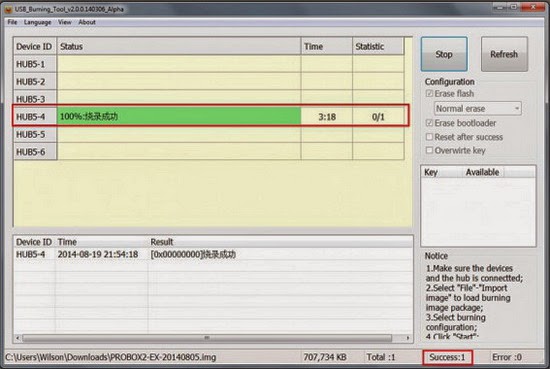
2. Download latest AMLogic USB Burning Tool v2.0.4.3. It's working also on Windows 8.1 64 bit (my PC OS), but you'll have to disable driver signature enforcement. Then you have to put Tronfy MXIV TV Box in upgrade / flash mode. To do that, prepare a thin metal stick / paper clip, then press and hold the restore button (inside the AV port hole) and press Power button at the same time. After 3-5 seconds USB_Burning_Tool will detect the USB device. (with the DC and OTG USB cable  plugged in). If needed, reinstall AMLogic USB Burning Tool and the drivers.
3. Launch USB_Burning_Tool. Click 'File' and choose 'Import image', choose the .img file you just download. Click "Start" to start firmware upgrade, it should take around 3-4 mins and please do NOT power off / unplug Tronfy MXIV TV Box during firmware upgrade. After finished firmware upgrade, it will auto disconnected. Now you can unplug it and connect to TV again.

For more details please watch the video below.


About Tinydeal.com 
Tinydeal.com is a Hong Kong-based online shopping site who specialises in selling globally a wide range of inexpensive electronic goods and other related items. Some of the most popular gadgets available on Tinydeal include toys, cell phones and computer accessories, rechargeable batteries and chargers, and other novelty items. With over three thousand new products uploaded every month, Tinydeal.com is one-stop shopping site for all electronics lovers. Most importantly, while people form countries nearby China are enjoying the wide range China-made goods at relatively low price, we are dedicating ourselves to bring the same products to another side of the world at the similar price as you would paid if you were in China. Tinydeal is also a power seller on eBay for its large and varied product range, competitive product pricing, as well as its draw-card feature of free air mail shipping on all orders.

May 30, 2015

Tronfy MXIV Smart TV Box - First impressions, firmware details and tests. The highest score ever in Antutu Video Tester 3.0!


As I told you in this article, Tinydeal.com company just send me a few days ago a new Amlogic S812 Android TV Box: Tronfy MXIV. Here you'll find a photo gallery and a video with the unboxing of this nice device.

The TV box has a black matte plastic exterior with the shiny 'MXIV' logo on top of it, together with power oval button. It is strong and well organized, all the connectors are located in the back of it and on the right side:
- 2x USB 2.0 full size ports
- 1x HDMI out
- 1x SPDIF Digital Audio Output
- 1x A/V Output
- 1x MicroSD Card Slot
- 1x Ethernet
- 1x D/C Input
- 1x micro USB OTG port

The overall impression is pretty nice, the device looks to be constructed with great care to details. In the front side it has only the IR receiver. Tronfy MXIV Smart TV Box was launched recently and is based on Amlogic S812 Quad core processor. It has 2GB of RAM, 16GB of ROM, Ethernet, WiFi AC, Bluetooth 4.0 & IR remote control. More details about its specifications you will find in this article.


Next, watch the first impressions and the experience on Android KitKat 4.4.2.

Firmware tested: latest stock Android KitKat 4.4.2
Kernel version: 3.10.33
Build number: 202k4
The Firmware is rooted.


The firmware and the launcher are generic for Amlogic Android devices, with big and nice tiles, like in Windows 8.1 Metro style. The 'Settings' menu gives you access to the settings shown in the same Metro-style with four sub menus: Network, Display, Advanced and Other. 

The Network settings allow you to select Ethernet or Wi-Fi. 
The Display settings options: HDMI auto-detection resolution, HDMI output mode, hide or show the status bar, adjust the display position and screensaver. 
The Advanced menu will let you start Miracast, enable the software Remote control / Google TV Remote, adjust CEC control, set the screen orientation and select digital audio output (PCM, SPDIF pass-through, HDMI pass-through). 
The Other button will give some details about the Android version (4.4.2) and kernel version (3.10.33). There’s also an OTA System Update menu. You can access the standard Android settings by going through Setting->Other->More Settings

There are a lot of preinstalled applications, including FlixUniverse, Play Store and Google applications (gapps). This firmware version has root acces. Tronfy MXIV Smart TV Box also supports eShare application and Miracast function.

FlixUniverse brings you a variety of thousands of full length feature movies and hundreds of music live shows and documentaries via the leading digital platforms.   FlixUniverse has a wide selection of over 1000 movies, TV shows, documentaries and music shows to choose from.  Mode details about FlixUniverse you'll find here.


In Antutu Video Tester 3.0 Tronfy MXIV Smart TV Box scores an incredible 1.111 points, the highest score ever in this test ranking. In fact, it played perfectly all 30 video formats included in the video benchmark.


In Antutu Benchmark 5.7.1 the device achieves a great score, about 42.000 points.


As you can see, Tronfy MXIV Smart TV Box is the ultimate multimedia player, giving you the power to transform your living room into a real 4k Home Theater. 


Believe it or not, but you can now buy Tronfy MXIV Android TV Box for only $108.99 from www.tinydeal.com if you'll use this coupon code: TRONFYMX4. (regular price: $119.99). The coupon code is available until June 20, 2015. 


About Tinydeal.com 
Tinydeal.com is a Hong Kong-based online shopping site who specialises in selling globally a wide range of inexpensive electronic goods and other related items. Some of the most popular gadgets available on Tinydeal include toys, cell phones and computer accessories, rechargeable batteries and chargers, and other novelty items. With over three thousand new products uploaded every month, Tinydeal.com is one-stop shopping site for all electronics lovers. Most importantly, while people form countries nearby China are enjoying the wide range China-made goods at relatively low price, we are dedicating ourselves to bring the same products to another side of the world at the similar price as you would paid if you were in China. Tinydeal is also a power seller on eBay for its large and varied product range, competitive product pricing, as well as its draw-card feature of free air mail shipping on all orders.

Download KitKat 4.4.2 114k4 firmware for Tronsmart MXIII TV Box


Download KitKat 4.4.2 114k4 firmware for Tronsmart MXIII TV Box from here or from here. To flash firmware on this box from PC via AMLogic USB Burning Tool read this article.


Firmware details
Update file name: Tronsmart MXIII_114k4_20150417
Archive size: 475 MB 
Firmware: Tronsmart MXIII_114k4_20150417.img
Model: Tronsmart MXIII TV Box
Platform: AMLogic S802


Caution: Please do not update firmware unless you know what you are doing, you really want it or it is absolutely necessary. Firmware updates may occasionally have bad results, like bricking your device, temporarily or permanently. The firmware update process is done entirely at your own risk. Before attempting to update the firmware, back up your data. 

Don’t miss any of our future video tutorials, follow us on Youtube. Like us on Facebook. Add us in your circles on Google+. Watch our photo albums on Flickr. Subscribe now to our newsletter.

Twitter Delicious Facebook Digg Stumbleupon Favorites More

 
Powered by Blogger