Unboxing Beelink L55, the Ultimate Mini PC you will ever need
Would you like to get a great compact mini-PC, which, due to its size, will significantly save space on the desktop, and it also has very good features? Beelink took care of this request by launching a new model called L55
Unboxing Umidigi Power 4G Phablet - Mighty Power in your Hand
Best Deal Alert! You can now buy Umidigi Power 4G Phablet from Aliexpress.com for as low as 135.99 USD. Hurry up, limited time offer!
Unboxing Doogee S40, The Rock-solid Explorer
Best Deal Alert! You can now buy the new Doogee S40 Rugged Smartphone from Doogee.cc for only $99.99. Hurry up, limited time offer!
Caution: Please do not update firmware unless you know what you are doing, you
really want it or it is absolutely necessary. Firmware updates may
occasionally have bad results, like bricking your device, temporarily or
permanently. The firmware update process is done entirely at your own
risk. Before attempting to update the firmware, back up your data.
Don’t miss any of our future video tutorials, follow us on Youtube. Like us on Facebook. Add us in your circles on Google+. Watch our photo albums on Flickr. Subscribe now to our newsletter.
Download Android Lollipop 5.1 stock firmware for Blackview BV5000 smartphone from here, here or from here. Download previous firmware from here. Download another Blackview firmware from here.
Caution: Please do not update firmware unless you know what you are doing, you
really want it or it is absolutely necessary. Firmware updates may
occasionally have bad results, like bricking your device, temporarily or
permanently. The firmware update process is done entirely at your own
risk. Before attempting to update the firmware, back up your data.
Don’t miss any of our future video tutorials, follow us on Youtube. Like us on Facebook. Add us in your circles on Google+. Watch our photo albums on Flickr. Subscribe now to our newsletter.
Download Android Lollipop 5.1.1 stock firmware for Qintex MSP05 Android Smart Projector from here, here or here. Download a newer firmware from here. This firmware is for Qintex MSP05 Android Smart Projector with AMLogic S905 CPU. BTW, here you can read about the unboxing Qintex MSP05 Mobile Android Smart Projector. First Impressions & Quick Review here.
BTW, you can buy Qintex MSP05 Android Smart Projector from Amazon.co.uk.
Firmware details Archive:MSP05-ota-20170622
Model: Qintex MSP05 Android Smart Projector
Image file size: 676 MB
Platform: Amlogic S905 Update file name: p6330-ota-20170622 Build number: Android/p6330/p6330:5.1.1/LMY47V/20170608:user/test-keys Inside archive: firmware + factory_update_param.aml Caution: Please do not update firmware unless you know what you are doing, you
really want it or it is absolutely necessary. Firmware updates may
occasionally have bad results, like bricking your device, temporarily or
permanently. The firmware update process is done entirely at your own
risk. Before attempting to update the firmware, back up your data.
Download Android Marshmallow 6.0 stock firmware for Leagoo Z3C smartphone from here or here. Download previous firmware from here. Download another Leagoo firmware from here.
Firmware details Archive: LEAGOO_Z3c_OS1.1_Lite_A_20170523 Image: LEAGOO_Z3c_OS1.1_Lite_A_20170523.pac Firmware: Leagoo OS 1.1 Lite based on Android Marshmallow 6.0 firmware Model: Leagoo Z3C smartphone Image file size: 718 MB Platform: Spreadtrum SC7731c
Caution: Please do not update firmware unless you know what you are doing, you
really want it or it is absolutely necessary. Firmware updates may
occasionally have bad results, like bricking your device, temporarily or
permanently. The firmware update process is done entirely at your own
risk. Before attempting to update the firmware, back up your data.
Don’t miss any of our future video tutorials, follow us on Youtube. Like us on Facebook. Add us in your circles on Google+. Watch our photo albums on Flickr. Subscribe now to our newsletter.
You can buy Qintex MSP05 Mobile Android Smart Projector from Amazon.com for only $278 with free shipping. For wholesales access this link.
Forget about Smart TV Boxes. Step forward. Buy something cooler and more versatile: a Mobile Projector. Looking to get as small as possible? Qintex might not be the most well-known brand on the market, but their MSP05 Mobile Android Smart Projector is one of the best out there. Its slim, candy bar shape manages to pack a plethora of ports and features into an aluminum rapped, glass topped device that is just as stylish as it is functional.
Coming in at just 220 grams, Qintex MSP05 is one of the lightest Mobile Projector on the market. Enjoy its premium feel on the go, its aluminium band ensures a sturdy feel, and provides protection. The glass-like surface looks gorgeous, and its small size would make you feel like it’s as portable as your smartphone.
Miracast, Airplay, Wi-Fi, HDMI, USB, MicroSD. Qintex MSP05 has an astounding amount of input options for a Mini Projector. Whether you’re at home, in a meeting or on the go, rest assured that you’ll always have one way to connect your favourite devices to this mobile projector. These are the same standards used in products like the ChromeCast, making it easy to get your video live on the big screen. If that isn’t enough for you, you can still playback files off of the MicroSD card, or load them off an external drive from USB.
Next, watch the first impressions and the experience on Android Lollipop 5.1.1 stock firmware.
Firmware tested: stock Android Lollipop 5.1.1 Model: Qintaix Projector
Kernel version: 3.14.29
Build number: LMY47V.20170422 test-keys Android security patch level: 2015-11-01 Root: Firmware is rooted with SuperSu application preinstalled. Full photo album here. Here you can read about the unboxing of this great device.
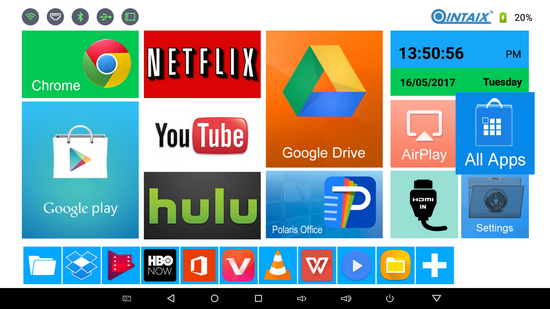
The launcher is awesome and is made in house by Qintex, with big and nice icons and great design for an incredible multimedia player experience.
Apps. There are many online video content preinstalled applications, including HBO NOW, Netflix, Hulu, Google Play Movies, Sling TV, TED, VidMate, Youtube and many multimedia players too (Kodi, VLC, Media Center & MoviePlayer). Gapps and Google Play Store are preinstalled and everything works just fine. This firmware version has root acces and SuperSu application preinstalled. Qintex MSP05 Mobile Android Smart Projector also supports Miracast, AirPlay, Wifi Direct, Bluetooth 4.0, USB Host & DLNA functions. Qintex MSP05 managed to play video big files from micro SD card, external HDD & network samba share, like .mkv files (even bigger than 37GB).
Available features:Full format video & audio player, HDMI 2.0a 4K*2K 10 bit color depth output, professional and fashionable user interface, Keystone correction, Dual Band WiFi, WiFi Direct, WVGA 854x480 hiqh quality image, already rooted firmware, OTA support, huge 4.000 mAh battery, Bluetooth LE, GPS, USB Host & Multitouch panel.
Qintex MSP05 Mobile Android Smart Projector offers a sleek design that doesn't look like any other projector you've ever seen. That said, Qintex MSP05 is smaller and lighter than either of those models out there right now and it will give you the brightest image you ever wanted, it offers amazing image quality for anything and it will let you easily display anything you can show on most phones or tablets. The combination makes it an excellent traveling companion, highly attractive for all purposes. As you can see, Qintex MSP05 Mobile Android Smart Projector is the perfect multimedia player giving you the power to
transform your living room into a real 4k Home Theater. Being portable & mobile, you can take it with you wherever you go.
About QintexQINTEX-TECH,
is a professional manufacturer of Network Player, Android Player, TV
Box (Media Player) and other digital products, which is located in
Shenzhen, China, and registered with one million RMB. QINTEX-TECH,
adhering to “Honest, Professional, Win-Win” business philosophy, and
customer-first, quality-first, service for customers with science and
technology, adhering to technology progress, continuous innovation,
constant transcendence, QINTEX-TECH has become an enterprise with strong
strength and scale. Your satisfaction is our pursuit! We sincerely
invite the masses of enterprises, users and consumers to visit us and be
free to contact us with your enquiries and interests, we will service
for you wholeheartedly with best products & best service. Welcome to
visit us www.qintexworld.com! Any inquiries and interests will be kindly invited and answered!
Don’t miss any of our future video tutorials, follow us on Youtube. Like us on Facebook. Add us in your circles on Google+. Watch our photo albums on Flickr. Subscribe now to our newsletter.
Download Android Lollipop 5.0 stock firmware for Asus Zenfone Max smartphone from here, here or from here. Download previous firmware from here. Firmware details Archive: (Update)ASUS ZENFONE MAX AND MAX PRO_ZC550KL_CN_12.8.10.89_5.0.2_ Image: (Update)170418_ASUS ZENFONE MAX AND MAX PRO_ZC550KL_CN_12.8.10.89_5.0.2_ Firmware: Android Lollipop 5.0 stock
Model: Asus Zenfone Max smartphone Image file size: 856GB
Caution: Please do not update firmware unless you know what you are doing, you
really want it or it is absolutely necessary. Firmware updates may
occasionally have bad results, like bricking your device, temporarily or
permanently. The firmware update process is done entirely at your own
risk. Before attempting to update the firmware, back up your data.
Don’t miss any of our future video tutorials, follow us on Youtube. Like us on Facebook. Add us in your circles on Google+. Watch our photo albums on Flickr. Subscribe now to our newsletter.
Flash Sale Alert! You can now buy Egreat A5 Professional 4K Blu-ray HDD Media Player from Geekbuying.com for only $128.99 with free shipping world wide.
As I told you in this article, Egreat Company send me a few days ago an amazing Professional 4K BD Menu HDD Media Player: Egreat A5. Here you'll find a photo gallery and a video with the unboxing of this great device.
The Egreat A5 TV Box is a solidly made and looks aesthetically. The case is made of aluminum in black with Egreat logo on top cover. The case and the TV Box are doing a very good impression, looks like High-End model. TV Box is a really high quality. As we said at the beginning of his heart is HiSilicon Hi3798C V200 quad-core ARM Cortex A53 processor which supports 10-bit 4K*2K H.265/H.264 hardware decoding, 4K*2K UHD video playback / 4K@60fps and HD Audio (7.1CH) passthrough. Device runs on Android 5.1 Lollipop. On the front panel A5 TV Box has LED display, IR receiver and Power button. On one side there is a SATA 3.0 port and USB 2.0 port. On another side of the device there are micro SD card slot, USB 3.0 port and USB 2.0 port. On the rear panel are: S/PDIF optical audio, Coaxial, Composite AV, HDMI 2.0a, Gigabit LAN (RJ45), RST hole and DC jack. At the bottom of the device also you can see four corners of the small rubber to prevent slipping device.
The Egreat A5 comes with a great quality IR remote control which is a pleasant change. We are generally used to seeing cheap remote controls packaged with Android TV boxes. The Remote control works via Infra-Red and is a nice size that fits your hand comfortable. It comes with all of the buttons that you should require including power buttons, android buttons, directional keypad, media playback controls and numerical buttons. The remote control also features learning functions so that you can map keys from other remote controls to the A5 remote.
Next, watch the first impressions and the experience on Android Lollipop 5.1.1 stock firmware.
Firmware tested: stock Android Lollipop 5.1.1 Firmware version: 1.1.0.9 Desktop & Player version:1.6.9 beta Model: EGREAT_A5_EN
Kernel version: 3.18.24
Build number: Hi3798CV200-eng 5.1.1 LMY48W eng.root.20170110.141229 test-keys. You can download this firmware version from here. Baseband version: HiSTBAandroidV600R002C00SPC031 Root: Firmware is not rooted. Full photo album here. Egreat A5 Official webpage here.
The launcher is awesome (EG-UI 2.0) and is made in house by Egreat, with big and nice icons and great design for an incredible multimedia player experience.
Apps. There are a fewof preinstalled applications, including Google Play Store. This firmware version has not root acces. Egreat A5 also supports Miracast, Happy Cast, Wifi Direct, Bluetooth 4.0, USB Host, DLNA functions. Egreat A5 managed to play from network samba share big files like DVD iso files & Blu-ray .mkv files (even bigger than 37GB).
Available features:Full format video & audio player, full specification Blu-ray menu, HDMI 2.0a 4K*2K 3840*2160p@60fps output, 10 bit color depth output, Dolby Atmos and TrueHD audio RAW passthrough, DTS:X and DTS-HD Master audio RAW passthrough, ISO & BDMV Folder playback, HDR (High Dynamic Range) display, HiVXE 2.0 video processing, Imprex 2.0 graph processing engine, Video 4K/2K H.265/HEVC hardware decoding, Support CEC remote control, Support ARC audio return channel, Professional and fashinable EG-UI 2.0 user interface, Specially optimized VidOn XBMC app support with vast ammount of add-ons.
Sensors available on device: 5 sensors on boad: HiMultiscreen Accelerometer, HiMultiscreen Gyroscope, Rotation Vector Sensor, Gravity Sensor, Gravity Sensor & Linear Acceleration Sensor.
In Antutu Video Tester 3.0Egreat A5 TV Box scores 937 points, an amazing score in this test ranking. It played smoothly almost all video file types; this firmware version fully supports 27 video & audio format files and it partially supports only 3 video & audio format files. In Antutu Benchmark 6.2.7 the device achieves also a very good score, almost40.000 points.
As you can see, Egreat A5 TV Box is the perfect multimedia player giving you the power to
transform your living room into a real 4k Home Theater. Internet speed tested on both WiFi & Ethernet gets great values. ForWiFi, the download speed was 27 Mbps and the upload speed is 24 Mbps. Wired, on Ethernet connection, the download speed was over 57 Mbps and the upload speed was over 99 Mbps.
About EgreatWhy
Choose Egreat: Solid Users’ Reputation, Exclusive Full Function Blu-Ray
Menu on Android OS, Excellent Picture and Sound Quality & Accept
Users’ Suggestions and make improvement. Our ission: Keep exploring the
highest level of Audio and Video. Our Focus: Keep Innovation on HD Media
Player & Make difference.
Don’t miss any of our future video tutorials, follow us on Youtube. Like us on Facebook. Add us in your circles on Google+. Watch our photo albums on Flickr. Subscribe now to our newsletter.
Download Android Marshmallow 6.0 stock firmware for Leagoo Z3C smartphone from here or here. Download Android Marshmallow 6.0OTA firmware update for Leagoo Z3C smartphone from here or here. Download another Leagoo firmware from here.
Firmware details Archive: LEAGOO_Z3c_OS1.1_Lite_E_20170301.pac / Z3c-fota-Package.20170301 Image: LEAGOO_Z3c_OS1.1_Lite_E_20170301.pac / Firmware: Leagoo OS 1.1 Lite based on Android Marshmallow 6.0 firmware Model: Leagoo Z3C smartphone Image file size: 718 MB / 1.41 GB Platform: Spreadtrum SC7731c Build number: sp7731c_1h10_32v4_bird:6.0/MRA58K/android.20170228.213530:user/release-keys
Caution: Please do not update firmware unless you know what you are doing, you
really want it or it is absolutely necessary. Firmware updates may
occasionally have bad results, like bricking your device, temporarily or
permanently. The firmware update process is done entirely at your own
risk. Before attempting to update the firmware, back up your data.
Don’t miss any of our future video tutorials, follow us on Youtube. Like us on Facebook. Add us in your circles on Google+. Watch our photo albums on Flickr. Subscribe now to our newsletter.
You can now buy Egreat A5 Professional 4K Blu-ray HDD Media Player from Geekbuying.com for only $209 with free shipping world wide.
Egreat A5 – New Master of Android TV Boxes These days Egreatreleased a new firmware update for their A5 TV Box, you can download it from here. Here you can read about the unboxing of Egreat A5 TV Box.
There are 3 ways to update firmware on Egreat A5: - OTA update (from TV Box Settings) - USB Update (also from TV Box Setting, you have to download the firmware from above link, decompress and copy all the 4 files on a USB drive) - Force to recovery Update (from recovery). In the below video we will show you how to do this.
Firmware update details
Firmware: A5BD_EN_Firmware_20170221_v1.1.0.9
Size:623 MB
Release date: 2017-02-21 Model: EGREAT_A5_EN OS:Android Lollipop5.1.1 Version Name: LOLLIPOP_MR1 Brand: HiSTBAandroidV6 Board / hardware: bigfish Old firmware version: 1.1.0.8 Old Desktop and Player version: 1.5.9 New firmware version: 1.1.0.9 New Desktop and Player version: 1.6.9 betaKernel version: 3.18.24 New build number: Hi3798CV200-eng 5.1.1 LMY48W eng.root.20170110.141229 test-keys Baseband version:HiSTBAandroidV600R002C00SPC031
Instructions 1. If your current firmware is v1.0.1.3, please force to recovery V1.1.0.7 firmware by USB and then update to V1.1.0.9 beta firmware. 2. If your current firmware is v1.0.1.5, please force to recovery V1.1.0.7 firmware by OTA and then update to V1.1.0.9 beta firmware. 3. You also can force to recovery the new V1.1.0.9 beta firmware directly, the force to recovery new version firmware instruction, like in the video below.
The steps for system forced refresh/recovery firmware. 1. Download the forced recovery firmware from the company's official website (www.egreatworld.com) of from here. The forced recovery firmware contains the following 4 files: update.zip, fastboot.bin, recovery.img, bootargs.bin. Please do not modify the file name and copy these four files to the root directory of the U-disk of FAT32 disk format. 2. Cut off the power supply of this machine, inset the U-disk into the USB2.0 interface of this machine's side (close to the USB3.0 as the below picture), with a slender hard object (something like the clip after expansion) to insert into the RST small round hole, keep holding down the RST key in RST round hole not loosened, plug the machine power supply after holding down the RST button. 3. Keep the posture, release the RST button until the TV screen appears the prompt (the green android small robot animation icon) of being forced refresh/recovery system, the system will automatically complete the forced refresh/recovery system process. 4. Please be patient, after the forced refresh/recovery system is completed, this machine will automatically restart, after restart, the player can be normally put into use.
Notes - Please do not turn off or cut off the power of this machine during the progress of upgrading, otherwise it may cause this machine can't boot. - The file name of the forced recovery system is very important, do not modify the file name(including capital and lower-case). - If you failed in a check, it is likely that the file has not been downloaded successfully or the file has been corrupted, please download again.
Changelog ROM v1.1.0.9 + 1.6.9 1. Poster-wall: New poster analysis engine 2. Poster-wall: Optimized poster wall load speed and Improve the display recognition rate 3. Poster-wall: Add DVD icon 4. Poster-wall: Improved text selected state display 5. Poster-wall:Folder containing .nomedia files will be automatically filtered 6. Player: Added support MVC 3D MKV format playback 7. Player: Added support DivX 5 format playback 8. Player: Added subtitle and OSD 3D depth adjustment 9. Player: Added auto playback function when power on(For videos in autoplay file of local play) 10. Player: Optimized buffering problem in network (Samba,NFS) playback 11. Player: Resolved some format video and audio out of sync problem 12. Player: Optimized the playback fluency when "Auto frame rate switch" is off 13. Player: Changed the tip position of 'volume setting is prohibited in passthrough mode' 14. Player: Solved lagging or stutter in some DTS-HD audio format 15. System: Fix Samba/NFS copy speed from PC to Egreat A5/A10 16. System: Support copy files over 1G from MAC or Linux system to A5/A10 shared folder 17. System: Revised some OSD language translation 18. System: Only standard IP address can be added in network share address 19. Added CetusPlay server, the best ever remote controller.
What's CetusPlay? As a multi-function remote control app like Apps2Fire and Fire Installer for Android TV box/Fire TV/Android TV, also have the function as Mouse Toggle for Android TV box and Fire TV
CetusPlay Features • Multiple navigation modes, including Direction-Pad, Touch Pad, Keyboard mode and Mouse mode; • Cast your local files(photo, videos, APK, DOC, XLS, PPT, TXT, etc.) from your phone to TV; • Live Channels features (add local M3U file and cast to TV/Box/Stick); • Send popular apps to TV in few seconds without any logging in; • Quick launch TV apps through one click on your phone; • Clean cache and trash to speed up your TV just one click on the accelerating ball; • Share screen capture when you watch to social media • Help you get rid of the paid Mouse Toggle


 11:28 AM
 danyrolux