y China Gadgets Reviews: realtek
Showing posts with label realtek. Show all posts

Dec 8, 2015

Download latest Android KitKat 4.4 stock firmware for Qintex Q95 TV Box


Download latest Android KitKat 4.4 stock firmware for Qintex Q95 TV Box from here or here

BTW, you can buy Qintex Q95 Smart TV Box from www.qintexworld.com & alibaba.com (wholesale) or aliexpress.com (end users).


Firmware details
Archive:QINTEX Q95 OTA 20151021
Model: Qintex Q95 TV Box
Image file size: 417 MB
Platform:  Realtek 1195
Update file name: install.img

Update method

1. Decompress the download firmware, you will find out the install.img file
2. Copy the install.img file to the USB stick, USB disk to the FAT32 format
3. Instert the usb stick to the Q95, and power adaptor to Q95 ,connect the HDMI cable to the TV
4. Press Q95 RES button on the right side (prepare a thin metal stick), then turn on the power
5. After arround 3 seconds, release the RES button, and after arround 10 seconds,it will show the update information on the TV
6. Please wait for the update, it will need arround 3 minutes
7. The Q95 will restart by itself, then the update is finish
8. Attention! Equipment update system, for the first time start the machine, system startup takes about 2 minutes time, please wait for.


Caution: Please do not update firmware unless you know what you are doing, you really want it or it is absolutely necessary. Firmware updates may occasionally have bad results, like bricking your device, temporarily or permanently. The firmware update process is done entirely at your own risk. Before attempting to update the firmware, back up your data. 


About Qintex QINTEX-TECH, is a professional manufacturer of Network Player, Android Player, TV Box /Dongle, Smart Watch, Wireless Bluetooth Keyboard, Multimedia Projector (Media Player) and other digital products, which is located in Shenzhen, China, and registered with one million RMB. QINTEX-TECH, adhering to “Honest, Professional, Win-Win” business philosophy, and customer-first, quality-first, service for customers with science and technology, adhering to technology progress, continuous innovation, constant transcendence, QINTEX-TECH has become an enterprise with strong strength and scale. Your satisfaction is our pursuit! We sincerely invite the masses of enterprises, users and consumers to visit us and be free to contact us with your enquiries and interests, we will service for you wholeheartedly with best products & best service. Welcome to visit us www.qintexworld.com! Any inquiries and interests will be kindly invited and answered!
 

Don’t miss any of our future video tutorials, follow us on Youtube. Like us on Facebook. Add us in your circles on Google+. Watch our photo albums on Flickr. Subscribe now to our newsletter. Biggest firmware download center.
 

Aug 31, 2015

Download latest Android KitKat 4.4.2 firmware for M-195 Realtek RTD1195 TV Box


Download latest Android KitKat 4.4.2 firmware for M-195 Realtek RTD1195 TV Box from here or from here. Download previous firmware version from here.


Firmware details
Archive name: M-195_sdk9_29052015
Firmware image name: install.img  
FW version: Android KitKat 4.4.2 stock firmware  
Archive file size: 379 MB  
Model: M-195 Realtek RTD1195 TV Box
Platform: Realtek 1195 chipset


Update Process  
To flash firmware from SD card follow this simple video tutorial.

Download the firmware 
Copy the file 'install.img' within a USB memory 
Turn off TV Box and connect the USB memory 
Press reset button and turn on the TV Box 
The update information appears on display
The update process takes about 3 minutes 
The device will automatically restart to complete the process.


Don’t miss any of our future video tutorials, follow us on Youtube. Like us on Facebook. Add us in your circles on Google+. Watch our photo albums on Flickr. Subscribe now to our newsletter.

May 16, 2015

Download KitKat 4.4 firmware for Acemax M195 SW TV Box


Download KitKat 4.4 firmware for Acemax M195 SW TV Box from here or from here. To flash firmware on this TV Box from SD card read this article.


Firmware details
Update file name: ACEMAX M195 SW  (Realtek 1195) 4.4 201504 fw
Archive size: 357 MB 
Firmware: pub_sdk8_root_0126_install / install.img
Model: Acemax M195 SW TV Box
Platform: Realtek 1195


Update Process (video tutorial here)  
- Download the firmware
- Copy the file with extension "img" within a USB memory
- Turn off TV Box and connect the USB memory
- Press reset button and turn on the TV Box
- The update information appears on
display
- The update process takes about 3 minutes
- The BOX will automatically restart to complete the process.


Caution: Please do not update firmware unless you know what you are doing, you really want it or it is absolutely necessary. Firmware updates may occasionally have bad results, like bricking your device, temporarily or permanently. The firmware update process is done entirely at your own risk. Before attempting to update the firmware, back up your data. 

Don’t miss any of our future video tutorials, follow us on Youtube. Like us on Facebook. Add us in your circles on Google+. Watch our photo albums on Flickr. Subscribe now to our newsletter.

May 2, 2015

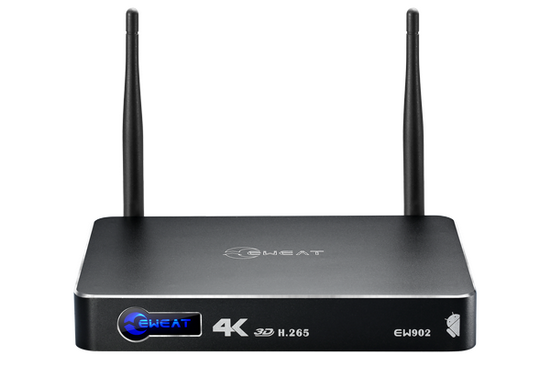
Video & Photo Gallery: latest Android KitKat 4.4 stock firmware installed on Eweat EW902 TV Box


Video & Photo Gallery: latest Android KitKat 4.4 stock firmware installed on Eweat EW902 TV Box

Firmware: Android KitKat 4.4
Model: Eweat EW902 TV Box
Platform:
Realtek 1195 chipset
Kernel version: 3.10.24
Build number: rtk_phoenix-eng 4.4 KRT16O eng.tony.20150423


Dec 4, 2014

Download latest Android KitKat 4.4.2 firmware for M-195 Realtek RTD1195 TV Box


Download latest Android KitKat 4.4.2 firmware for M-195 Realtek RTD1195 TV Box from here or from here. Download previous firmware version from here.


Archive name: pub_sdk6_1080_1127_install
Firmware image name: install.img  
FW version: Android KitKat 4.4.2 stock firmware  
Archive file size: 215 MB  
Model: M-195 Realtek RTD1195 TV Box
Platform: Realtek 1195 chipset


Update Process  
To flash firmware from SD card follow this simple video tutorial.

Download the firmware 
Copy the file 'install.img' within a USB memory 
Turn off TV Box and connect the USB memory 
Press reset button and turn on the TV Box 
The update information appears on display
The update process takes about 3 minutes 
The device will automatically restart to complete the process.

Nov 21, 2014

Download latest Android KitKat 4.4.2 firmware for M-195 Realtek RTD1195 TV Box


Download latest Android KitKat 4.4.2 firmware for M-195 Realtek RTD1195 TV Box from here or from here. Download previous firmware version from here.


Archive name: pub_1115_install
Firmware image name: install.img  
FW version: Android KitKat 4.4.2 stock firmware  
Archive file size: 330 MB  
Model: M-195 Realtek RTD1195 TV Box
Platform: Realtek 1195 chipset


Update Process  
To flash firmware from SD card follow this simple video tutorial.

Download the firmware 
Copy the file 'install.img' within a USB memory 
Turn off TV Box and connect the USB memory 
Press reset button and turn on the TV Box 
The update information appears on display
The update process takes about 3 minutes 
The device will automatically restart to complete the process.

Nov 6, 2014

Download XBMC Android application for Realtek CPU devices


Download XBMC Android application for Realtek CPU devices from here, here or from here.

Archive file name: xbmcapp-armeabi-v7a-debug-rtk-20141010
Archive size: 95 MB
Application file: xbmcapp-armeabi-v7a-debug-rtk-20141010.apk 

Nov 2, 2014

Download latest Android KitKat 4.4.2 firmware for M-195 Realtek RTD1195 TV Box


Download latest Android KitKat 4.4.2 firmware for M-195 Realtek RTD1195 TV Box from here, here or here


Archive name: M-195 RTD 1195 TV BOX STOCK FIRMWARE install- 177490_20141024
Firmware image name: install.img  
FW version: Android KitKat 4.4.2 stock firmware  
Archive file size: 241 MB  
Model: M-195 Realtek RTD1195 TV Box
Platform: Realtek 1195 chipset
Build number: rtk-phonenix-eng 4.4 krt160 eng.ton.20141024.094201 


Update Process
     Download the firmware
     Copy the file with extension "img" within a USB memory
     Turn off TV Box and connect the USB memory
     Press reset button and turn on the TV Box
     The update information appears on
display
     The update process takes about 3 minutes
     The device will automatically restart to complete the process.


Oct 31, 2014

Download latest Android KitKat 4.4.2 firmware for EC-U6D Android Media Player


Download latest Android KitKat 4.4.2 firmware for EC-U6D Android Media Player from here, here or here


Archive name: U6D-442.038.10.141014-install
Firmware image name: install.img  
FW version: Android KitKat 4.4.2 stock firmware  
Archive file size: 163 MB  
Model: EC-U6D Android Media Player
Platform: Realtek 1195 chipset


Update Process
     Download the firmware
     Copy the file with extension "img" within a USB memory
     Turn off TV Box and connect the USB memory
     Press reset button and turn on the TV Box
     The update information appears on
display
     The update process takes about 3 minutes
     The device will automatically restart to complete the process.


Oct 27, 2014

Download latest Android KitKat 4.4.2 firmware for Eweat EW902 TV Box


Download latest Android KitKat 4.4.2 firmware for Eweat EW902 TV Box from here, here or here. Download original stock firmware from here.


Archive name: eweat_EW902_20141024.zip  
Firmware image name: install.img  
FW version: Android KitKat 4.4.2 stock firmware  
Archive file size: 276 MB
Model: Eweat EW902 TV Box  
Platform: Realtek 1195 chipset

Changelog
Fixed the slow speed problem 


Update Process
     Download the firmware
     Copy the file with extension "img" within a USB memory
     Turn off TV Box and connect the USB memory
     Press reset button and turn on the TV Box
     The update information appears on
display
     The update process takes about 3 minutes
     The EW902 will automatically restart to complete the process.


Oct 20, 2014

Download original stock firmware for Eweat EW902 TV Box


Download original stock firmware for Eweat EW902 TV Box from here, here or here.


Archive name: eweat_ew902_20141013
Firmware image name: install.img
FW version: Android KitKat 4.4.2 stock firmware
Archive file size: 245 MB

Model: Eweat EW902 TV Box
Platform:
Realtek 1195 chipset


Update Process
     Download the firmware
     Copy the file with extension "img" within a USB memory
     Turn off TV Box and connect the USB memory
     Press reset button and turn on the TV Box
     The update information appears on
display
     The update process takes about 3 minutes
     The EW902 will automatically restart to complete the process.


Twitter Delicious Facebook Digg Stumbleupon Favorites More

 
Powered by Blogger