y China Gadgets Reviews: amlogic
Showing posts with label amlogic. Show all posts

Nov 23, 2017

Video & Photo Gallery: Ugoos UM4 TV Dongle - First impressions & Quick Review

http://ugoos.net/ugoos-brand/ugoos-um4-rk3328-hdr-cec-ddr4-dongle

Meet Ugoos UM4  TV Dongle

UM4 is the first Brand Ugoos device running under Android Nougat 7.1.2. Nougat brings new feelings in TV Box usage. New settings menu – combination of TV settings and standard phone settings looks fresh and more user-friendly for both Remote Controllers and mouse pointers. New animation looks up-to-date, smooth and have good reaction on RC actions. Combination of 4K resolution, H.265, H.264 and VP9 codecs and HDR function make this device a reliable all-format media center at home or small office. UM4 is also the first Ugoos device that welcomes users in a new way – running a setup wizard.

Ugoos UM4 RK3328 SoC Android 7.1 TV Dongle Features

– OTA Updates. Like all other Ugoos models, the Ugoos UM4 Android tv box also has OTA Firmware (OTA is also known as firmware that is automatically updated over the internet). As a result, the user never has to worry about the firmware updates. Within a few simple clicks, your firmware is completely up-to-date.
– Dual Channel Memory RAM. The Ugoos UM4 Android TV Box has 2GB of RAM memory. This work memory is DDR4 fastest type.
– 16 GB of internal Storage ROM. The Ugoos UM4 Android tv box also features a 16GB Nand Flash internal / flash storage. In addition, the user can also extend the storage itself with an SD card, external hard disk or USB stick.
– Google Play Store and gappps. In the Google Play Store you can download all applications you want to be a user. For example, think of the famous Facebook, Youtube, Gmail, Twitter, Picasa, Google+, MX player or Chrome. Do you like more games? Then you are also at the right place. For example, you can download games like Angry Birds, Fruit Ninja, Candy Crush Saga, Wordfeud and more. The Google Playstore now has more than 3 million apps!
– Ports and Gates. The Ugoos UM4 Android tv box features a full size USB 2.0 OTG port and a full size USB 3.0 port. These are ideal for connecting, for example, a Flymouse, external hard drive or other USB device. It also has 2.5mm IR jack, micro USB port for power, Dual Band WiFi 802.11 b/g/n/ac external antenna, 3.5mm AV output with composite and stereo audio, TF / micro SD card slot, HDMI 2.0a female port up to 4k @ 60 fps with CEC and HDR support and a recovery hole.
– Dual Band WiFi 2.4 Ghz/5.0 GHz 802.11 b/g/n/ac. The biggest advantage of the Ugoos UM4 Android tv box compared to other TV boxes is that the Ugoos UM4 Android TV box has an external WiFi antenna. This allows the device to get the maximum Internet connection / Internet speed. The built-in WiFichip supports dual-band WiFi 802.11 b / g / n / ac. This gives you a very fast and stable wifi connection.
– 4K UHD. The Ugoos UM4 Android TV Box supports 4K Ultra HD videos. This allows you to view crisp images and it seems like you’re there! H.265 encoded videos are also supported by the UT5. H.265 videos are very high quality videos that you can even stream about low bandwidth connections without overloading them too much.
– Autopower. Autopower means that the device automatically enters when the user connects the device to the mains. This means that no power button is needed.
– USB Switch. The user can set whether the USB port is used as an OTG port or USB port.
– LED Swttings. The user can determine the way in which the power LED flashes. In addition, the user can even determine if the power LED is on or off.
– Fan Settings. The user can determine when the fan is used for additional cooling of the system.
–  Operating system. The operating system of the Ugoos UM4 Android tv box is Android 7.1 Nougat.
– Root. Root feature gives you access to the entire operating system of your TV Box. Certain applications requires root rights to operate in system. Be careful while using this feature, application activate it for should be trustful. Device rooted without reboot, but if you want to undo all changes, system will ask to restart device. For managing separate applications, you can choose Supersu installation. Popular function installed on all up-to-date Ugoos TV Boxes. Activate Root access you can in: Settings – Ugoos settings – System – Root.
– File Server. File server (Samba) allows sharing files among different OS devices in local network. This feature was one of the most popular functions on Ugoos boxes based on Android 4.4. and 5.1 based on RockChip and Amlogic SoCs. File server can work via Wi-Fi connection, but if load will be big, may need to use LAN adapter via USB to make this function proceed more effective and fast. In this release new local networks functions were added: NFS client and CIFS client. These functions make shared Windows folders visible in Android system. Samba server available in Settings – Ugoos settings – System – File server.
– Hardware Monitor. Hardware performance visualization is a useful feature if you prefer to control actual work and speed of your device. Now you can control your Box hardware performance more effectively. We added ability to place animated graphic icons in the upper bar, which can show real time main hardware values.
– Wireless Assistant. Users can control TV Box, play Android games with your mobile device being a wireless game pad and share media resources with Ugoos Box through the application. You can activate Fireasy assistant from settings menu: Settings – Ugoos Settings – Wireless Assistant. Mobile application for IOS and Android devices you can download using QR code on the screen or run ugoos.net/remote/
– Gamepad Settings. GS let you extend personalization of your TV Box and get more advantages during gaming process. Just connect you favorite gamepad run Ugoos settings – Gamepad Settings. In upper menu, choose previously connected gamepad and set buttons and axes. Safe and share profiles with your friends who also has Ugoos devices. More about Gamepad Settings in previous posts.
– Debug Settings. Another exclusive option will be useful for developers. Simple switchers let you connect device for application diagnostics using ADB via USB or Wi-Fi. Also Debug settings gives ability to gather Log files during TV Box processing. In first firmware, we already add some additional functions can be useful for casual usage and digital signage providers:
– Screen rotation. In Display settings, we add simple switcher in case if you need to use unusual screen rotate format. Besides Landscape and portrait format, we also add reversed versions of these positions and original mode to let applications choose rotation by system settings. Screen rotation also available in upper bar like in cellphones.
– Autoframerate. Via playback of many video samples, we concluded that sometimes AFR function in KODI is choosing best options for playback due to different video parameters. For more convenience, we set tree options for Frame Rate: System resolution / Video resolution priority / Frequency resolution priority. Kodi has their own Frame Rate settings, so these options enabled in other players with using generic codecs.


Ugoos OS Settings 
You’ll get a choice of 8 submenus with some options that are not commonly found in other TV boxes:
– Root Service – Enable/disable root access which can be useful as some apps require a system without root, while others won’t work with root.  The user can easily turn off or turn on the root of the device.
– File server/client – The file manager allows the user to choose where applications are to be installed.
– Hardware Monitor – Shows network usage, CPU info, RAM info in notification bar. You can use the settings to display the cpu load / ram memory and the temperature on your desktop.
– Wireless Assistant – Remote control app for Android / iOS (download)
– Gamepad settings – Gamepad buttons mapping app. Profiles are shareable among users
– Debug settings – WiFi/USB Adb access, log files management, etc.
– NFS Client – NFS and SAMBA client, and SAMBA server. I understand the clients make your SAMBA/NFS server accessible from any apps
– User scripts – Create init.d directory is enabled, and allows advanced user to run scripts at boot time without rooting the device.

Next, watch the first impressions and the experience on Android Nougat 7.1.2 stock firmware.
Model: UGOOS-UM4
Firmware tested: Android Nougat 7.1.2 stock
Kernel version: 3.10.104
Build number: UM4-userdebug 7.1.2 NHG47K eng.avagetto.20171011.171117 release-keys

Android Security Patch Level: April 5, 2017
Root: Firmware is not rooted, but you can root it from settings and it will install SuperSU also.
Oher: The stock firmware runs very smooth and I didn't find any problems. During my tests, I didn't experienced any applications force closes and hangups. Google Play Store and gapps are working just fine. 3rd party apps downloaded and updated without issues. It supports Cast Screen, Dual band Wifi 2.4 GHz /5 GHz, Bluetooth 4.0, USB Host, CEC, DLNA and Miracast functions. It is HDR 10 and 4K ultra HD 60 fps capable, and Kodi 17 and USB 3.0 ready.
Storage. Total Capacity: 16 GB of internal Storage,  internal space
available: 11 GB. The device sees with no problem at all my Mixza Tohaoll 128GB SDXC Micro SD Memory Card and my Netac K330 1TB External HDD USB 3.0.

Full photo album here. Unboxing Ugoos UM4  TV Dongle here.


The launcher looks nice, it is fast, and we have the Google TV right settings menu. There are a very few preinstalled applications, including Google Play Store, Total Commander and Media Center.

In Antutu Video Tester 3.0 Ugoos UM4  TV Dongle scores 889 points, a very good score in this test ranking. It played smoothly almost all video file types; this firmware version fully supports 27 video & audio format files and it partially supports only 3 video & audio format files.

In Antutu Benchmark 6.2.7 the device achieves a good score, over 36.300 points.

Internet speed tested on both WiFi bands got incredible values. For 5 GHz WiFi, the download speed was over 116 Mbps and the upload speed over 101 Mbps. For 2.4 GHz WiFi, the download speed was over 41 Mbps and the upload was the same. The router used in this test is Xiaomi Mi WiFi Router.


Ugoos UM4  TV Dongle is indeed a very good device, you can try it out for a great experience on an Android TV Box.

Ugoos UM4 Pros
- OS: latest Android Nougat 7.1.2
- CPU: Rockchip RK3328 64-bit quad-corecortex-A53 fast processor
- GPU: Mali-450MP2
- 2GB DDR4 RAM + 16GB ROM eMMC
- Dual Band Wifi 2.4/5 GHz
- Root option already in OS settings (with SuperSU install)
- Micro SD card slot up to 128 GB tested
- External HDD up to 1GB tested
- Great launcher offers a better experience for users.
- OTA wireless firmware updates
- USB 3.0 ready
- HDMI 2.0 connector
- Bluetooth 4.0
- Beautiful IR remote
- External DualBand WiFi antenna for powerful signal reception
- Support 4Kx2K decode output
- H.264 H.265 encoder
- 10bit HDR 10,  HLG support & 4K ultra HD 60fps
- DLNA & Miracast Protocol Support

- File Server, Hardware Monitor, Wireless Assistant, Gamepad Settings, Debug Settings, Autoframerate, Screen rotation options.


About Ugoos Ugoos Industrial Co., Ltd. is the first Dual core and Quad core TV dongle company that specializes in designing, R&D, manufacturing, and marketing of Android HD Media Players, Smart TV Box, Smart tv dongle, Set Top Box in China. In early 2011, Ugoos developed the first Dual core Android TV dongle in the world. As the leading company of Smart TV dongles and TV boxes in China, Ugoos has a European Development Team in China, always insists on the principles of high quality products, high quality service, and win-win relationships. We are committed to providing our customers with professional, safe, and stable HD Media Players solutions. Having been in this field for more than 3 years, Ugoos is now one of the leading companies among its domestic counterparts. Our products mainly include RK3066 Dual Core,RK3188 Quad Core, and RK3288 Quad Core products. In order to speed up the strategy of “Based in Shenzhen to Build a Global Brand”, Ugoos has set up after sales service agencies nationwide, and established foreign trade offices in Shenzhen. Ugoos’ products have been exported to Southeast Asia, Central Asia, Australia, the Middle East, Africa, and Europe. All of our products are strictly compliant with rules such as CE, FCC, and RoHS. Ugoos is owned by its staff, and its ups and downs are closely connected with every employee’s vital interests. It is only when the enterprise grows stronger that the employees can improve their living conditions as well as uplift their spirit. Therefore, with today’s fierce competition, Ugoos’ staff members must unite and collaborate in order to improve the company and ultimately to put it in an invincible position. Ugoos’ goal is to “Bring HD to Thousands of Households”

Don’t miss any of our future video tutorials, follow us on Youtube. Like us on Facebook. Add us in your circles on Google+. Watch our photo albums on Flickr. Subscribe now to our newsletter.

Oct 28, 2017

Download Android Lollipop 5.1.1 firmware for Qintex MSP05 Android Smart Projector

 
Download Android Lollipop 5.1.1 stock firmware for Qintex MSP05 Android Smart Projector from here, here or here. Download a newer firmware from here.

This firmware is for Qintex MSP05 Android Smart Projector with AMLogic S905 CPU. BTW, here you can read about the unboxing Qintex MSP05 Mobile Android Smart Projector. First Impressions & Quick Review here. 

BTW, you can buy Qintex MSP05 Android Smart Projector from Amazon.co.uk.

Firmware details
Archive:MSP05-ota-20170622
Model: Qintex MSP05 Android Smart Projector
Image file size: 676 MB
Platform: Amlogic S905
Update file name: p6330-ota-20170622
Build number: Android/p6330/p6330:5.1.1/LMY47V/20170608:user/test-keys
Inside archive: firmware + factory_update_param.aml


Caution: Please do not update firmware unless you know what you are doing, you really want it or it is absolutely necessary. Firmware updates may occasionally have bad results, like bricking your device, temporarily or permanently. The firmware update process is done entirely at your own risk. Before attempting to update the firmware, back up your data. 

Don’t miss any of our future video tutorials, follow us on Youtube. Like us on Facebook. Add us in your circles on Google+. Watch our photo albums on Flickr. Subscribe now to our newsletter.
Biggest firmware download center. 

Sep 13, 2017

Video & Photo Gallery: Xiaomi Mi Box 3 International Version - First impressions & Quick Review


Best Price Alert! You can now buy Xiaomi Mi Box International Version from Banggood.com for only $77.67 with free shipping world wide. Hurry up, limited stock.

Meet  Xiaomi Mi Box 3 International Version. If you have already bought into Xiaomi ecosystem, the Mi Box will definitely carve out a dominating position for your home entertainment. Its powerful components, petite size and a lot of content to choose from is a killer combination. A wide list of available content, convenient user interface and fantastic 4K image makes Mi Box a great set-box for enthusiasts. In fact, it is not just a box — it is a whole new viewing platform built to recognize what you want and deliver it in full measure. Sometimes, it is simple things in life that really count. Mi Box IE got high praise worldwide for its minimalistic, refined and ergonomic design, acquiring two of the most prestigious awards — Good Design Award and Red Dot Design Award. Enter the world of entertainment! All of your favorite media is here: music videos, films, TV shows, radio and news stations, and games. Based on your profile activity, Mi Box suggests content that would cohere with your interests. Besides that the latest version of the platform supports Google search and voice controls.

Next, watch the first impressions and the experience on Android Nougat 7.0 stock firmware.
Model: MIBOX3
Firmware tested: Android Nougat 7.0 stock (updated from Marshmallow 6.0.1)
Kernel version: 3.14.29
Build number: once-user 7.0 NBD91Z 924

Android Security Patch Level: February 5, 2017
Root: Firmware is not rooted.
Google TV experience: Discover apps for movies, TV, music, radio and more in Google Play. Connect to a world of content and entertainment at home with the sleek and powerful Mi Box, a 4K Ultra HD streaming device and gaming box powered by Android TV. Apps like YouTube, Hulu Plus and NBA Game Time put personalized recommendations for videos, shows and sports in your home screen. Press the mic on your remote and tell Android TV what you want. Try “Jurassic Park”, “romantic comedies set in New York” or “what’s tomorrow’s weather forecast?” Cast movies & TV shows, music, games, sports and more — from Android, iOS, Mac, Windows, or Chromebook to your TV. Just tap the Cast button on your mobile app to start playing on your TV. Grab up to four gamepads, Android phones or tablets to play Beach Buggy Racing head-to-head with friends..
Storage. Total Capacity: 8 GB of internal Storage,  Total space: 5.13 GB, available: 1.32 GB (25%). The device sees with no problem at all my Mixza Tohaoll 128GB SDXC Micro SD Memory Card and my Netac K330 1TB External HDD USB 3.0.


Full photo album here. Unboxing Xiaomi Mi Box 3 International Version here.


Android TV Launcher is the jumping-off point for starting all activities on your Android TV entertainment device. The Launcher is optimized to put content at the center; from casual movie-watching, to edge-of-seat, immersive gameplay. It’s all about finding and enjoying content with the least amount of friction and providing quick access to all the features Android TV has to offer.

In Antutu Video Tester 3.0  Xiaomi Mi Box 3 International Version scores 945 points, a very good score in this test ranking. It played smoothly almost all video file types; this firmware version fully supports 26 video & audio format files and it partially supports only 4 video & audio format files.

In Antutu Benchmark 6.3.4 the device achieves a good score, over 35.500 points.


Internet speed tested on WiFi gets good values too. The download speed was almost 34 Mbps and the upload speed over 49 Mbps. The router used in this test is Xiaomi Mi WiFi Router. 


Xiaomi Mi Box 3 International Version is indeed a very good device, you can try it out for a great experience on an Android TV Box.

Highlights for Xiaomi Mi Box
- Price: It is one of the most cost efficient TV Box product of 2017.
- 4K Video Support: At this price, there are very few devices, which offers you with real 4K Video Support.
- Solid Remote: It comes up with an awesome, small-sized remote controller which can also be used in dark easily.
- Extra Features: This Best Android TV Box offers you with many other extra features such as VUDU, Pandora, CBS, Sling TV and many more, which will get you too many options to go on with your streaming player.
- Pure Google TV user experience. 


About Banggood. Banggood was founded in 2004, specializing in computer software research and development. Focusing on foreign trade e-commerce. From there it developed into an online retailer for almost everything you need for happy living, eating and entertaining. We have 4 offices, one in Hong Kong, one in Shenzhen,one in Hangzhou, and one in Yiwu. Banggood’s heart is in Guangzhou it is where all the Banggood magic happens, there you will find our main office housing 1000+ employees from customer service to product managers. The whole team is committed to providing low price, high quality products and professional services to global customers.

Don’t miss any of our future video tutorials, follow us on Youtube. Like us on Facebook. Add us in your circles on Google+. Watch our photo albums on Flickr. Subscribe now to our newsletter.

Jul 22, 2017

Download Android Nougat 7.1 stock firmware for XGody S912x TV Box


Download Android Nougat 7.1 stock firmware for XGody S912x TV Box from here or here. Download Amlogic USB Burning Tool v2.0.8 from here or download Amlogic Burn_Card_Maker v2.0.2 from here.


Firmware details
Archive: aml_7.1_s912_q9377-XGODY_XGO_mac-20170510
Firmware: Android Nougat 7.1 stock
Image: aml_7.1_s912_q9377-XGODY_XGO_mac-20170510.img
Image file size: 838 MB
Platform: Amlogic S912


Caution: Please do not update firmware unless you know what you are doing, you really want it or it is absolutely necessary. Firmware updates may occasionally have bad results, like bricking your device, temporarily or permanently. The firmware update process is done entirely at your own risk. Before attempting to update the firmware, back up your data.


Don’t miss any of our future video tutorials, follow us on Youtube. Like us on Facebook. Add us in your circles on Google+. Watch our photo albums on Flickr. Subscribe now to our newsletter. Biggest firmware download center.

Jul 5, 2017

Video & Photo Gallery: THL Box 1 Pro Android 7.1 TV Box - First impressions & Quick Review

https://www.tinydeal.com/thl-box1-pro-android-71-tv-box-s905x-2gb-16gb-4k-h265-kodi-bluetooth-p-164845.html?utm_source=chinagadgetsreviews&utm_medium=referral&utm_campaign=THLtvbox&utm_term=danyrolux

Best Price Alert! You can now buy THL Box 1 Pro Android 7.1 TV Box from TinyDeal.com for only $58.99 with free shipping world wide.

Meet THL Box 1 Pro Android 7.1 TV Box

THL Box 1 Pro at first glance makes a very good impression. The box design that looks professional and gives the product a nice premium look. It is a small, very well and solidly made TV Box, with great attention to details. TV Box looks really nicely, I like it a lot. The housing is made of high quality plastic. On the top cover also we find THL logo. The front panel has IR receiver; on one right side we found the micro SD / TF card port & a full size  USB 2.0 port. On the rear panel we can find AV output port, another USB 2.0 port, RJ45 Ethernet port, HDMI port and DC power jack. This specific model accompanies a square molded configuration, and it’s light in weight.

The device runs Android 7.1 out of the box and ships with an IR remote control, an HDMI cable, a power adapter and a user’s manual in English. It supports a wide range of video and audio codecs, allowing you to enjoy most of your media. Ethernet, Dual-band Wi-Fi and Bluetooth ensures you never get short of connectivity options. Android Nougat operating system allows you to install apps and enjoy unlimited stream of movies, sports events, music, TV shows and much more, both paid and free.

Next, watch the first impressions and the experience on Android Nougat 7.1.1 stock firmware.
Model: thl Box 1 Pro
Firmware tested: Android Nougat 7.1.1 stock
Kernel version: 3.14.29
Build number: thl.Box.1.Pro.H2.0.20170512.release-keys

Android Security Patch Level: February 1, 2017
Root: Firmware is rooted.
Oher: The stock firmware runs very smooth and I didn't find any problems. During my tests, I didn't experienced any applications force closes and hangups. Google Play Store and gapps are working just fine. 3rd party apps downloaded and updated without issues.
Storage. Total Capacity: 16 GB of internal Storage,  Space
available: 11 GB. The device sees with no problem at all my Mixza Tohaoll 128GB SDXC Micro SD Memory Card and my Netac K330 1TB External HDD USB 3.0.
  Full photo album here. Unboxing THL Box 1 Pro Android 7.1 TV Box here.


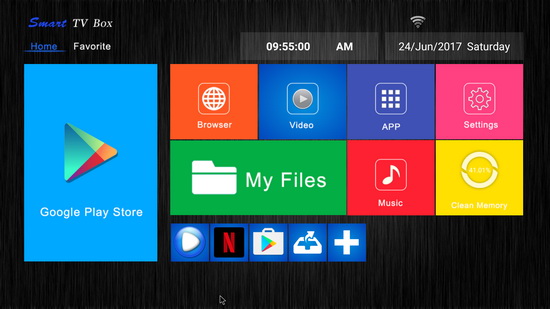
The launcher looks nice, with big and nice tiles, like in Windows 8.1 / 10 Metro style. There are a lot of preinstalled applications, including Play Store and Google applications (gapps). This firmware version hasn't root acces and. 

In Antutu Video Tester 3.0 THL Box 1 Pro Android 7.1 TV Box scores 917 points, a very good score in this test ranking. It played smoothly almost all video file types; this firmware version fully supports 27 video & audio format files and it partially supports only 3 video & audio format files.

In Antutu Benchmark 6.2.7 the device achieves a good score, over 33.500 points.


THL Box 1 Pro Android 7.1 TV Box is indeed a very good device, you can try it out for a great experience on an Android TV Box.


About Tinydeal.com Tinydeal.com is a Hong Kong-based online shopping site who specialises in selling globally a wide range of inexpensive electronic goods and other related items. Some of the most popular gadgets available on Tinydeal include toys, cell phones and computer accessories, rechargeable batteries and chargers, and other novelty items. With over three thousand new products uploaded every month, Tinydeal.com is one-stop shopping site for all electronics lovers. Most importantly, while people form countries nearby China are enjoying the wide range China-made goods at relatively low price, we are dedicating ourselves to bring the same products to another side of the world at the similar price as you would paid if you were in China. Tinydeal is also a power seller on eBay for its large and varied product range, competitive product pricing, as well as its draw-card feature of free air mail shipping on all orders.

Don’t miss any of our future video tutorials, follow us on Youtube. Like us on Facebook. Add us in your circles on Google+. Watch our photo albums on Flickr. Subscribe now to our newsletter.

Jul 4, 2017

Video & Photo Gallery: H96 Pro Plus Android TV Box - First impressions & Quick Review

http://shrsl.com/?hzdl

Best Price Alert! You can now buy H96 Pro Plus Android TV Box from Banggood.com for only $62.99 with free shipping world wide.

Meet the H96 Pro Plus. So from what we can see you will receive standard equipment like H96 Pro Plus Android TV Box, remote control, power adapter, english user manual and HDMI cable. Everything is packed in fancy box which gives you premium feeling. The top of the H96 Pro Plus comes with a simply plastic material that carries the model number on the left upper corner, hints on one of the key features of it and showcases it’s packed with a S912 CPU. The left side carries two USB 2.0 full size ports alongside with the reset button, while a Micro SD card slot is located on the right side. The DC power port, AV, HDMI port, optical S/PDIF and RJ45 ports are located on the back.

It supports a wide range of video and audio codecs, allowing you to enjoy most of your media. Ethernet, Dual-band Wi-Fi and Bluetooth ensures you never get short of connectivity options. Android operating system allows you to install apps and enjoy unlimited stream of movies, sports events, music, TV shows and much more, both paid and free.

Next, watch the first impressions and the experience on Android Marshmallow 6.0.1 stock firmware.
Model: H96 PRO+
Firmware tested: Android Marshmallow 6.0.1 stock
Kernel version: 3.14.29
Build number: q201_9377-userdebug 6.0.1 MHC19J 20170308
test-keys
Android Security Patch Level: August 1, 2016
Root: Firmware is rooted.
Oher: The stock firmware runs very smooth and I didn't find any problems. During my tests, I didn't experienced any applications force closes and hangups. Google Play Store and gapps are working just fine. 3rd party apps downloaded and updated without issues.
Storage. Total Capacity: 32 GB of internal Storage,  Total space: 25.96 GB, available: 23.82 GB (91%). The device sees with no problem at all my Mixza Tohaoll 128GB SDXC Micro SD Memory Card and my Netac K330 1TB External HDD USB 3.0.


Full photo album here. Unboxing H96 Pro Plus Android TV Box here.


The launcher looks nice, with big and nice tiles, like in Windows 8.1 / 10 Metro style. There are a lot of preinstalled applications, including Play Store and Google applications (gapps). This firmware version has root acces and SuperSU application preinstalled. 

In Antutu Video Tester 3.0 H96 Pro Plus TV Box scores 853 points, a very good score in this test ranking. It played smoothly almost all video file types; this firmware version fully supports 27 video & audio format files and it partially supports only 3 video & audio format files.

In Antutu Benchmark 6.2.7 the device achieves a good score, over 41.000 points.


Internet speed tested on WiFi gets good values too. The download speed was almost 14 Mbps and the upload speed over 31 Mbps. The router used in this test is Xiaomi Mi WiFi Router. 


H96 Pro Plus TV Box is indeed a very good device, you can try it out for a great experience on an Android TV Box.


About Banggood. Banggood was founded in 2004, specializing in computer software research and development. Focusing on foreign trade e-commerce. From there it developed into an online retailer for almost everything you need for happy living, eating and entertaining. We have 4 offices, one in Hong Kong, one in Shenzhen,one in Hangzhou, and one in Yiwu. Banggood’s heart is in Guangzhou it is where all the Banggood magic happens, there you will find our main office housing 1000+ employees from customer service to product managers. The whole team is committed to providing low price, high quality products and professional services to global customers.

Don’t miss any of our future video tutorials, follow us on Youtube. Like us on Facebook. Add us in your circles on Google+. Watch our photo albums on Flickr. Subscribe now to our newsletter.

Twitter Delicious Facebook Digg Stumbleupon Favorites More

 
Powered by Blogger