y China Gadgets Reviews: google
Showing posts with label google. Show all posts

Apr 27, 2018

ACEMAX New TV Box with Google TV OS ATV supporting Voice Remote


ACEMAX new TV Box with Google TV OS, ATV, With Remote Control - Say it, Search it, with Amlogic S905W Solutions  or S912 Solutions.
Check with us soon for more infomation.


Don’t miss any of our future video tutorials, follow us on Youtube. Like us on Facebook. Add us in your circles on Google+. Watch our photo albums on Flickr. Subscribe now to our newsletter. Biggest firmware download center.

Mar 8, 2017

Google Assistant will Come to Ulefone Gemini Pro and More Models

Today we get a great news from our engineering team. They confirm us that our coming models, from Ulefone Gemini Pro on, will have Google Assistant pre-installed. That means, you will have the chance to enjoy Google’s cutting edge artificial intelligence technology at very sweet prices.

As Google announced on February 26, they have already been bringing Google Assistant to mobile phones running Android 7.0 Nougat and Android 6.0 Marshmallow. As a consequence, we will optimize the kernel source of our news phones for the compatibility of this smart assistant. You will definitely feel excited if you imagine the scenario that you will ask your Ulefone device how to say “it’s a good day” in Chinese or let your phone connect your smart speaker.

This year, we will launch plenty of high-rank products like the Armor 2, F1, T1, and T3. And we can confirm that all of them will enable Google Assistant.


Don’t miss any of our future video tutorials, follow us on Youtube. Like us on Facebook. Add us in your circles on Google+. Watch our photo albums on Flickr. Subscribe now to our newsletter.

Jun 21, 2014

How to install KitKat 4.4.4 on your Nexus device without waiting for Google OTA Update


First of all just download Nexus Root Toolkit 1.8.3 from here, here or here. Install it, run it and select your Nexus model type. Download KitKat 4.4.4 (KTU84P) image file from here https://developers.google.com/android/nexus/images
Enable 'USB Debugging' on your device, then choose 'Flash Stock + Unroot' and select 'Other/Browse...' + 'I downloaded a factory image...'. Choose TU84P image file. Follow the onscreen instruction and that's all.

Important: this upgrade will wipe all user data, so better make a back-up first.

Successfully tested earlier today on my Google Nexus 4 LG 960.


About KitKat 4.4.4
Android 4.4.4 is a security update, which addresses issues within the Open SSL protocol. That was the code behind the Heartbleed bug, which caused major security headaches across the Internet in April. Sprint Corp. (NYSE:S), which carries the Nexus 5, has also confirmed that the update fixes various security issues.


This program will automatically bring together all the files you need to unlock and root your device in a few clicks, or flash it back to stock and re-lock it. You can also use this program to backup/restore all your important data, flash zips, set file permissions, push and pull files, install apps, generate logcats/bugreports, and much more! With the included file association options, you can perform tasks like flashing zips, installing apps, restoring android backup files, and flashing/booting img files with just a double click! The program includes a full featured interface for automating tasks in TWRP, enhanced restore features, an in-built auto-updater/notification system, ‘any build’ mode, advanced restore features,’NRT- Live Log’ for viewing the adb/fastboot cmds that are run in the background, quick tools utilities, and tools for taking screenshots/screen-recordings.   All the latest Android builds and Nexus devices are officially supported including the new Nexus 5, with full KitKat support for all the newly upgraded devices.  The program intelligently and selectively downloads the files it needs for your device and makes sure you are using the latest files available.  The program can even auto-detect your device and build.  The main changes in this release are full 4.4.3 support, improvements to the updater, fixes to the Philz Advanced Recovery integration, and general code enhancements and optimizations. 

Supported Nexus devices:
· Galaxy Nexus: GSM Models (both yakju and non-yakju builds)
· Galaxy Nexus: CDMA/LTE Verizon Models
· Galaxy Nexus: CDMA/LTE Sprint Models
· Nexus S: Worldwide, i9020t and i9023 Models
· Nexus S: 850MHz, i9020a Models
· Nexus S: Korea, m200 Models
· Nexus S 4G: d720 Models
· Nexus 7: Asus Tablet
· Nexus 7 3G: Asus Tablet
· Nexus 7 v2 (2013): Asus Tablet
· Nexus 7 v2 (2013) LTE: Asus Tablet
· Nexus 10: Samsung Tablet
· Nexus 4: LG Phone
· Nexus 5: LG Phone


Instructions:
1. Select the correct device and build (what you are currently running)
2. Configure your drivers if you haven’t already using the driver guide (If you aren’t sure use Step 3 of the driver guide to test your drivers).
3. If you need to, backup your important data.
4. Unlock your device
5. Root your device
6. Enjoy! ^_^
  • Learn more about each option by mousing over the control, dynamic tooltips will provide you more information, also each button displays a message about what it does first.
  • So the best way to get familiar with the toolkit is simply to press the buttons and read what it says

Jun 7, 2014

How to repair and revive your Google Nexus 4 - LG E960


Hello everybody.
This article is for owners of Nexus 4 who have had big problems lately with their smartphone.

Symptoms:
- the phone loses signal randomly;
- using camera related apps the phone turns off or reboots;
- using wifi network with weak signal the phone turns off or reboots;
- CPU intensive requests make the phone to turn off or to reboot;
- other issues related with above problems.

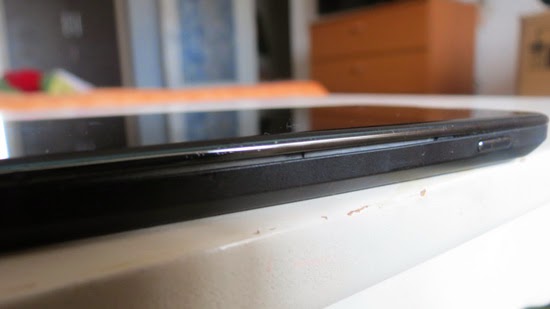
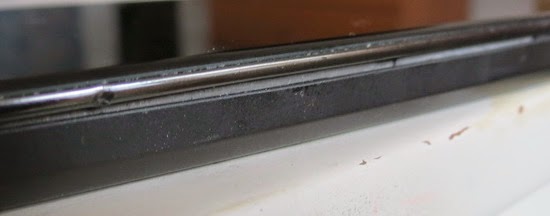
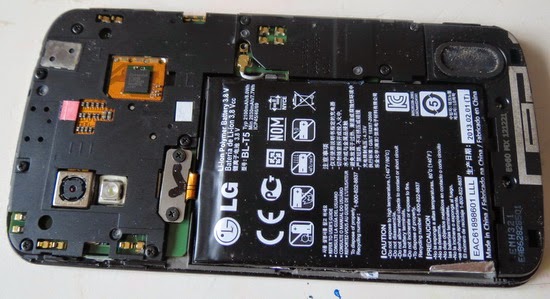
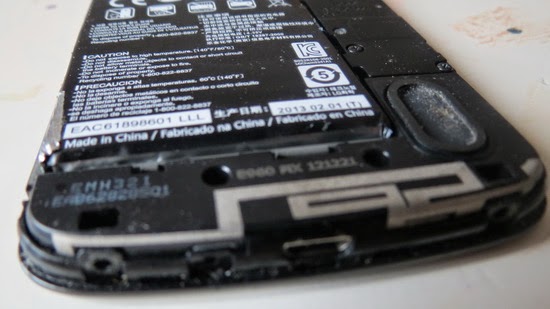
I concluded that all these problems are due to faulty battery the battery life cycle ended and must be replaced. As you see in the image below, the battery was swollen inside the phone, forcing housing to crack open. 


The solution is simple and you can fix Google Nexus 4 yourself, just follow these steps:

1. Buy a high quality replacement battery For LG Google Nexus from Aliexpress.com for only 9.73 USD with free shipping.
2. Follow this tutorial to replace the battery.
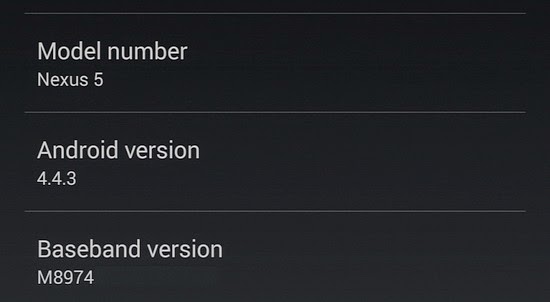
3. Follow this tutorial to upgrade your Google Nexus 4 to KitKat 4.4.3 without waiting for OTA Update. You also can unlock and root the phone.
4. If your Nexus 4 is already on KitKat 4.4.3, then unlock and root it with Nexus Root Toolkit 1.8.3 and then calibrate the battery, installing 'Battery Calibration' application, free from Play Store. 
5. Use this tutorial to maximize and optimize battery life on Google Nexus 4 - LG E960.

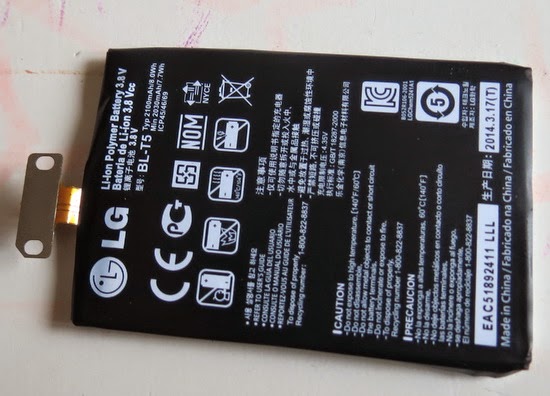
The new battery


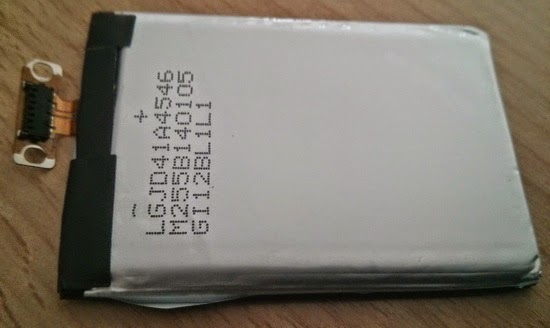
The old swollen battery


Now the phone is working just great, as good as new... 
Enjoy, share is love!

Jun 4, 2014

How to install KitKat 4.4.3 on Nexus devices without waiting for Google OTA Update


First of all just download Nexus Root Toolkit 1.8.3 from here, here or here. Install it, run it and select your Nexus model type. Enable 'USB Debugging' on your device, then choose 'Flash Stock + Unroot' and select build KTU84L. Follow the onscreen instruction and that's all. After that you can easily unlock and root your device.

Important: this upgrade will wipe all user data, so better make a back-up first.

Successfully tested earlier today on my Google Nexus 4 LG 960.

About KitKat 4.4.3
Among a number of bug fixes and design changes, the biggest update introduced by Google Inc. (NASDAQ:GOOGL) in Android 4.4.3 (KTU84L) is a redesigned Dialer app, used to make phone calls and access contacts. With Dialer version 1.1, Android users still view their most “favorite” contacts -- those whom they contact the most often -- but in Android 4.4.3, they can rearrange their favorites and access all of their information directly from the app.


The blue telephone icon still loads the Dialer app in Android 4.4.3, but users can customize their favorite contact cards by pressing and holding, what is known as a long press, to rearrange their position in the app. The three dots that appear throughout Android, called an overflow button, now appear on contact cards as well, allowing users to access more information, including phone number, email address and the option to send a text message.

Google also fixed a number of Bluetooth issues in Android with version 4.4.3, sometimes caused by connecting to wearables like smartwatches and other devices using Bluetooth Low Energy (BLE) technology. The playback of lossless (.FLAC) audio files was improved, as well as certain errors that could cause the operating system to reboot.


This program will automatically bring together all the files you need to unlock and root your device in a few clicks, or flash it back to stock and re-lock it. You can also use this program to backup/restore all your important data, flash zips, set file permissions, push and pull files, install apps, generate logcats/bugreports, and much more! With the included file association options, you can perform tasks like flashing zips, installing apps, restoring android backup files, and flashing/booting img files with just a double click! The program includes a full featured interface for automating tasks in TWRP, enhanced restore features, an in-built auto-updater/notification system, ‘any build’ mode, advanced restore features,’NRT- Live Log’ for viewing the adb/fastboot cmds that are run in the background, quick tools utilities, and tools for taking screenshots/screen-recordings.   All the latest Android builds and Nexus devices are officially supported including the new Nexus 5, with full KitKat support for all the newly upgraded devices.  The program intelligently and selectively downloads the files it needs for your device and makes sure you are using the latest files available.  The program can even auto-detect your device and build.  The main changes in this release are full 4.4.3 support, improvements to the updater, fixes to the Philz Advanced Recovery integration, and general code enhancements and optimizations. 

Supported Nexus devices:
· Galaxy Nexus: GSM Models (both yakju and non-yakju builds)
· Galaxy Nexus: CDMA/LTE Verizon Models
· Galaxy Nexus: CDMA/LTE Sprint Models
· Nexus S: Worldwide, i9020t and i9023 Models
· Nexus S: 850MHz, i9020a Models
· Nexus S: Korea, m200 Models
· Nexus S 4G: d720 Models
· Nexus 7: Asus Tablet
· Nexus 7 3G: Asus Tablet
· Nexus 7 v2 (2013): Asus Tablet
· Nexus 7 v2 (2013) LTE: Asus Tablet
· Nexus 10: Samsung Tablet
· Nexus 4: LG Phone
· Nexus 5: LG Phone


Instructions:
1. Select the correct device and build (what you are currently running)
2. Configure your drivers if you haven’t already using the driver guide (If you aren’t sure use Step 3 of the driver guide to test your drivers).
3. If you need to, backup your important data.
4. Unlock your device
5. Root your device
6. Enjoy! ^_^
  • Learn more about each option by mousing over the control, dynamic tooltips will provide you more information, also each button displays a message about what it does first.
  • So the best way to get familiar with the toolkit is simply to press the buttons and read what it says

Twitter Delicious Facebook Digg Stumbleupon Favorites More

 
Powered by Blogger