y China Gadgets Reviews: windows
Showing posts with label windows. Show all posts

Jun 27, 2018

Microsoft Windows 10 Pro with Coupon for Just $12.60 and More


If you have a PC, then there’s a very high probability it’s running a Microsoft operative system. Microsoft Windows is the go-to OS for anybody who wants a simple user experience, without giving up too much on the more advanced features you’d find on something like Linux. Also because of that, Microsoft Windows is the most commonly used desktop operative system worldwide.


Microsoft Windows 10 for only $12.6
Microsoft Windows 10, is the latest iteration of the popular OS, designed to be compatible with the hardware, software, and peripherals you already own. Coming with always-enabled updates to help you stay current on features and security for the supported lifetime of your device.

Windows 10 gives you absolutely the best experience for doing what you do. Stay focused with easy ways to snap apps in place and optimize your screen space for getting things done. See your open tasks in a single view and create virtual desktops to gain space or group things by project, like Office apps for work and games for play.
Also gaming got even better with Windows 10. Not only do your existing games work great, but now you can play and connect with gamers across Xbox One and Windows 10 devices. From the best casual games to a new generation of PC gaming, Windows 10 is built for games you love.
You can get Microsoft Windows 10 Pro OEM for just $12.6 using the coupon code: Gadget.
Office 2016 Professional Plus for only $31.5
On the same website they also have Office 2016 Professional Plus at a discounted price. Microsoft Office Professional Plus 2016 is aimed primarily at companies and meets even the highest expectations.Containing the programs Word, Excel, PowerPoint, OneNote, Outlook, Publisher, Access and Skype for Business,Office Professional Plus 2016 meets all the requirements that are placed on an extensive office software. Whether you create form letters,manage figures and tables, design presentations,create databases or want to organize your eMails – your professional or private projects can be done with the Office applications in no time.

You can get Office 2016 Professional Plus at just $31.5 using the coupon code: Gadget.

Or you can buy together: Windows10 PRO OEM + Office2016 Professional Plus CD Keys Pack for only $39.14 if you use this coupon code: Gadget.


Don’t miss any of our future video tutorials, follow us on Youtube. Like us on Facebook. Add us in your circles on Google+. Watch our photo albums on Flickr. Subscribe now to our newsletter. Biggest firmware download center.

Nov 4, 2017

Download Windows 10 x64 Drivers for VORKE V2 Plus Mini PC

 
http://shrsl.com/m767


Download Windows 10 x64 Drivers for VORKE V2 Plus Mini PC from here, here or here.

You can now buy VORKE V2 Plus I5-7200U 8GB RAM + 128GB ROM  Mini PC from Geekbuying.com for only 345.99 with free shipping world wide.


VORKE V2 Plus Mini PC Drivers
Arhive name: VORKE V2 Plus Win10 X64 Driver V3.1 / MINI A1 Win10 X64 Driver V3.1
Archive size: 581 MB
Platform: Intel Skylake I5-7200U

Content: 
1. Chipset 
2. VGA
3. Audio

4. AHCI
5. LAN
6. Bluetooth
7. Wireless
8. ME_SW_MSI


Don’t miss any of our future video tutorials, follow us on Youtube. Like us on Facebook. Add us in your circles on Google+. Watch our photo albums on Flickr. Subscribe now to our newsletter.

May 31, 2017

Windows 10 running on the Snapdragon 835 Mobile PC Platform unveiled at Computex


Attendees at Computex will be able to experience a Windows 10 PC prototype, for the first time powered by the flagship Qualcomm Snapdragon 835 Mobile PC Platform. With the first-ever launch of sleek, innovative, fanless devices running Windows 10 PC devices powered by Snapdragon 835 are expected to be available from Asus, HP, and Lenovo.

In December at Microsoft’s Windows Hardware Engineering Conference (WinHEC), Microsoft’s Terry Myerson (EVP, Windows and Devices Group) invited Qualcomm Technologies’ Cristiano Amon to the keynote to announce that Windows 10 is coming to the premium-tier Snapdragon platform.

Consumers will get the Windows 10 experience they know and love. With Snapdragon, hardware makers can create Windows 10 PCs that are thin, light, fan-less, and designed to deliver long battery life. With the integrated Snapdragon X16 LTE modem, your Windows 10 device can support blazing fast Gigabit internet speeds for a virtually anytime, anywhere experience.

The device on display at Computex is running on our small development platform, but it’s set up like a desktop PC. We attached a 46-inch monitor, wireless keyboard, and wireless mouse, and loaded it with familiar apps like Microsoft Office and other great apps so attendees can experience productivity and entertainment on Windows 10 powered by Snapdragon. We’ve also set up a Gigabit LTE network so attendees can experience the extreme speed supported by the integrated Gigabit LTE modem.

Stay tuned for more information as we launch sleek, innovative, fanless devices running Windows 10 PCs powered by the Snapdragon 835 Mobile PC Platform.


Don’t miss any of our future video tutorials, follow us on Youtube. Like us on Facebook. Add us in your circles on Google+. Watch our photo albums on Flickr. Subscribe now to our newsletter. Biggest firmware download center.

Nov 19, 2016

Download Windows 10 firmware for Jumper EZbook 2 tablet PC


Download Windows 10 firmware for Jumper EZbook 2 tablet PC from here.

Flash Sale Alert! You can now buy Jumper EZbook 2 tablet PC from Gearbest for only $177.89 with free shipping world wide.


Firmware details
Archive name: T314_Z8300_Jumper_WIN10_20160915
Image: T314_Z8300_Jumper_WIN10_20160915
Inside archive: Windows 10 firmware + Tool & Flash Guide ( How To Make Boot U Disk + Intel Cherry Trail to Install WIN10 SOP  + uiso9_cn + WinPE_amd64) + Scripts
Archive size: 4.8 GB


Don’t miss any of our future video tutorials, follow us on Youtube. Like us on Facebook. Add us in your circles on Google+. Watch our photo albums on Flickr. Subscribe now to our newsletter. Biggest firmware download center.

Nov 11, 2016

Video & Photo Gallery: Unboxing Minix Neo Z83-4 Windows 10 Fanless Mini PC

http://shrsl.com/?evfk

Flash Sale Alert! You can now buy Minix Neo Z83-4 Windows 10 Fanless Mini PC from Gearbest for only $154.99 with free shipping world wide

Minix NEO Z83-4 Fanless Mini PC re-imagines the desktop PC, delivering an unrivalled combination of ultra-compact design and premium performance that is ideal for work, play and entertainment. Equipped with Intel’s Cherry Trail Quad-Core processor, NEO Z83-4 fits the power of computing into the palm of your hand. 

Excellent Thermal Design
The innovative passive cooling design of
Minix NEO Z83-4 realizes the perfect balance of speed, temperature, performance and absolute silence. Containing no moving parts, it seamlessly operates without even a whisper of noise, while simultaneously maintaining an incredibly low operation temperature even when accomplishing the most strenuous tasks. Plus, NEO Z83-4 is unbelievably energy-efficient requiring 80% less energy than traditional desktop PCs. 

Desktop Performance
Thanks to its 32GB of Samsung eMMC (MLC)
Minix NEO Z83-4 effortless achieves a lightning-fast and highly responsive user experience, delivering the high-end performance that users have come to expect from MINIX. NEO Z83-4 also comes packed with 802.11ac Dual-Band Wi-Fi and Gigabit Ethernet, providing substantially improved connectivity capabilities compared to its predecessor, NEO Z64-W. 

Multi-Purpose PC
 
Minix NEO Z83-4 truly excels as Thin Client Solution, being equipped with dual output display ports (Mini DP and HDMI) and combining awesomely fast start-up, seamless web browsing, multi-tasking and compatibility with a vast array of office productivity software. While also being the perfect Home Theater PC, designed to create a stunning cinematic visual experience in your living room (support up to 4K @ 30fps). 

Ready To Run Out Of The Box
An included 32GB of eMMC (5.0) built-in storage, 4GB of DDR3L memory and pre-installed with Windows 10 (64-bit) ensures NEO Z83-4 is ready to run out of the box.  


Minix NEO Z83-4 Features
● Intel x5-Z8300 Quad Core CPU is rapid and stable which can give you high speed feedback and smooth response
● Intel HD Graphics: the image processing function is also very powerful
● With 64bit Windows 10 stable and smooth system, which gives you the high definition pictures and videos
● 4GB DDR3L RAM + 32GB eMMC 5.0 ROM: easily enjoy many games and movies
● 2.4GHz / 5GHz WiFi standard: IEEE 802.11ac, connect effortlessly in a world without wires


Minix NEO Z83-4 Specifications
Brand: MINIX
Model: NEO Z83-4
Type: Mini PC
GPU: Intel HD Graphic
System: Windows 10
System type: 64Bit
CPU: Intel Atom Cherry Trail x5-Z8300
Core: Quad Core
RAM: 4G
RAM Type: DDR3L
ROM: 32G
Color: Black
Decoder Format: H.264,H.265
Video format: 1080P,4K,4K x 2K
Audio format: AAC, ACC, WAV, WMA
Support 5G WiFi: Yes
WIFI: 802.11 AC
Bluetooth: Support
Power Supply: Charge Adapter
Interface: 3.5mm Audio,DC Power Port,Ethernet,HDMI,Mini DP,TF card,USB2.0,USB3.0
Antenna: Yes
Language: Multi-language
HDMI Version: 1.4
Power Type: External Power Adapter Mode
Power Adapter Output: 12V 3A
Product weight: 0.348 kg
Product size (L x W x H): 12.20 x 12.20 x 2.50 cm / 4.8 x 4.8 x 0.98 inches

Product code: E-D05-B3-203 / 196709703 / SGG00591609300011 (3) / Eu Plug / JZ834BOX16A00531 / A01E0B05085A / Y5PA-60087-00 / 4897016415609
Power adapter:  Model: ADP-36PH B, Input: 100-240V - 1A 50-60Hz, Output: 12V - 3A LPS / C.C.: M, REV.: 00 / 3BSW66101MT / 150119-15 / R33030
Power cord: KC-015 KING-CORD 16/250  1562AP 

Package Content
1 x MINIX NEO Z83-4 Fanless Mini PC
1 x Antenna
1 x Power Adapter
1 x HDMI Cable
1 x User Manual (English / German / Chinese)

1 x Minix Product Brochure (English)

Unboxing Photo Album with Hi-Rez images here


About Gearbest GearBest is more than just a shopping site, it's designed for gadget lovers by gadget lovers. We have a passion for all kinds of tech from retro style to the absolute cutting edge. At GearBest, our company vision is simple: to become the premier online electronics seller by providing an unparalleled selection of the very best gadgets, an unbeatable shopping experience, prompt shipping and exceptional customer service that exceeds expectations. For us, the customer is always king. Our total commitment to customers empowers us to work closely together with every customer. When you buy from us, the sale is not complete when we ship your order, it is complete when you are totally satisfied.


Don’t miss any of our future video tutorials, follow us on Youtube. Like us on Facebook. Add us in your circles on Google+. Watch our photo albums on Flickr. Subscribe now to our newsletter. Biggest firmware download center.

Oct 30, 2016

Download Windows 10 firmware for Pipo X10 Mini PC


This Windows 10 OS version is for Pipo X10 Mini PC with Intel Atom Cherry Trail X5-Z8300 CPU. BTW, you can now buy Pipo X10 Mini PC from Gearbest for only $220.81 with free shipping world wide.

You can download Windows 10 firmware for Pipo X10 Mini PC from here. Download Android Lollipop 5.1.1 stock firmware for Pipo X10 Mini PC from here. Here you can read about the unboxing Pipo X10 Mini PC. Pipo X10 BIOS Settings Presentation - download BIOS file from here.

Archive name: JSX1001S10+中简中繁美语法语德语俄语+20160818_64
Archive size: 5.58 GB


Don’t miss any of our future video tutorials, follow us on Youtube. Like us on Facebook. Add us in your circles on Google+. Watch our photo albums on Flickr. Subscribe now to our newsletter. Biggest firmware download center.

Jul 23, 2016

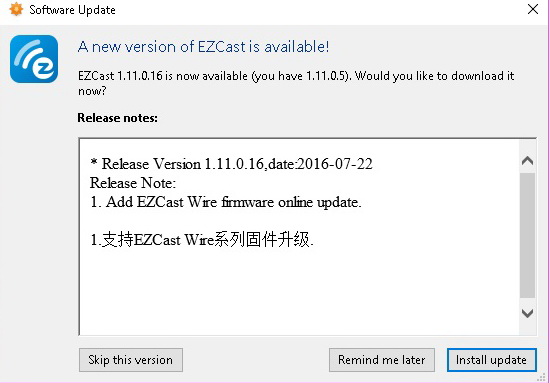
EZCast for Windows reaches 1.11.0.16 version. Download it now from here!


Download EZCast_Win for Windows v1.11.0.16 from here, here or here. (51.8 MB) Download previous version 1.11.0.5 from here.


* Release Version 1.11.0.16, date:2016-07-22
Release Note:
1. Add EZCast Wire firmware online update.

1.支持EZCast Wire系列固件升级.


EZCast application for Windows version, developed by WinnerWave, displays your Windows embedded PC and Notebook wirelessly via EZCast devices or platforms.
Requirements: Windows 7, Windows 8/8.1.
Supports Extension and Mirror with audio transmission.
Supports music and video streaming.
Do not support Windows starter version.


Everything you want to know about EZCast previous versions you'll find here


Don’t miss any of our future video tutorials, follow us on Youtube. Like us on Facebook. Add us in your circles on Google+. Watch our photo albums on Flickr. Subscribe now to our newsletter. Biggest firmware download center. 
Jun 29, 2016

EZCast for Windows reaches 1.11.0.5 version. Download it now from here!


Download EZCast_Win for Windows v1.11.0.5 from here, here or here. (51.8 MB) Download previous version 1.10.0.9 from here.

* Release Version 1.11.0.5,date:2016-06-29
Release Note:
1. Release portable version.
2. Fix bugs.

1. 更新免安装版.
2. 修正问题.


EZCast application for Windows version, developed by WinnerWave, displays your Windows embedded PC and Notebook wirelessly via EZCast devices or platforms.
Requirements: Windows 7, Windows 8/8.1.
Supports Extension and Mirror with audio transmission.
Supports music and video streaming.
Do not support Windows starter version.


Everything you want to know about EZCast previous versions you'll find here


Don’t miss any of our future video tutorials, follow us on Youtube. Like us on Facebook. Add us in your circles on Google+. Watch our photo albums on Flickr. Subscribe now to our newsletter. Biggest firmware download center. 

Jun 15, 2016

Download BIOS upgrade file for Pipo X1S Mini PC


Download BIOS upgrade file for Pipo X1S Mini PC from here, here or here

Archive name: Pipo X1S-bios
Archive size:  4.32 MB
BIOS File: i19t_win_pipo_20160324.bin

Platform: Intel Atom-x5 Cherry-Trail Z8300


Don’t miss any of our future video tutorials, follow us on Youtube. Like us on Facebook. Add us in your circles on Google+. Watch our photo albums on Flickr. Subscribe now to our newsletter.

Jun 7, 2016

MOREFINE M1s Upgraded Version: Your Ideal Finger PC is Here


MOREFINE is releasing their new version of M1s, featuring 4GB RAM and 64GB Flash.
More details soon, please stay tuned!

Don’t miss any of our future video tutorials, follow us on Youtube. Like us on Facebook. Add us in your circles on Google+. Watch our photo albums on Flickr. Subscribe now to our newsletter.

May 30, 2016

First Run of Cube iWork10 Flagship tablet. Download Windows 10 drivers from here.


You can buy Cube iWork10 Flagship tablet  from Gearbest.com for only 167.39 USD with free shipping world wide.

Here you’ll find the unboxing of this great device and here you can read about its BIOS settings. 

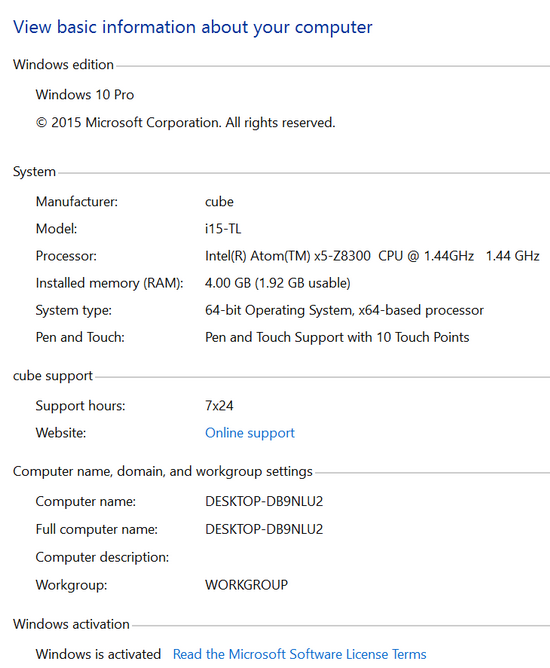
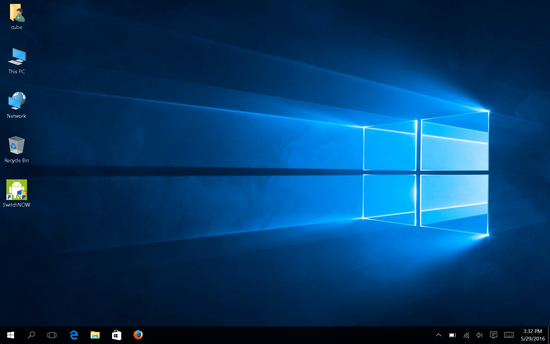
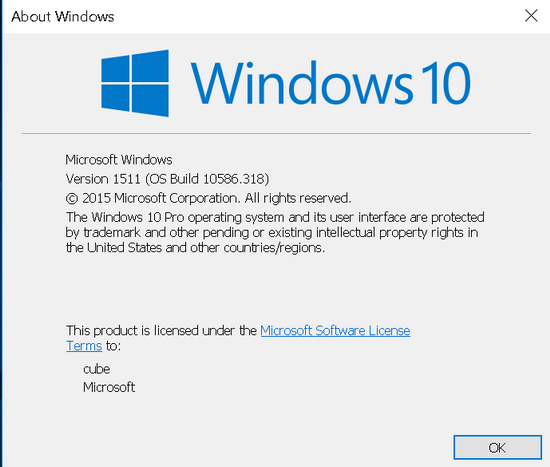
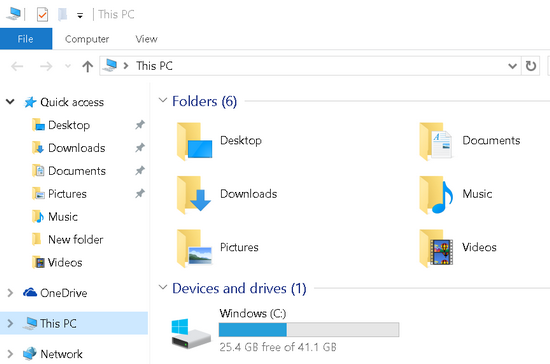
Cube iWork10 Flagship tablet came with Windows 10 Pro 64bit edition version 1511, build 10586.318. This version is activated and everything is just ok. All the drivers are correctly installed and untill now everything runs just great. On the first run, there were 25.4 GB free on C: partition, from 41.1 GB. The Intel Atom X5-Z8300 Cherry trail Processor is clocked at 1.44 GHz, according to Windows 10 OS.

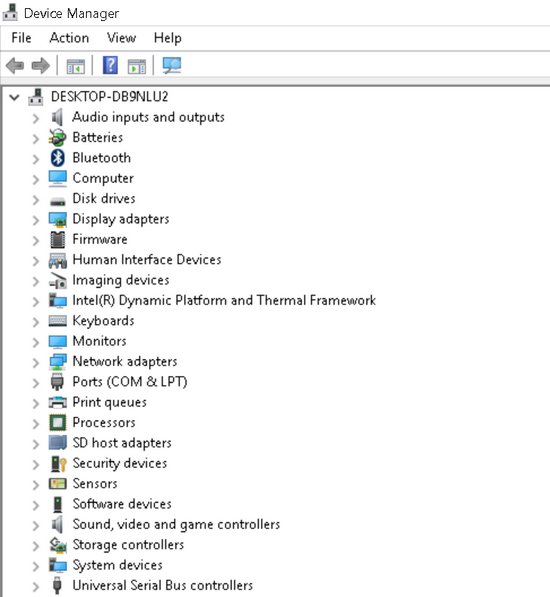
Installed drivers for: Audio inputs and outputs, Batteries, Bluetooth, Computer, Disk drives, Display adapters, Firmware, Human Interface Devices, Imaging devices, Intel(R) Dynamic Platform and Thermal Framework, Keyboards, Monitors, Network adapters, Ports (COM & LPT), Print queues, Processors, SD host adapters, Security devices, Sensors, Software devices, Sound, video and game controllers, Storage controllers, System devices & Universal Serial Bus controllers.

You can download Cube iWork10 Flagship tablet Windows 10 Drivers from here, here or here. (166 MB) Use the provided Double Driver application (as Admin) to simply restore the missing drivers from your collection, just locate the extracted folder.

High resolution photo album here.


Don’t miss any of our future video tutorials, follow us on Youtube. Like us on Facebook. Add us in your circles on Google+. Watch our photo albums on Flickr. Subscribe now to our newsletter. 

Video & Photo Gallery: Cube iWork 10 Flagship Tablet BIOS Settings


The Aption/AMI BIOS of Cube iWork 10 Flagship Tablet is one of the most complete among those available on Windows tablets. It really has dozens of options not available on other products. You will find also an Android section. Here you'll find a Video & Photo Gallery with unboxing of Cube iWork 10 Flagship Tablet and here is the first run of the device. High resolution photo album here.

If you need it, I have made a back-up of Cube iWork 10 Flagship Tablet BIOS. You can download it from here, here or here. (3,90 MB).

I advise everyone to make a copy of a working BIOS, if possible, before doing BIOS experiments. To do that you can simple use the provided AfuWin64 v.5.08.02.1189 software from the links above. If you disabled USB in the BIOS, or if you did another mess in device BIOS, only overwriting NVRAM can reset BIOS settings. In this way, there is no need to open the case, to teardown the device to be able to reset the CMOS. All the actions are made from Windows environment, so your tablet has to be able to boot into Windows. All the following actions that are you will do next are entirely at your own risk.


BIOS details 
Archive name: Cube iWork10 Flagship tablet BIOS
Archive size: 3,90 MB
Archive content:  AfuWin64 v.5.08.02.1189 & Cube iWork10 Flagship.romCube iWork10 Flagship.rom
BIOS Vendor: American Megatrends (Aption / Ami)
Core version: 5.011 / 05.11
Compliancy: UEFI 2.4, PI 1.3
Project version: B3D6_I15-TL.211 X64 / 00.06
Firmware ID: 1ATFG006
Build Date and Time: 03/17/2016 17:47:53
BIOS Chip Name: Winbond 25X/Q Series  


For flashing NVRAM:  
1. Download the above archive. It is better to extract the content to the disk C.
2. Open as administrator AfuWin64 v.5.08.02.1189\AFUWINGUI.exe. 
3. Open original backuped bios. Uncheck default 'Main BIOS Image' and check only NVRAM box. Press Flash. And best of all, start a command prompt as administrator and type, for example: C:\AfuWin64 v.5.08.02.1189\AFUWINGUI.exe BIOS.rom /N
4. Press exit and restart the PC. After boot go into the BIOS and reset settings to default.

You can buy Cube iWork 10 Flagship Tablet from Gearbest.com for only 167.39 USD with free shipping world wide. 


Don’t miss any of our future video tutorials, follow us on Youtube. Like us on Facebook. Add us in your circles on Google+. Watch our photo albums on Flickr. Subscribe now to our newsletter.

May 9, 2016

Video & Photo Gallery: First Run of NexBox T11 Mini PC. Download Windows 10 drivers from here.


You can buy NexBox T11 Windows 10 Mini PC  from Geekbuying.com for only 129.99 USD with free shipping world wide.

NexBox T11 comes with 2GB RAM, and 32GB eMMC, built in wi-fi module, SATA and USB 3.0 support. I've been playing around with this for just over a couple of weeks now I have to say im very immpressed with it.  The main plus for me is being able to pick wether to use the VGA or the HDMI output both work as they should and the posibility to install an internal HDD (I already put one inside, with 150 GB). Here you’ll find the unboxing of this great device and here you can read about its BIOS settings.

NexBox T11 Mini PC came with Windows 10 Home 64bit edition version 1511, build 10586.218. This version is activated and everything is just ok. All the drivers are correctly installed and untill now everything runs just great. On the first run, there were 15 GB free on C: partition, from 28.2 GB (32 GB). The Intel Atom X5-Z8300 Cherry trail Processor is clocked at 1.44 GHz, according to Windows 10 OS.

Installed drivers for: Audio inputs and outputs, Batteries, Bluetooth, Computer, Disk drives, Display adapters, Firmware, Human Interface Devices, Imaging devices, Intel(R) Dynamic Platform and Thermal Framework, Keyboards, Mice and others pointing devices, Monitors, Network adapters, Ports (COM & LPT), Print queues, Processors, SD host adapters, Software devices, Sound, video and game controllers, Storage controllers, System devices & Universal Serial Bus controllers.

You can download NexBox T11 Mini PC Windows 10 Drivers from here, here or here. (335 MB) Use the provided Double Driver application (as Admin) to simply restore the missing drivers from your collection, just locate the extracted folder.
High resolution photo album here.


Don’t miss any of our future video tutorials, follow us on Youtube. Like us on Facebook. Add us in your circles on Google+. Watch our photo albums on Flickr. Subscribe now to our newsletter. 

Twitter Delicious Facebook Digg Stumbleupon Favorites More

 
Powered by Blogger