y China Gadgets Reviews: ezcast
Showing posts with label ezcast. Show all posts

Oct 27, 2020

Unboxing EZCast Minibox Display Receiver - Cast it Your Way


Coupon Code Alert! You can buy EZCast Minibox Display Receiver from Amazon.com / Amazon.co.uk with 10% off if you'll use our coupon code: EZCASTGADGET. Hurry up, limited time offer, the coupon code expires on Dec 31st, 2020!

Meet EZCast Minibox Display Receiver
EZCast MiniBox is the very first 4K connected display receiver on the market, supporting both Wi-Fi and LAN connection, which allows you the flexibility to use Wi-Fi or LAN connections. EZCast Mini Box delivers new features, makes it the best streaming device to mirror portrait content from mobiles with full screen, especially decent for live-streaming apps and mobile games. It also delivers an unprecedented screen mirroring experience with stable LAN connection, 4K high image quality — and YouTube streaming support. High speed internet with extremely stable WiFi performance. Enjoy your photos and videos from cloud storage or shared albums on the big screen.

Other reasons for you to buy an EZCast Minibox is to watch online videos on your TV and to play games on the big screen. This amazing display receiver turn your HDTV into a smarter TV. Dual band 2.4GHz/5GHz wireless antenna offers you the best wireless display experience, compliant with multiple wireless display technologies, including Airplay, DLNA, Miracast, EZAir and Google Cast. Unleash the screen mirroring potenial of your iOS, Android, Windows and Mac Devices. BTW, in our tests, the 5GHz WiFi speed was over 300 Mbps, whic is just amazing.

Use the companion EZCast app to play videos and photos on TV, and also use the smart phone as a document camera. Keep a playlist of videos from different platforms and view them on the big screen. Whether users are using an iPhone, Android phone, iPad, Android tablet or laptop, EZCast Mini Box can easily cast a high-quality video from the smart devices to the TV and turn the house into a luxury cinema.

Its portable design makes it a perfect travel companion for business professionals, because of the flexibility of wireless display. The plug and cast option is one of the best feature - no need to set anything, just connect your smartphone to Mini Box via charging cable. In our test, this feature worked flawless, even from the first try. It also supports playing audio on the big screen using Bluetooth.


EZCast Minibox Display Receiver Features
- Awesome compatibility. No matter which device you’re using, compatible with iOS, Android, macOS or Windows, it just works!
- Plug and play your mobile. Connect your smartphone to Mini Box via charging cable and enjoy stable streaming immediately.
- Tailored for mirroring mobile's portrait screen. Designed for mirroring portrait content from mobiles with full screen, especially decent for live-streaming apps and mobile games.
- Autoplay wallpapers. Stream pictures from USB drive automatically when you plugging it in Mini Box's USB port!
- Fabulous interaction with your voice. No more typing to find exactly what you’re looking for. Just ask Google home or Alexa for a show, artist or song you love.
- Take control on your connectivity. No matter what you’re streaming, enjoy a strong connection with dual-band wireless—or use the Gigabit Ethernet port for wired streaming.
- Say goodbye to dead spots. No matter where you are, external antenna will ensure the stronger signal transmission and reception so that you can enjoy a stable mirroring throughout your home.
- Voice control. Use smart speakers and AI assistants on your smartphone to command EZCast to search and play your favorite videos. It supports voice control in English, Chinese, Japanese, and German.
- Compatible with Google home. No more typing to find exactly what you’re looking for. Ask Google home for a show, artist or song you love.
- Streaming photos to your TV. Plug a USB drive into the EZCast Minibox and turn your TV into a digital photo frame.
- Tailored for mirroring mobile's portrait screen. Designed for mirroring portrait content from mobiles with full screen, especially decent for live-streaming apps and mobile games.
- Easy installation. Connect the device to the HDMI port on your HDTV and power it on.


EZCast Minibox Display Receiver Highlights
- Ethernet network connectivity
- DLNA, Airplay, Miracast, EZAir, Google Home and Google Cast support
- Use EZCast app to create unique video playlists and autoplay on startup
- Supports Google Home voice control
- Supports quick setup with QR code

 
EZCast Minibox Display Receiver Specs  
Model: Minibox / Mini Box
Main Chip: AM8270
Network: 802.11AC 2.4GNz/5GHz 2T2R, Bluetooth, RJ-45 10/100/1000 Ethernet
Display Output: HDMI 3840x2160/30p, 1920x1080/60p, 1280x720/60p
Function: EZCast, EZAir, DLNA, Miracast, Google Home, Voice Control
Support OS: Android / iOS / Windows / MacOS / ChromeOS
Power: DC5V/2A
Color: White
Firmware version: updated to v1.10359.0 from v1.9823.26
 
How to connect
Connect the power adapter and plug USB cable to device; connect the HDMI into your TV HDMI port. You will need to provide
5V/2A power to the device. Change the TV / monitor to the corresponding HDMI port and you'll see the Ezcast start image, which shows the SSID and the password. Install the EZCast app on your phone / tablet. Connect the phone / tablet to the SSID provided - just to setup the wireless connection / wired connection. After that, you will be presented to a full menu: EZChannel, Web, IP Camera, Media and Camera. Start casting!

Ezcast Android application
EZCast app will help you cast any smartphone and laptop screen to an HDTV or a projector using EZCast’s wireless or connected display solutions.
 
Features:
1. Faster Wi-Fi Setup – Supports Wi-Fi setup by scanning QRCode or using Bluetooth.
2. Create Your Own Video Playlists – Use EZChannel to watch videos across YouTube, Facebook and more, and add your favorite videos into your playlists.
3. Share Cherished Moments – Re-live best moments with family photos on the big screen.
4. Immersive Viewing Experience – Play mobile videos on a big screen for the best viewing experience.
5. Bigger and Clearer Web Browsing Experience – Browse the internet on a big screen.
6. Supports Chromecast – Supports casting to your favorite wireless display receivers, including EZCast and Chromecast.

 
Options
- Connect. Connect with your favorite wireless display receivers, including EZCast and Chromecast.
- One-click mirror. One-click screen mirror to big screen with EZCast dongle.
- Share. Re-live best moments with family photos on big screen.
- Replay. Play mobile videos on big screen for the best viewing experience.
- Watch. Watch videos across YouTube, Facebook, Dailymotion and Vimeo in the same place.
- Surf. Browse the internet on big screen.

Download Ezcast Android application latest version
2.12.0.1263 for free from Google Play Store. Download Ezcast application for all platforms from here.
 
MiraPlug Android application
The MiraPlug application is specially designed for the MiraPlug series of wired projection products to provide you with the most stable projection technology. This app is needed for using the plug and play feature with your mobile, to connect your smartphone to Mini Box via charging cable,

Features:
1. Plug and cast-no need to set, just plug in the device to mirror the screen.
2. Sound synchronization output-When mirroring the screen, the sound and the image are perfectly synchronized.
3. Support firmware update-automatically detect the new version and maintain the best experience at any time.
4. Zero delay mirroring-Play various high-speed mobile games on the large screen without delay.

You can download MiraPlug Android application latest version 1.2.0.21 for free from Google Play Store.

 
Package content 
1 x EZCast Minibox Display Receiver
1 x Power Adapter model ICP12-050-2000B
1 x USB Power Cable
1 x Short HDMI Cable
1 x Network Patch Lan Cable
1 x English / Chinese Quick Start Guide rev1.0


Photo gallery full album here. Official website here.
 
Unboxing EZCast Beam V3 HD LED Projector here. Unboxing Ezcast 2 Universal Wireless Display Receiver here. Here you can read about the unboxing of Unboxing EZCast 4K Wifi Display Dongle. Unboxing EZCast Audio Music Box Receiver here. Unboxing EZCast LAN Box here.


Don’t miss any of our future video tutorials, follow us on Youtube. Like us on Facebook. Add us in your circles on Google+. Watch our photo albums on Flickr. Subscribe now to our newsletter. Biggest firmware download center.

Jul 21, 2020

Unboxing EZCast Beam V3 HD LED Projector, the best projector for gaming you should not miss out

https://www.amazon.com/dp/B088H2HNCR

Cupon Code Alert! You can buy EZCast Beam V3 HD LED Projector from Amazon.com with 10% off if you'll use our promo code: GADGETV3.

Meet EZCast Beam V3 HD LED Projector
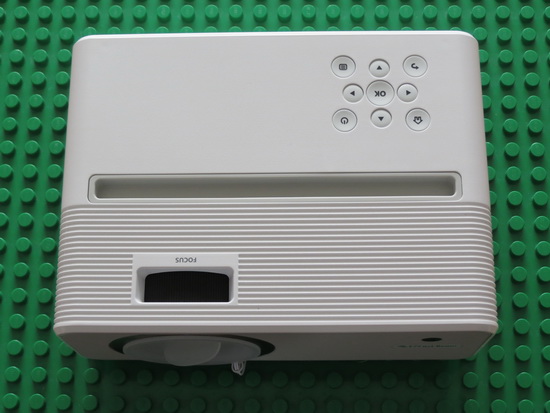
EZCast Beam V3 delivers unparalleled projection experience for smartphones with a combination of portrait projection, 2D keystone, and a smartphone stand. Simply plug in an EZCast Wi-Fi adapter and it's ready to screen mirror wirelessly from all popular OS devices. Alternatively plug and screen mirror with a charging cable to immerse yourself in high-quality projection.

EZCast Beam V3 is the very first LCD projector that supports portrait projection and the 2D smart keystone in the world.  It can function both as a Bluetooth speaker and a versatile home projector you can easily fall in love with
. 

EZCast Beam V3 HD LED Projector Highlights 
- World's 1st Portrait Mode: Project horizontal images and upright mobile phone's content with full screen
- Portrait mode to provide the best image no matter which way the smartphone tilts
- Plug and play screen mirroring
- Low latency screen mirroring perfectly for mobile games
- Supports standard mobile charging cables and HDMI cables
- Supports USB, HDMI, card reader and 3.5 mm audio interfaces
- Comes with a dual-band 2.4 GHz/5 GHz Wi-Fi adapter to support wireless screen mirroring
- Connected display feature using both wired and wireless interfaces
- Miracast, Google Home, AirPlay, DLNA, and YouTube TV support
- EZCast app and EZChannel video-streaming experience
- The 2D keystone to project perfect images from any angle
- Grooved chassis that functions as a smartphone stand
- Works as a powerful Bluetooth Speaker: Enhanced with a strong 5W speaker, it delivers better sound quality than normal projector

EZCast Beam V3 HD LED Projector Features
- More than you can imagine. Now with portrait projection, 2D electrical keystone – and a new groove designed for mobile phone – EZCast Beam V3 delivers unparalleled projection experience. Simply plug in the EZCast Wi-Fi adapter and it’s ready to use with all popular OS devices and projects wirelessly. Plug and screen mirror with a charging cable, immersing you in high-quality projection.
- 2 best ways to watch. Besides the horizontal projection, the innovative portrait mode lets you well project upright images and mobile phone’s content with full screen.
- Also a Bluetooth speaker. V3 can be used as a Bluetooth speaker, bringing you wonderful sound wherever you go. Experience better sound while watching a video with an upgraded 5-watt speaker.
- View from any angles. With 2D electrical keystone, adjust the images from horizontal and vertical direction with remote, make every corner of image clearly.
- 2D smart keystone features. Supports 2D keystone settings to project a perfect picture from any angle.
- Enjoy streaming at greater speeds. Supports dual-band 2.4G/5G Wi-Fi network to enjoy faster and more stable streaming.
- Project smartphones the right way, every way. Whether you are viewing your phone in landscape or in portrait, V3 can rotate the image right way up for the best mobile-first video experiences.
- Tailored for mobile. Groove for mobile. Enjoy the stable performance by using a charging cable to screen mirror your mobile.
- Gone wireless to the fullest. No matter which OS device you use, amazing wireless projection experience with EZCast Wi-Fi adapter.
- Fulfilling your entertainment needs. V3 is a versatile home projector equipped with HDMI and USB port, 3.5mm audio jack, micro SD card and WiFi adapter sockets, to meet diversified entertainment needs.
- Cross-platform screen mirroring support. Supports projection from all the major OS, as well as card readers and HDMI-enabled gaming consoles.
 

Gaming on a bigger screen is the new trend now.
- When we talk about gaming on TV, sometimes we might feel unsatisfied with the TV screen size that fits in our living room. So, let’s tell you why you should choose the projector that could give you the best gaming and watching experience that can fulfill your entertainment needs. EZCast Beam V3, designed for gamers, can project up to 80 inches, works with all popular OS and gaming consoles, and supports a 120 Hz high refresh rate.
- Are you a fan of Nintendo Switch, Xbox, PS4, or mobile games? Try to imagine that if you can play those games with a bigger screen that must be more exciting. Or, play games with your friends beside you on a bigger screen instead of sticking together in front of a small monitor. EZCast Beam V3 has supported up to 80 inches projection that can give you and your friends better gaming experiences.
- The refresh rate is one of the important elements for a gamer picking the projector, they will expect the game wouldn't be lagged. But the normal LCD projects have only supported 60Hz. EZCast Beam V3 supports up to 120Hz high refresh rate. Now you can play your game smoothly without lag. Without connecting a bulky speaker, EZCast Beam V3 can function as a Bluetooth speaker brings you a better sound experience when you are playing games. You can adjust the volume by remote control.
- EZCast Beam V3 has more than 30,000 hours of lamp life and 10,600 LED lumens brightness. You can adjust the projector brightness manually that suitable for you. During the daytime, you can increase the projector brightness meanwhile during the night time you can decrease the projector brightness to comfort your eyes.
- EZCast Beam V3 supports all popular OS devices and gaming consoles for wireless projection, including Nintendo Switch, X-box, or PS4. For people like to use a wired connection, EZCast Beam V3 also allows you to plug and play to connect your phone with it without extra setting required. Furthermore, you can enjoy streaming at greater speeds with the support for dual-band 2.4G/5G Wi-Fi networks, resulting in faster and more stable streaming. Wired or wireless, it’s all up to you! 

EZCast Beam V3 HD LED Projector Specs  
Brand: EZCast
Model: Beam V3
Type:  HD LED Projector
Projection technology: LCD
Brightness: 200 ANSI lumens
Contrast: 1000:1
Output resolution: 1280 x 720
Input resolution: 1080p
Light source: LED
LED lumens: 10,600 lumens
LED life: >30,000 hours
Throw ratio: 1.5:1
Focus: Manual 
Throw distance: 1-5.2m
Screen size: 32-176 inches
Aspect ratio: 16:9
Wi-Fi: Wi-Fi Adapter 2.4G / 5G
Bluetooth: v4.1 + HS
Keystone: 2D electrical correction
Power Input: 100-240V 50/60 Hz
Power output: 19V / 3.42A
Speaker: 1 x 5W
Operating system: EZCast Multimedia Center
Language supporty: 22 countries
Dimensions: 230 x 168.5 x 90 mm
Weight: 1,200g
Color: White

Firmware version: version 1.24126.20200618 from 2020/06/18

Ezcast Android application 
EZCast app will help you cast any smartphone and laptop screen to an HDTV or a projector using EZCast’s wireless or connected display solutions.

Features:
1. Faster Wi-Fi Setup – Supports Wi-Fi setup by scanning QRCode or using Bluetooth.
2. Create Your Own Video Playlists – Use EZChannel to watch videos across YouTube, Facebook and more, and add your favorite videos into your playlists.
3. Share Cherished Moments – Re-live best moments with family photos on the big screen.
4. Immersive Viewing Experience – Play mobile videos on a big screen for the best viewing experience.
5. Bigger and Clearer Web Browsing Experience – Browse the internet on a big screen.
6. Supports Chromecast – Supports casting to your favorite wireless display receivers, including EZCast and Chromecast.

Download Ezcast Android application v
2.12.0.1263 for free from Google Play Store. Download Ezcast application for all platforms from here.

EZCast Beam V3 firmware history
Firmware v1.24126.20200618 / 2020/06/18
- Minor bugs fixed


Firmware v1.24117.20200602 / 2020/06/04
- Added a shortcut key for Back function


Firmware v1.24109.20200427 / 2020/04/28
- UI refinement


Firmware v1.24086.20200410 / 2020/04/13
- First Release


EZCast Beam V3 HD LED Projector Ports
1 x DC power port
1 x Wireless Kit adapter socket
1 x USB 2.0 full size
1 x HDMI input
1 x Micro SD card slot
1 x 3.5mm audio jack output
1 x IR remote sensor receiver
1 x Lens
1 x Manual Focus Ring
1 x Mobile stand 
1 x Control Panel buttons
1 x Stand

Package content 
1 x EZCast Beam V3 HD LED Projector
1 x Power Adapter model ADP-65DW Y
1 x IR Remote Control
1 x WiFi Adapter model EZC-5201BS
1 x English / Chinese Quick Start Guide
2 x Holders

EZCast Beam V3 HD LED Projector Preparation 
1. Plug the power to the projector, and the power button will light up.
2. Insert the wireless adapter into the wireless kit port of the projector.
3. To turn on projector, hold the power button of the projector for 3 seconds till you hear the "beep” sound and the light will turn blue.
4. Adjust focus ring until the projection image is clear and focused.

Projector stand and holders

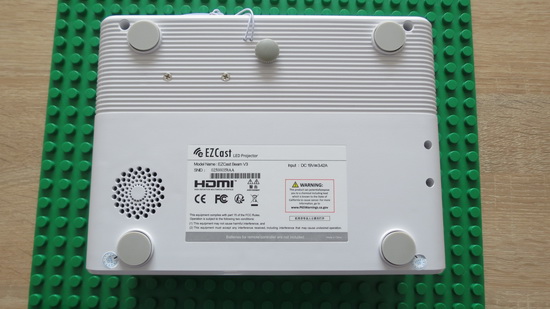
1. Normal mode: When projecting forward, adjust elevation angel by loosening the projector stand under the projector. When projecting upward, use the holders to avoid blockage of ventilation.
2. Portrait mode: Equip the projector holders at the bottom to make sure the ventilation works well.

First time settings
 

1. Select the start-up language.
2. Wi-Fi setting: connect the projector to your router and enter the password.
3. After starting up, enter the main menu and select the functions by arrow keys on the projector or remote control: Android, iOS, MacOS, Windows, bluetooth, EZCast, Multimedia, HDMI, and Setting.

Power off:
 

1. Sleeping mode: press the power button and hear the “beep” sound with the power button still blue.
2. Power off: hold the power button for 3 seconds till you hear the "beep” sound twice, and the power button turns red.

Multimedia playback
 

1. Insert a USB flash drive into USB1 port or insert SD Card to SD Card slot on the projector.
2. Select the "Multimedia">>"USB Disk" or "SD card">>"Video", "Music" or "Photo" to enter the file folder.
3. Select the file to play with the up and down arrow keys, and press "OK" to confirm.
4. When playing media, press "OK" to see the menu, and select item by the left and right keys.
5. Support format: video, audio, and image.

Settings
 

1. Wi-Fi setting : Select the "Wi-Fi setting" menu and enter the Wi-Fi setting interface, select the "Internet", press "OK" key to confirm, and select the router from AP list and enter the password.
2. Display mode: Swtich standard/ ECO/ bright mode.
3. Portrait mode: Switch on to project vertically. Please make sure NOT to block the ventilation.
4. V.Keystone: Automatic vertical keystone adjustment up to ±25 degrees.
5. H. Keystone: Manually adjust horizontal keystone up to ±14 degrees.
6. 4 Corner Correction: Choose the corner to be adjusted and use arrows to change the location.
7. Color Setting: Change brightness, Contrast, Saturation, Sharpness, R/G/B Gain, and R/G/B Offset.
8. Firmware Upgrade: Upgrade via USB drive or through internet.
9. Projector Location: Change to Front/ Front Ceiling/ Rear/ Rear Ceiling mode.
10. Language: Change language with arrows.
11. Reset All: Choose yes to reset projector to factory default. All saved changes to Setting are lost.restored. The projector will be restored to the factory settings, and the data adjusted by the user will not be saved.

Bluetooth
 

Select “bluetooth” to use Beam V3 as a bluetooth speaker.
Connection: Turn on bluetooth of your mobile or computer, and find Beam-XXXX to connect. The projection screen will turn black during connection.
Disconnection: Press “back” key on projector chassis/ remote control, or disconnect from the bluetooth list of your mobile or computer. The projection screen will turn on again after disconneted.

DLNA streaming

 - Select EZCast on main menu of projector and make sure both of your projector and mobile are connected to the same Wi-Fi router.
- Launch the app that support DLNA, such as QIY, QQTV.
- Click the DLNA icon on the video you’d like to play, and select “Beam-XXXX”.


Frequently Asked Questions
Q1: How could I switch to Portrait mode?
A1: You could easily switch from Horizontal to Portrait cast mode in Settings directly.

Q2: Do I need a speaker for Beam V3 projector?
A2: V3 has a built-in Bluetooth speaker. Experience better sound while watching a video with an upgraded 5-watt speaker.

Q3: How to adjust the image on Beam V3 projector?
A3: User could go to Advanced setting > Keystone Calibration to adjust the image manually if the image is not rectangular after auto calibration.

Q4: Why is the remote not working?
A4: Please bring the remote closer to the projector and check whether the batteries are weak.

Conclusion
On top of the many features, EZCast Beam V3 also has more than 30,000 hours LED lifetime, supports 10,600 LED lumens brightness, and 1280x720 vivid image resolution. In conclusion, EZCast Beam V3 can totally fulfill the entertainment needs and lets you enjoy both mobile games and gaming consoles on big screen easily. EZCast Beam V3 is the best value LCD projector on the market.


Photo gallery full album here. Official website here. Download EZCast Beam V3 User Manual & Quick User Guide from here or here. Download EzCast application from here or from Google Play Store. 

Here you can read about the unboxing of Unboxing EZCast 4K Wifi Display Dongle. Unboxing EZCast Audio Music Box Receiver here. Unboxing EZCast LAN Box here. Unboxing Ezcast 2 Universal Wireless Display Receiver here.


Don’t miss any of our future video tutorials, follow us on Youtube. Like us on Facebook. Add us in your circles on Google+. Watch our photo albums on Flickr. Subscribe now to our newsletter. Biggest firmware download center.
Apr 30, 2019

Video & Photo Gallery: Unboxing Ezcast 2 Universal Wireless Display Receiver


Best Deal Alert! You can buy Ezcast 2 Universal Wireless Display Receiver from Shopping.ezcast.com for only 39.99 USD.

Meet Ezcast 2 Universal Wireless Display Receiver
One of the top 2 reasons for you to buy an EZCast dongle is to watch online videos on your TV. The other reason is to play games on the big screen.
This Universal Wireless Display Receiver Turn your HDTV into a smart TV with EZCast Wireless Display Receiver. Dual band 2.4GHz/5GHz wireless antenna offers you the best wireless display experience with a fraction of the cost. Univeral Wireless Display Receiver Dual Core, Dual Decoder, and Dual Band Concurrent AP- router and P2P connection.

RTL 8821 chip supports dual band Wi-Fi 802ac to provide a better media streaming experience. EZCast is compliant with multiple Wireless Display Technologies, including Airplay,MiraCast and DLNA. Universal Receiver for Mobile Devices and Laptops - Unleash the screen mirroring potenial of your iOS, Android, Windows and Mac Devices.

Use the companion EZCast app to play videos and photos on TV, and also use the smart phone as a document camera. Keep a playlist of videos from different platforms and view them on the big screen.

Regular updates of the dongle firmware from the cloud to add features and maintain compatibility with the latest smart phones and laptops.

Easy installation: Connect the dongle to the HDMI port on your HDTV and power it on with an external USB power source
.

Ezcast 2 Universal Wireless Display Receiver Specs  
Model: Ezcast 2 Dongle
SoC: Actions Semi AM8271
DRAM: 256MB DDR3
NAND: 128 MB (firmware only)
Wi-Fi: Wireless
Dual Band 2.4G/5G 802.11ac
USB: 1x micro USB port
Output: 1x HDMI 

Video Output: up to 1920 x 1080 @ 60p
Standards: Miracast, DLNA, Airplay
Platforms: Windows, Mac, Android, iOS, Chrome
Power supply: DC 5V/1A via Micro USB port

LED: LED indication for Power and Wireless status
WiFi SSID: EZCast2-BFB73BFC
FCC ID: 2ADFS-CC911 
Product code: 4712899900151
Firmware version: updated from 1.4505.1 to 1.4821.0

How to connect
Connect USB to USB Power adapter, micro USB to the dongle and plug in the HDMI into your TV HDMI port. You will need to provide
5V/1A power to the device. Change the TV / monitor to the corresponding HDMI port and you'll see the Ezcast start image, which shows the SSID and the password. Install the EZCast app on your phone/tablet. Connect the phone/tablet to the SSID provided above - just to setup the wireless connection. In the EZCast app, use the first icon on the top-right, the blue "V" to select the device to connect to. After that, you will be presented to a full menu: EZChannel, Music, Video, Photo, Camera, Web, Cloud Storage. Start casting!

Share mobile internet with EZCast
So what can you do if you are using EZCast without an accessible local Wi-Fi network, such as a hotel, youth hostel, or a client’s office? First connect your smartphone to the EZCast dongle’s Wi-Fi, so you can access the dongle with EZCast app. After you execute the 3G4G function, you will be prompted to type in your phone’s mobile hotspot settings, so your dongle can connect to your mobile internet. Once you have entered the mobile hotspot settings, you will disconnect from the dongle and both the EZCast dongle and your phone will switch to the mobile hotspot to connect to the internet.


Ezcast Android application
- Connect. Connect with your favorite wireless display receivers, including EZCast and Chromecast.
- One-click mirror. One-click screen mirror to big screen with EZCast dongle.
- Share. Re-live best moments with family photos on big screen.
- Replay. Play mobile videos on big screen for the best viewing experience.
- Watch. Watch videos across YouTube, Facebook, Dailymotion and Vimeo in the same place.
- Surf. Browse the internet on big screen.

Download Ezcast Android application for free from Google Play Store. Download Ezcast application for all platforms from here.


How to update firmware through PC, if OTA is stuck
The tool you may need:
1. Micro USB cable: To connect EZCast 2 dongle with your PC.
2. Paper pin: To push the reset button.
3. A Windows PC, running Windows 7 or above.

Please follow the methods to update FW:
Step 1: Download EZCast Repair Tool to your Windows PC. Uncompressed the downloaded file and unfold the usb_driver, click “install” to install EZCast repair tool. After installing the driver, please double click the “EZCastUpdate.exe” file.
Step 2. Push the reset button on EZCast 2.
Step 3. Enter download mode. Please make sure you have installed our update tool on your PC. Plug micro USB connector of the USB cable into your EZCast 2 dongle. Use paper pin to push and hold the button of the NAND Flash memory and plug USB type A connector of the USB cable to PC. When the USB cable is connected to PC, a wizard window (Download) will pop up to guide you through USB driver installation process. Now you can remove paper pin before moving on to the next step.
Step 4. Update firmware. Click “Download”, you will see the following window to display FW Download progress. As a reminder, make sure your PC is connected to the Internet. After the FW is downloaded, the button will change to “Upgrade”, now you can update the FW. The FW is successfully updated when you see this  message: 'Upgrade Success'.

 
Package content 
1 x Ezcast 2 Universal Wireless Display Receiver
1 x USB to micro-USB Power Cable
1 x English Quick Start Guide rev1.0


Photo gallery full album here. Official website here. Download EzCast application from here or from Google Play Store. Here you can read about the unboxing of Unboxing EZCast 4K Wifi Display Dongle. Unboxing EZCast Audio Music Box Receiver here. Unboxing EZCast LAN Box here.


Don’t miss any of our future video tutorials, follow us on Youtube. Like us on Facebook. Add us in your circles on Google+. Watch our photo albums on Flickr. Subscribe now to our newsletter. Biggest firmware download center.

May 31, 2018

Video & Photo Gallery: Unboxing EZCast 4K Wifi Display Dongle


Best Deal Alert! You can buy EZCast 4K Wifi Display Dongle from Shopping.iezvu.com for only 69.99 USD or you can buy it directly from Amazon.com.

Meet EZCast 4K Wifi Display Dongle
The EZCast 4K dongle is designed to make it easy to get content from your phone, tablet or computer onto the biggest screen in your room, whether that’s a TV, monitor or projector. It supports three popular standards — Miracast, AirPlay and DNLA — and is also available in app form for all major platforms.

EZCast 4k is a 4Kx2K Wifi display dongle which is a media streaming device that plugin into the HDMI port on your TV. EZCast 4K supports multiple WiFi display standards, including Miracast , DLNA and Airplay. We THINK it's BETTER than ULTRA by providing you a fantastic Autoplay function which can automatically play your favorites show without phone involvement. With H.265 4K video decoding, EZCast 4K also offers you a superior viewing experience! 


Inside the little box we found the EZCast 4K device, an HDMI extender (useful if your TV's HDMI port is hard to reach), USB to micro-USB cable and the Quick Start Guide, which is quite detailed, covering all important features and setup options - with pictures.  The device is made out a good-quality material, with a LED for Power and Wi-Fi status, the 5V/1A power input (micro USB), and the clever MHL / USB physicalpower switch.

EZCast 4K Wifi Display Dongle Highlights
- New hardware design. To deliver more powerful and efficient performance, we designed our EZCast 4K hardware using dual core CPU with GHz operation clock.
- Dual Display Interfaces of HDMI / MHL. To enhance better user experience, we redesign EZCast 4K into Dual output interfaces : HDMI / MHL for your device connection.
- 2.4G/5G dual band WiFi with 802.11ac supported. 802.11ac Dual band for larger bandwidth and wide applications.
- Cross-platform mirroring. Mirror your screen wirelessly from Windows, Mac, Android, iOS, Windows Phone and Chrome devices to big screen with brilliant 4K Ultra HD picture quality.
- Rich AV formats streaming. We makes EZCast 4K easily stream video/audio/subtitle to big screen with wide coverage of formats.You can enjoy favorite movies with your loves one.
- Simple connection with full support of WiFi display standards. No need of modes switch for Miracast, Airplay, EZCast and DLNA. Use what you want at anytime.
- Support Autoplay based on EZCast account. Autoplay is a fantastic functions that let you automatically play your channel video without phone involvement. Sign in EZCast account and Power-On autoplay, you can create your own personal Channel and be your own VJ.
- Regular OTA updates. Through the cloud server, we will regularly update the firmware to improve compatibility, add new features and fix bugs. This is the best way to keep your device always up to date.


EZCast 4K Wifi Display Dongle Specs  
Model: EZCast 4K Dongle D01
SoC: Actions Semi AM8270
CPU: Dual core, 1.0+ GHz
DRAM: 512MB DDR3
NAND: 256 MB (firmware only)
Wi-Fi: 802.11ac Dual Band 2.4G/5G
USB: 1x micro USB port
Output: 1x HDMI with MHL support
Video Output: 4Kx2K@30p video decode Output 2160p 30Hz
Resolution: 1280 x 720 (60 fps), 1920 x 1080 (60 fps), 3840 x 2160 (30 fps), 4096 x 2160 (24 fps)
Standards: Miracast, DNLA, Airplay
Platforms: Windows, Mac, Android, iOS, Chrome
LED: LED indication for Power and WiFi status
Power supply: DC 5V/1A via Micro USB port (HDMI), DC 5V/0.9A via MHL

FCC ID: 2ADFS-CC32A 
WiFi SSID: EZCast4K-4F34CE59

How to connect
Connect USB to USB Power adapter, micro USB to the dongle and plug in the HDMI into your TV HDMI port. You will need to provide some power to the device and this is quite easy: you can use the micro-USB cable to draw power from one of TV's USB ports or you can use the hardware switch found on the device to power it via MHL. Change the TV / monitor to the corresponding HDMI port and you'll see the below image, which shows the SSID and the password. Install the EZCast app on your phone/tablet. Connect the phone/tablet to the SSID provided above - just to setup the wireless connection. In the EZCast app, use the first icon on the top-right, the blue "V" to select the device to connect to. After that, you will be presented to a full menu: EZChannel, Music, Video, Photo, Camera, Web, Cloud Storage. Start casting!


Ezcast Android application
- Connect. Connect with your favorite wireless display receivers, including EZCast and Chromecast.
- One-click mirror. One-click screen mirror to big screen with EZCast dongle.
- Share. Re-live best moments with family photos on big screen.
- Replay. Play mobile videos on big screen for the best viewing experience.
- Watch. Watch videos across YouTube, Facebook, Dailymotion and Vimeo in the same place.
- Surf. Browse the internet on big screen.

Download Ezcast Android application for free from Google Play Store.

 
Package content 
1 x EZCast 4K Wifi Display Dongle
1 x USB to micro-USB Power Cable
1 x HDMI extender 
1 x English Quick Start Guide Rev. 0.18


Photo gallery full album here. Official website here. Download EzCast application from here.


Don’t miss any of our future video tutorials, follow us on Youtube. Like us on Facebook. Add us in your circles on Google+. Watch our photo albums on Flickr. Subscribe now to our newsletter. Biggest firmware download center.

Twitter Delicious Facebook Digg Stumbleupon Favorites More

 
Powered by Blogger