y China Gadgets Reviews: Mini PC TV
Showing posts with label Mini PC TV. Show all posts

May 31, 2018

Video & Photo Gallery: Unboxing EZCast 4K Wifi Display Dongle


Best Deal Alert! You can buy EZCast 4K Wifi Display Dongle from Shopping.iezvu.com for only 69.99 USD or you can buy it directly from Amazon.com.

Meet EZCast 4K Wifi Display Dongle
The EZCast 4K dongle is designed to make it easy to get content from your phone, tablet or computer onto the biggest screen in your room, whether that’s a TV, monitor or projector. It supports three popular standards — Miracast, AirPlay and DNLA — and is also available in app form for all major platforms.

EZCast 4k is a 4Kx2K Wifi display dongle which is a media streaming device that plugin into the HDMI port on your TV. EZCast 4K supports multiple WiFi display standards, including Miracast , DLNA and Airplay. We THINK it's BETTER than ULTRA by providing you a fantastic Autoplay function which can automatically play your favorites show without phone involvement. With H.265 4K video decoding, EZCast 4K also offers you a superior viewing experience! 


Inside the little box we found the EZCast 4K device, an HDMI extender (useful if your TV's HDMI port is hard to reach), USB to micro-USB cable and the Quick Start Guide, which is quite detailed, covering all important features and setup options - with pictures.  The device is made out a good-quality material, with a LED for Power and Wi-Fi status, the 5V/1A power input (micro USB), and the clever MHL / USB physicalpower switch.

EZCast 4K Wifi Display Dongle Highlights
- New hardware design. To deliver more powerful and efficient performance, we designed our EZCast 4K hardware using dual core CPU with GHz operation clock.
- Dual Display Interfaces of HDMI / MHL. To enhance better user experience, we redesign EZCast 4K into Dual output interfaces : HDMI / MHL for your device connection.
- 2.4G/5G dual band WiFi with 802.11ac supported. 802.11ac Dual band for larger bandwidth and wide applications.
- Cross-platform mirroring. Mirror your screen wirelessly from Windows, Mac, Android, iOS, Windows Phone and Chrome devices to big screen with brilliant 4K Ultra HD picture quality.
- Rich AV formats streaming. We makes EZCast 4K easily stream video/audio/subtitle to big screen with wide coverage of formats.You can enjoy favorite movies with your loves one.
- Simple connection with full support of WiFi display standards. No need of modes switch for Miracast, Airplay, EZCast and DLNA. Use what you want at anytime.
- Support Autoplay based on EZCast account. Autoplay is a fantastic functions that let you automatically play your channel video without phone involvement. Sign in EZCast account and Power-On autoplay, you can create your own personal Channel and be your own VJ.
- Regular OTA updates. Through the cloud server, we will regularly update the firmware to improve compatibility, add new features and fix bugs. This is the best way to keep your device always up to date.


EZCast 4K Wifi Display Dongle Specs  
Model: EZCast 4K Dongle D01
SoC: Actions Semi AM8270
CPU: Dual core, 1.0+ GHz
DRAM: 512MB DDR3
NAND: 256 MB (firmware only)
Wi-Fi: 802.11ac Dual Band 2.4G/5G
USB: 1x micro USB port
Output: 1x HDMI with MHL support
Video Output: 4Kx2K@30p video decode Output 2160p 30Hz
Resolution: 1280 x 720 (60 fps), 1920 x 1080 (60 fps), 3840 x 2160 (30 fps), 4096 x 2160 (24 fps)
Standards: Miracast, DNLA, Airplay
Platforms: Windows, Mac, Android, iOS, Chrome
LED: LED indication for Power and WiFi status
Power supply: DC 5V/1A via Micro USB port (HDMI), DC 5V/0.9A via MHL

FCC ID: 2ADFS-CC32A 
WiFi SSID: EZCast4K-4F34CE59

How to connect
Connect USB to USB Power adapter, micro USB to the dongle and plug in the HDMI into your TV HDMI port. You will need to provide some power to the device and this is quite easy: you can use the micro-USB cable to draw power from one of TV's USB ports or you can use the hardware switch found on the device to power it via MHL. Change the TV / monitor to the corresponding HDMI port and you'll see the below image, which shows the SSID and the password. Install the EZCast app on your phone/tablet. Connect the phone/tablet to the SSID provided above - just to setup the wireless connection. In the EZCast app, use the first icon on the top-right, the blue "V" to select the device to connect to. After that, you will be presented to a full menu: EZChannel, Music, Video, Photo, Camera, Web, Cloud Storage. Start casting!


Ezcast Android application
- Connect. Connect with your favorite wireless display receivers, including EZCast and Chromecast.
- One-click mirror. One-click screen mirror to big screen with EZCast dongle.
- Share. Re-live best moments with family photos on big screen.
- Replay. Play mobile videos on big screen for the best viewing experience.
- Watch. Watch videos across YouTube, Facebook, Dailymotion and Vimeo in the same place.
- Surf. Browse the internet on big screen.

Download Ezcast Android application for free from Google Play Store.

 
Package content 
1 x EZCast 4K Wifi Display Dongle
1 x USB to micro-USB Power Cable
1 x HDMI extender 
1 x English Quick Start Guide Rev. 0.18


Photo gallery full album here. Official website here. Download EzCast application from here.


Don’t miss any of our future video tutorials, follow us on Youtube. Like us on Facebook. Add us in your circles on Google+. Watch our photo albums on Flickr. Subscribe now to our newsletter. Biggest firmware download center.
Jun 20, 2016

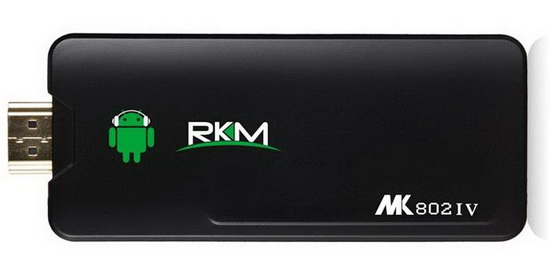
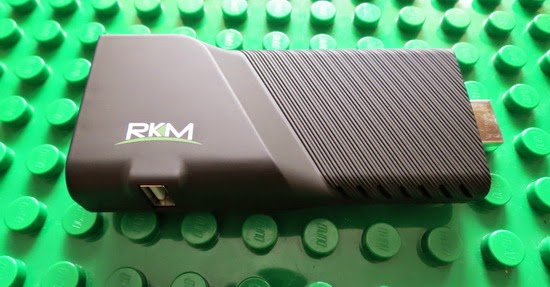
Download latest KitKat stock firmware for Rikomagic MK802IV TV Stick (AP6212 version)


Download latest KitKat stock firmware for Rikomagic MK802IV TV Stick (AP6210 version) from here or from here. Download previous firmware from here.


Firmware details
Archive: 20160126_RKM_MK802IV_ap6212
Image:20160126_RKM_MK802IV_ap6212.img
Platform: Rockchip RK3188 / RK31
Archive size: 325 MB
Boot version: 2.16
Firmware version: 4.4.02
Model number: MK802IV
Company: RKM
Build number: RKM MK802IV-eng 4.4.2 KOT49H eng.hyz.20160126.092940 test-keys
SDK version: RK30_ANDROID$(PLATFORM_VERSION)-SDK-v1.00.00 \
 

A list with 16 firmwares for Rikomagic RKM MK802IV with RTL8188 Wireless/BT chip you'll find here.


Caution: Please do not update firmware unless you know what you are doing, you really want it or it is absolutely necessary. Firmware updates may occasionally have bad results, like bricking your device, temporarily or permanently. The firmware update process is done entirely at your own risk. Before attempting to update the firmware, back up your data. 


Don’t miss any of our future video tutorials, follow us on Youtube. Like us on Facebook. Add us in your circles on Google+. Watch our photo albums on Flickr. Subscribe now to our newsletter.

Nov 23, 2015

Download latest Android KitKat 4.4.2 stock firmware for Rikomagic V5 TV Stick


Download latest Android KitKat 4.4.2 stock firmware for Rikomagic V5 TV Stick from here or here. Download previous firmware from here. Download Android 5.1.1 Lollipop stock firmware for Rikomagic V5 TV Stick from here. Download another Rikomagic firmware from here.

Video Tutorial: How to easily flash firmware on Rikomagic V5 RK3288 TV Stick
Video Tutorial: How to unbrick Rikomagic V5 TV Stick with RK3288 CPU

Firmware details
Archive: RKM_V5_ RK3288_13_11_20151
Firmware: Android KitKat 4.4.2
Image file name: RKM_V5_151113.img
Model: Rikomagic V5 TV Stick
Image file size: 422 MB
Platform: Rockchip RK3288
Boot version: 2.17
FW version: 4.4.02
Build version: RKM V5-eng_4.4.2_2015_11_13 / rk3288-eng 4.4.2 KOT49H eng.root.20150121.090824 test-keys
Inside archive: firmware + RKBatchTool v1.7, DriverAssitant_v4.3 & V5 recovery and update method.doc

Caution: Please do not update firmware unless you know what you are doing, you really want it or it is absolutely necessary. Firmware updates may occasionally have bad results, like bricking your device, temporarily or permanently. The firmware update process is done entirely at your own risk. Before attempting to update the firmware, back up your data. 

Don’t miss any of our future video tutorials, follow us on Youtube. Like us on Facebook. Add us in your circles on Google+. Watch our photo albums on Flickr. Subscribe now to our newsletter.


About Rikomagic 
We were pioneers of the Android Mini PC concept and were the first Android Mini PC provider. Based in Shenzhen, China, Rikomagic aims to revolutionize the digital media player market. Our Research and Development team has extensive expertise in consumer electronics products and the development of network media players. Our core strength remains focussed around Android PCs and Android Mini PCs, where we have a great deal of experience. Rikomagic has been at the forefront of the development of multimedia, internet connected devices which truly transform TVs into home entertainment centers. The combination of our forward-looking market research, proven technological expertise and acumen, innovation, and our mature and efficient development process has given us industry-wide recognition. We differentiate ourselves by the quality, value and sophistication of our products. Our customers trust the RKM brand to enhance their entertainment experience, and we always strive to exceed their expectations.

Oct 1, 2015

Download latest Android KitKat 4.4 for MINIX Neo X6 Mini TV Box


Download latest Android KitKat 4.4 for MINIX Neo X6 Mini TV Box from here or from here. Download previous version from here.


Firmware details
Archive name: X6_FW008_20150923
Archive file size: 1 GB
Firmware: X6_FW008_20150923.img & X6_FW008_20150923.zip

Platform: Amlogic S805 
Build number: 201-user 4.4.2 KOT49H 20150923 release-keys


Changelog
1) libstagefright security patches
2) Fixed YouTube livestream unable to play issue
3) Fixed Vidon XBMC 3D playback issue. Download Latest Vidon XBMC apk
4) Added RK remote app compatibility support [not including gaming mode]
5) Improve compatibility to some applications


Caution: Please do not update firmware unless you know what you are doing, you really want it or it is absolutely necessary. Firmware updates may occasionally have bad results, like bricking your device, temporarily or permanently. The firmware update process is done entirely at your own risk. Before attempting to update the firmware, back up your data. 


Don’t miss any of our future video tutorials, follow us on Youtube. Like us on Facebook. Add us in your circles on Google+. Watch our photo albums on Flickr. Subscribe now to our newsletter.

Sep 6, 2015

Download Android Jelly Bean 4.2.2 stock firmware for Rikomagic MK802IV TV Stick


Download Android Jelly Bean 4.2.2 stock firmware for Rikomagic MK802IV TV Stick from here or from here. A list with 16 firmwares for Rikomagic RKM MK802IV with RTL8188 Wireless/BT chip you'll find here.


Firmware details
Archive: MK802IV_V4.2
Firmware image file name: MK802IV_V4.2.img
Platform: Rockchip RK3188
Archive size: 282 MB
Boot version: 2.19
Firmware version: 4.1.01
Build number: RKM MK802IV-eng 4.2.2 JDQ39 eng.hyz.20150409.150552 test-keys
Model number: RKM MK802IV
SDK version: RK30_ANDROID4.2.2-SDK-v1.00.00


Caution: Please do not update firmware unless you know what you are doing, you really want it or it is absolutely necessary. Firmware updates may occasionally have bad results, like bricking your device, temporarily or permanently. The firmware update process is done entirely at your own risk. Before attempting to update the firmware, back up your data. 


Don’t miss any of our future video tutorials, follow us on Youtube. Like us on Facebook. Add us in your circles on Google+. Watch our photo albums on Flickr. Subscribe now to our newsletter.

Sep 2, 2015

Download Android KitKat 4.4.4 stock firmware for Rikomagic MK36 TV Box


Download Android KitKat 4.4.4 stock firmware for Rikomagic MK36 TV Box from here or here. Download previous firmware from here. Download another Rikomagic firmware from here.


Firmware details
Archive: MK36 Android software
Firmware: Android KitKat 4.4.4
Model: Rikomagic MK36 TV Box
Image file size: 357 MB
Platform: Intel Baytrail-T CR Z3736F 64bit


About Rikomagic 
We were pioneers of the Android Mini PC concept and were the first Android Mini PC provider. Based in Shenzhen, China, Rikomagic aims to revolutionize the digital media player market. Our Research and Development team has extensive expertise in consumer electronics products and the development of network media players. Our core strength remains focussed around Android PCs and Android Mini PCs, where we have a great deal of experience. Rikomagic has been at the forefront of the development of multimedia, internet connected devices which truly transform TVs into home entertainment centers. The combination of our forward-looking market research, proven technological expertise and acumen, innovation, and our mature and efficient development process has given us industry-wide recognition. We differentiate ourselves by the quality, value and sophistication of our products. Our customers trust the RKM brand to enhance their entertainment experience, and we always strive to exceed their expectations. 


Caution: Please do not update firmware unless you know what you are doing, you really want it or it is absolutely necessary. Firmware updates may occasionally have bad results, like bricking your device, temporarily or permanently. The firmware update process is done entirely at your own risk. Before attempting to update the firmware, back up your data.


Don’t miss any of our future video tutorials, follow us on Youtube. Like us on Facebook. Add us in your circles on Google+. Watch our photo albums on Flickr. Subscribe now to our newsletter.

Aug 1, 2015

Download latest Android KitKat 4.4.2 stock firmware for Rikomagic MK12 TV Box

http://chinagadgetsreviews.blogspot.ro/2014/11/mk12-new-amlogic-s812-quad-core-tv-box.html


Download latest Android KitKat 4.4.2 stock firmware for Rikomagic MK12 TV Box from here, here or here. Download previous firmware from here. Download another Rikomagic firmware from here.


Firmware details
Archive: MK12_150703
Firmware: Android KitKat 4.4.2
Image file name: RKM MK12-150703.img
Model: Rikomagic MK12 TV Box
Image file size: 367 MB
Platform: Amlogic S812


About Rikomagic 
We were pioneers of the Android Mini PC concept and were the first Android Mini PC provider. Based in Shenzhen, China, Rikomagic aims to revolutionize the digital media player market. Our Research and Development team has extensive expertise in consumer electronics products and the development of network media players. Our core strength remains focussed around Android PCs and Android Mini PCs, where we have a great deal of experience. Rikomagic has been at the forefront of the development of multimedia, internet connected devices which truly transform TVs into home entertainment centers. The combination of our forward-looking market research, proven technological expertise and acumen, innovation, and our mature and efficient development process has given us industry-wide recognition. We differentiate ourselves by the quality, value and sophistication of our products. Our customers trust the RKM brand to enhance their entertainment experience, and we always strive to exceed their expectations. 


Caution: Please do not update firmware unless you know what you are doing, you really want it or it is absolutely necessary. Firmware updates may occasionally have bad results, like bricking your device, temporarily or permanently. The firmware update process is done entirely at your own risk. Before attempting to update the firmware, back up your data.


Don’t miss any of our future video tutorials, follow us on Youtube. Like us on Facebook. Add us in your circles on Google+. Watch our photo albums on Flickr. Subscribe now to our newsletter.

Jul 16, 2015

Photo Gallery: Pipo X8 Mini PC


Don’t miss any of our future video tutorials, follow us on Youtube. Like us on Facebook. Add us in your circles on Google+. Watch our photo albums on Flickr. Subscribe now to our newsletter.

Jul 11, 2015

Download latest Android KitKat 4.4.2 stock firmware for Rikomagic V5 TV Stick


Download latest Android KitKat 4.4.2 stock firmware for Rikomagic V5 TV Stick from here or here. Download previous firmware from here. Download another Rikomagic firmware from here.


Firmware details
Archive: RKM V5 RK3288 Android 4.4 2G 16G TV Dongle Firmware 183142 20150701
Firmware: Android KitKat 4.4.2
Image file name: V5_20150112_V001.img
Model: Rikomagic V5 TV Stick
Image file size: 336 MB
Platform: Rockchip RK3288
Boot version: 2.17
FW version: 4.4.02
Build version: RKM V5-eng 4.4.2 K07 49H eng.zz.20150112.test-keys

 
Caution: Please do not update firmware unless you know what you are doing, you really want it or it is absolutely necessary. Firmware updates may occasionally have bad results, like bricking your device, temporarily or permanently. The firmware update process is done entirely at your own risk. Before attempting to update the firmware, back up your data. 

Don’t miss any of our future video tutorials, follow us on Youtube. Like us on Facebook. Add us in your circles on Google+. Watch our photo albums on Flickr. Subscribe now to our newsletter.


About Rikomagic 
We were pioneers of the Android Mini PC concept and were the first Android Mini PC provider. Based in Shenzhen, China, Rikomagic aims to revolutionize the digital media player market. Our Research and Development team has extensive expertise in consumer electronics products and the development of network media players. Our core strength remains focussed around Android PCs and Android Mini PCs, where we have a great deal of experience. Rikomagic has been at the forefront of the development of multimedia, internet connected devices which truly transform TVs into home entertainment centers. The combination of our forward-looking market research, proven technological expertise and acumen, innovation, and our mature and efficient development process has given us industry-wide recognition. We differentiate ourselves by the quality, value and sophistication of our products. Our customers trust the RKM brand to enhance their entertainment experience, and we always strive to exceed their expectations.

Jul 9, 2015

Download latest Android KitKat 4.4.2 stock firmware for Rikomagic MK80 TV Box


Download latest Android KitKat 4.4.2 stock firmware for Rikomagic MK80 TV Box from here, here or here. Download previous firmware from here. Download another Rikomagic firmware from here.


Archive: MK80_150627
Firmware: Android KitKat 4.4.2
Image file name: MK80_SDK3.0_150627.img
Model: Rikomagic MK80 TV Stick
Image file size: 310 MB
Platform: Allwinner A80  
FW version: RKM_MK80_4.4.2-a80-v3.0rc3
Build number: jaws_tvd_p3-eng 4.4.2 KOT49H 20150626 test-keys
Style: MK80
Company: RKM
Pixels: 720x576


About Rikomagic 
We were pioneers of the Android Mini PC concept and were the first Android Mini PC provider. Based in Shenzhen, China, Rikomagic aims to revolutionize the digital media player market. Our Research and Development team has extensive expertise in consumer electronics products and the development of network media players. Our core strength remains focussed around Android PCs and Android Mini PCs, where we have a great deal of experience. Rikomagic has been at the forefront of the development of multimedia, internet connected devices which truly transform TVs into home entertainment centers. The combination of our forward-looking market research, proven technological expertise and acumen, innovation, and our mature and efficient development process has given us industry-wide recognition. We differentiate ourselves by the quality, value and sophistication of our products. Our customers trust the RKM brand to enhance their entertainment experience, and we always strive to exceed their expectations. 


Caution: Please do not update firmware unless you know what you are doing, you really want it or it is absolutely necessary. Firmware updates may occasionally have bad results, like bricking your device, temporarily or permanently. The firmware update process is done entirely at your own risk. Before attempting to update the firmware, back up your data. 

Don’t miss any of our future video tutorials, follow us on Youtube. Like us on Facebook. Add us in your circles on Google+. Watch our photo albums on Flickr. Subscribe now to our newsletter.
  

Jun 6, 2015

Download KitKat 4.4.2 Stock Firmware for Cloudnetgo CR12 / CR13 / CR16 TV Box


Download KitKat 4.4.2 Stock Firmware for Cloudnetgo CR12 / CR13 / CR16 TV Box from here or here. Download previous stock firmware from here.


Firmware details
Archive name: CR16_cloudnetgo_ap6330_vga_20150602
Archive file size: 422 MB
Image file name: CR16_cloudnetgo_ap6330_vga_20150602.img
Support: Rockchip RK3288
Boot version: 2.17
FW Version: 4.4.02
Build number: rk3288-eng 4.4.2 KOT49H eng.zz.20150602.110023 test-keys


Caution: Please do not update firmware unless you know what you are doing, you really want it or it is absolutely necessary. Firmware updates may occasionally have bad results, like bricking your device, temporarily or permanently. The firmware update process is done entirely at your own risk. Before attempting to update the firmware, back up your data. 

Don’t miss any of our future video tutorials, follow us on Youtube. Like us on Facebook. Add us in your circles on Google+. Watch our photo albums on Flickr. Subscribe now to our newsletter.
  

May 21, 2015

Download KitKat 4.4.2 Stock Firmware for Cloudnetgo CR12 / CR13 / CR16 TV Box


Download KitKat 4.4.2 Stock Firmware for Cloudnetgo CR12 / CR13 / CR16 TV Box from here or here. Download previous stock firmware from here.


Firmware details
Archive name: CR12_13_Cloudnetgo_AP6330_20052015
Archive file size: 422 MB
Image file name: CR12_13_Cloudnetgo_AP6330_20052015.img
Support: Rockchip RK3288
Boot version: 2.17
FW Version: 4.4.02
Build number: rk3288-eng 4.4.2 KOT49H eng.ant.20150520.163433 test-keys


Caution: Please do not update firmware unless you know what you are doing, you really want it or it is absolutely necessary. Firmware updates may occasionally have bad results, like bricking your device, temporarily or permanently. The firmware update process is done entirely at your own risk. Before attempting to update the firmware, back up your data. 

Don’t miss any of our future video tutorials, follow us on Youtube. Like us on Facebook. Add us in your circles on Google+. Watch our photo albums on Flickr. Subscribe now to our newsletter.
  

Apr 16, 2015

Download latest KitKat 4.4.2 Stock Firmware for Cloudnetgo CR12 / CR13 / CR16 TV Box


Download latest KitKat 4.4.2 Stock Firmware for Cloudnetgo CR12 / CR13 / CR16 TV Box from here or here. Download previous stock firmware from here.


Firmware details
Archive name: CR13_public_AP6330_changescreen_20150415
Archive file size: 366 MB
Image file name: CR13_public_AP6330_changescreen_20150415.img
Support: Rockchip RK3288
Boot version: 2.17
FW Version: 4.4.02
Build number: rk3288-eng 4.4.2 KOT49H eng.ant.20150415.180456 test-keys


Caution: Please do not update firmware unless you know what you are doing, you really want it or it is absolutely necessary. Firmware updates may occasionally have bad results, like bricking your device, temporarily or permanently. The firmware update process is done entirely at your own risk. Before attempting to update the firmware, back up your data. 

Don’t miss any of our future video tutorials, follow us on Youtube. Like us on Facebook. Add us in your circles on Google+. Watch our photo albums on Flickr. Subscribe now to our newsletter.
  

Apr 7, 2015

Download latest Android KitKat 4.4.2 stock firmware for RKM MK602 TV Box


Download latest Android KitKat 4.4.2 stock firmware for RKM MK902II TV Box from here, here or here. Read here how to flash MK602 model. You can read more details about RKM MK602 TV Box here and here.


Firmware details
Archive: MK602 4.2_140401
Firmware: Android KitKat 4.4.2
Image file name: MK902II_150401.img
Model: RKM MK602 TV Box / RKM MK902
Image file size: 307 MB
Platform: Rockchip RK3066
Boot version: 1.34
FW version: 4.1.01
Build number: RKM MK902-eng 4.4.2 KOT49H eng.zz.20150107.095918 test-keys


About Rikomagic 
We were pioneers of the Android Mini PC concept and were the first Android Mini PC provider. Based in Shenzhen, China, Rikomagic aims to revolutionize the digital media player market. Our Research and Development team has extensive expertise in consumer electronics products and the development of network media players. Our core strength remains focussed around Android PCs and Android Mini PCs, where we have a great deal of experience. Rikomagic has been at the forefront of the development of multimedia, internet connected devices which truly transform TVs into home entertainment centers. The combination of our forward-looking market research, proven technological expertise and acumen, innovation, and our mature and efficient development process has given us industry-wide recognition. We differentiate ourselves by the quality, value and sophistication of our products. Our customers trust the RKM brand to enhance their entertainment experience, and we always strive to exceed their expectations. 


Caution: Please do not update firmware unless you know what you are doing, you really want it or it is absolutely necessary. Firmware updates may occasionally have bad results, like bricking your device, temporarily or permanently. The firmware update process is done entirely at your own risk. Before attempting to update the firmware, back up your data.


Don’t miss any of our future video tutorials, follow us on Youtube. Like us on Facebook. Add us in your circles on Google+. Watch our photo albums on Flickr. Subscribe now to our newsletter.

Download latest Android KitKat 4.4.2 stock firmware for RKM MK902II TV Box


Download latest Android KitKat 4.4.2 stock firmware for RKM MK902II TV Box from here, here or here. Download previous stock firmware from here. Video & Photo gallery here.


Firmware details
Archive: MK902II_150401
Firmware: Android KitKat 4.4.2
Image file name: MK902II_150401.img
Model: RKM MK902II TV Box / RKM MK902II
Image file size: 370 MB
Platform: Rockchip RK3288
Boot version: 2.17
FW version: 4.4.02
Kernel version: 3.10.0
Build number: RKM MK902II-eng 4.4.2 KOT49H eng.ant.20150401.140420 test-keys


Changelog & Fix List
1. Update to New UI
2. Update XBMC to Kodi14.1
3. Optimized 4K video playback
4. Update FFMPEG Video decode library.Fixed memory leak bug.Fixed 3D video Playback flashing bug.
5. Fixed that some external USB hard drive can not be recognized multi-partition problem
6. Fixed Skype voice calling bug
7. Optimized the connection compatibility of 4K 60Hz TV set


About Rikomagic 
We were pioneers of the Android Mini PC concept and were the first Android Mini PC provider. Based in Shenzhen, China, Rikomagic aims to revolutionize the digital media player market. Our Research and Development team has extensive expertise in consumer electronics products and the development of network media players. Our core strength remains focussed around Android PCs and Android Mini PCs, where we have a great deal of experience. Rikomagic has been at the forefront of the development of multimedia, internet connected devices which truly transform TVs into home entertainment centers. The combination of our forward-looking market research, proven technological expertise and acumen, innovation, and our mature and efficient development process has given us industry-wide recognition. We differentiate ourselves by the quality, value and sophistication of our products. Our customers trust the RKM brand to enhance their entertainment experience, and we always strive to exceed their expectations. 


Caution: Please do not update firmware unless you know what you are doing, you really want it or it is absolutely necessary. Firmware updates may occasionally have bad results, like bricking your device, temporarily or permanently. The firmware update process is done entirely at your own risk. Before attempting to update the firmware, back up your data.


Don’t miss any of our future video tutorials, follow us on Youtube. Like us on Facebook. Add us in your circles on Google+. Watch our photo albums on Flickr. Subscribe now to our newsletter.

Twitter Delicious Facebook Digg Stumbleupon Favorites More

 
Powered by Blogger