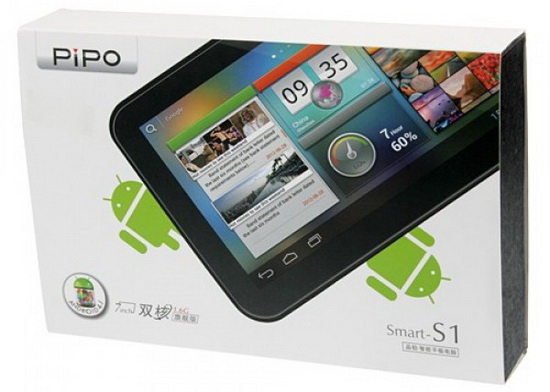
Here is the easiest to do this firmware update:
1. Download Android Jelly Bean 4.2.2 v1.2 firmware image from: link1 or link2.
2. Put your Pipo S1 in 'firmware update mode'.
3. Run Rockchip Batch Tool v1.7, select the proper image .img file from your desktop, and after your device is found by the program, press the 'Restore' button and wait for 2-3 minutes to finish. The first boot is very long, wait about 5-7 minutes.
What we have at the moment:
- Firmware 4.2.2 from PIPO S1S
- Removed Chinese applications
- Added root
- Default language English
- Customise kernel
- G-sensor is operating
- Camera is working
- HDMI output is working
- Antutu produces about 11.647 points
- Wifi Display Miracast support
- 2 GB of internal storage
1. Download Android Jelly Bean 4.2.2 v1.2 firmware image from: link1 or link2.
2. Put your Pipo S1 in 'firmware update mode'.
3. Run Rockchip Batch Tool v1.7, select the proper image .img file from your desktop, and after your device is found by the program, press the 'Restore' button and wait for 2-3 minutes to finish. The first boot is very long, wait about 5-7 minutes.
What we have at the moment:


- Firmware 4.2.2 from PIPO S1S
- Removed Chinese applications
- Added root
- Default language English
- Customise kernel
- G-sensor is operating
- Camera is working
- HDMI output is working
- Antutu produces about 11.647 points
- Wifi Display Miracast support
- 2 GB of internal storage
Firmware provided by Cripple Guy.
Credits for this firmware go to realmaple.
1. To install the CWM 6.0.2.7 please follow the update steps from this post. Then download CWM 6.0.3.1 from here or from here and copy it as it is on a micro SD card, install Quick Boot free from Play store, reboot into recovery, then choose 'install zip from sd card' and apply the new CWM zip file from your card. Enjoy CWM 6.0.3.1 on your tablet!

Enjoy this firmware release, share is love!
Always
keep in mind that this is not a review, just a first sight of this
firmware. You have to test it more for another details, to see if it
satisfies your needs.
Help,
ReplyDeleteafter the update wifi doesn't work.
Thanks man, I keep my tablet updated Pipo
ReplyDeleteTry reflashing wifi works fine on all the tablets I have tested this on.
ReplyDeleteThere is a problem with screen light when set it to minium. The screen became black...
ReplyDeleteI have a problem with this firmware,I can't get fully charged on my tablet it's almost 10 hour n the battery not full
ReplyDelete@Adha Basar
ReplyDeleteIt's not the firmware...
Try to calibrate your tablet baterry - http://touchscreen-apps.blogspot.ro/2013/01/pipo-tablets-battery-issue-fix.html
Does anyone have the same problem ? Try the brightness to a minimum but do not release the selector ! Otherwise, the screen will be dark and you will not see anything
ReplyDeleteI'm working on the dimness, have family issues that set president right now.
ReplyDeletehai dan,can u teach me how to swap memory on pipo s1.I can't find any proper method to do this
ReplyDeletehi this firmware is the best i haved test in My pipo s1, but i’m getting problem with the sound some time when I using the xbmc or another program to stream video from my PC to the tablet the sound turn off and some time it get freeze. there is a solution to this or I should wait for a update of this firmware
ReplyDeletewhy r u been quiet for a long time dan,no update on pipo s1 anymore
ReplyDelete@Adha Basar
ReplyDeleteI'm still looking for the best next firmware for our tablet, you can be sure of that... ;)
i have pipo s1s work better with this firmare? or i have a problem ti flash it?
ReplyDeleteI have repeated flashing, but WIFI does not work. Turning it on does not work, it tries to turn WIFI on, then just goes back to turned off.
ReplyDeleteNice, stable and fast, except for the rotation -screen gets black when rotating-, othet than that is ok!
ReplyDeletelaucher is problem that comes with Android not rotate the screen left to do change it, the better the Nova Launcher first in Pipo S1 with Android 4.2.2 Launcher needs to be changed forever, does not work if not done
ReplyDeletei have problems with this firmware is block the tablet until i reset this ... not good .. i hope so that come out a firmware stable one
ReplyDeleteThis comment has been removed by the author.
ReplyDeleteWiFi do not works. How can i solve this problem?
ReplyDeletefunciona em um tablet titan 7010b, obrigado.
ReplyDeletePlease help me to get
ReplyDeleteAndroid 4.2.2 Build v1.3
jad.dwikat@hotmail.com
@jad dwikat
ReplyDeletehttp://chinagadgetsreviews.blogspot.ro/2013/10/crew-rktablets-genio-cm101-v13-firmware.html
@Dan Stefan
ReplyDeletethanksssssssssssssss